
ASUS
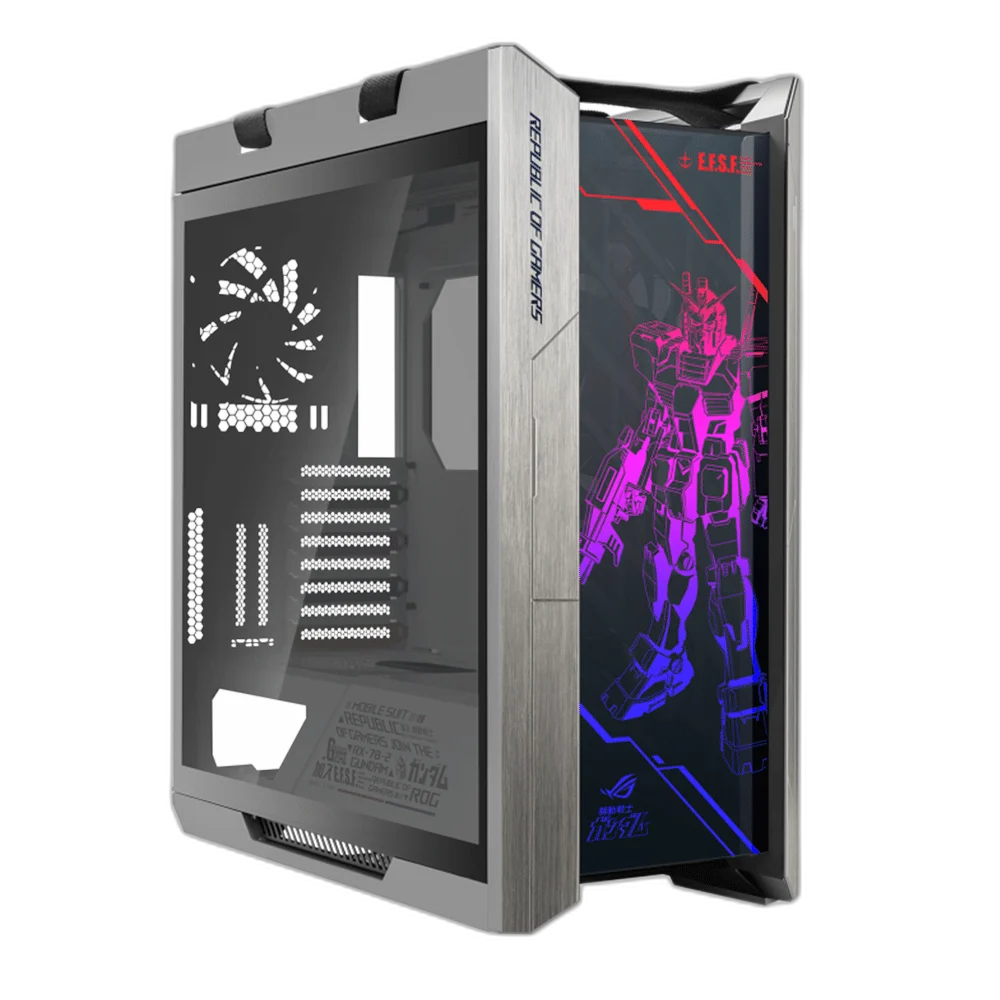
Asus ROG Strix Helios GUNDAM EDITION Mid-Tower Case
The ASUS ROG Strix Helios Gundam Edition gives a custom desktop build the named Gundam identity alongside the Helios chassis platform. A 450 mm graphics-card length limit, 190 mm CPU-cooler height limit, organised cable covers, lighting connections and maintenance access provide practical starting points for planning the components inside.
Regular price
83.000 KWD
or 4 payments of 20.750 KWD with
Pay with card & save


79.000 KWD
Save 4.000 KWD
Overview
ASUS ROG STRIX HELIOS GUNDAM EDITION
A Gundam Edition Chassis with Room to Build
The ASUS ROG Strix Helios Gundam Edition gives a custom desktop build the named Gundam identity alongside the Helios chassis platform. A 450 mm graphics-card length limit, 190 mm CPU-cooler height limit, organised cable covers, lighting connections and maintenance access provide practical starting points for planning the components inside.
Gundam
Edition
Helios
Chassis Platform
450 mm
GPU Length Limit
190 mm
CPU Cooler Height
A Gundam Edition of the Helios Chassis
The Gundam Edition brings the named collaboration into the ROG Strix Helios chassis range. Treat it as the enclosure for your own component selection: the motherboard, processor, graphics card and other hardware determine the finished computer, its performance and the connections available on the system.
Plan Around the Main Component Clearances
The ASUS installation guide gives a maximum graphics-card length of 450 mm and a CPU-cooler height limit of 190 mm. Check the complete arrangement before assembly, including any radiator, tubing or additional hardware that shares the available space with the graphics card and cooler.
Cooling Options Around Your Components
Fan arrangements, water-cooling radiator mounting options and pump installation let you plan the cooling around the hardware you choose. Check the mounting layout together with the actual dimensions of the cooling equipment. Radiator size alone does not establish clearance for every fan thickness, fitting or tube route.
Cable Covers and an Organised Interior
A multifunction cover helps organise the interior around the motherboard and power supply, with front-I/O cables routed to the matching motherboard connections. Plan cable routes as the components are installed, leaving access to connectors and adjustment points before securing the final arrangement.
Lighting and Fan-Hub Connections
The chassis platform supports lighting synchronisation with compatible addressable-RGB motherboards and provides a fan-hub arrangement for the build. Follow the matching connector and motherboard guidance when connecting accessories. Lighting compatibility depends on the actual header and controller arrangement, not simply the presence of an RGB label.
Brand
ASUS ROG
Chassis family
ROG Strix Helios
Edition
Gundam Edition
Access for Cleaning and Later Changes
Removable dust filters and side-panel access help with maintenance, while alternative graphics-card placement gives the build another layout option. Leave access for cleaning and future component changes when arranging the interior. Any alternative GPU arrangement still needs the appropriate mounting hardware, riser and component clearances.
Complete Your Workspace
Explore PC Cases to compare suitable options and complete your setup.
Frequently Asked Questions
Is this listing a complete gaming PC?
This listing is for the chassis. The finished computer depends on the motherboard, processor, graphics card, cooling, power supply, memory and storage selected for the build.
How long can the graphics card be?
The ASUS Helios guide lists a maximum graphics-card length of 450 mm. The complete arrangement still needs checking where radiators, tubing or other hardware share the same space.
What is the CPU-cooler height limit?
The guide lists a maximum CPU-cooler height of 190 mm. Use the actual cooler dimensions, installed height and intended motherboard arrangement when checking the build.
Can I plan a liquid-cooled build?
The ASUS guide includes radiator mounting options and pump installation. Match the mounting position and full radiator, fan and fitting dimensions to the chassis layout before choosing the cooling hardware.
Does every RGB accessory connect directly to the chassis?
Use the documented controller and motherboard connections with matching accessories. An RGB label alone does not establish compatible voltage, connector type or control protocol.
Build Your Setup with AX Store Kuwait
Explore computers, displays and accessories for your workspace at AX Store Kuwait. For help choosing the right model or checking an accessory, contact AX Store.
THE DETAILS
Technical specifications
Product Specifications
ASUS ROG
ROG Strix Helios
Gundam Edition
90DC0023-B30010
Desktop PC chassis
450 mm, subject to the complete build arrangement
190 mm
Fan, radiator and pump mounting arrangements
Multifunction cover
Compatible addressable-RGB motherboard synchronisation
Chassis fan-hub arrangement
Removable side panels and dust filters
Requires the appropriate hardware and fit checks
COMPLETE YOUR SETUP
Pairs well with