ASUS
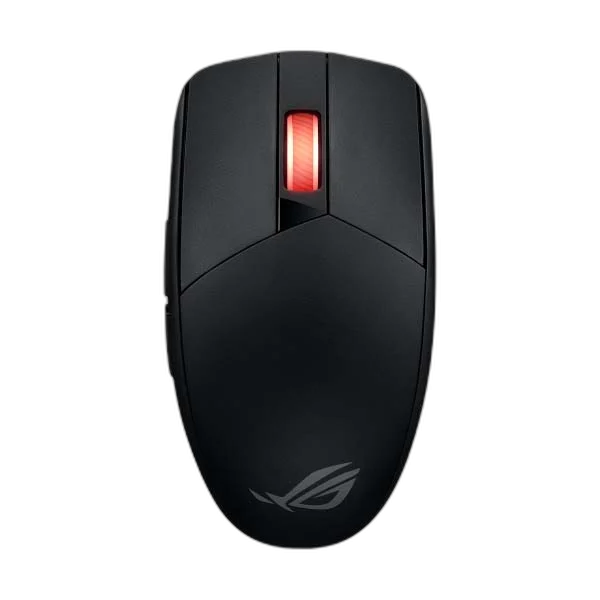
ASUS ROG Strix Impact III Wireless Gaming Mouse, 57g
Switch between 2.4 GHz wireless and Bluetooth with a compact gaming mouse built around the 36,000 DPI ROG AimPoint sensor. Its symmetrical shape suits claw and fingertip grips, while replaceable AA or AAA batteries keep power simple.
Overview
ASUS ROG STRIX IMPACT III WIRELESS GAMING MOUSE, 57G
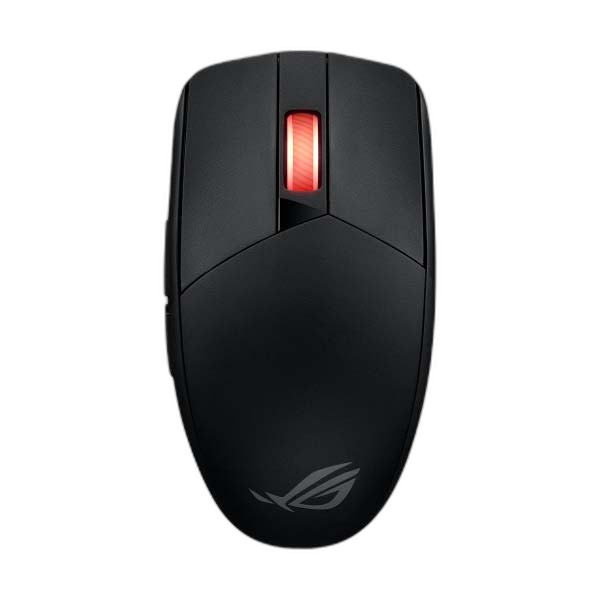
ASUS ROG Strix Impact III Wireless
ASUS ROG Strix Impact III Wireless: Switch between 2.4 GHz wireless and Bluetooth with a compact gaming mouse built around the 36,000 DPI ROG AimPoint sensor. Its symmetrical shape suits claw and fingertip grips, while replaceable AA or AAA batteries keep power simple. Available from AX Store in Kuwait.
36,000 DPI
Maximum Sensor Resolution
2.4GHz / Bluetooth
Wireless Modes
AA / AAA
Supported Battery Choices
Symmetrical
Body Shape
AimPoint Tracking up to 36000DPI
The ROG Strix Impact III Wireless uses the ROG AimPoint optical sensor with a maximum resolution of 36,000 DPI. ASUS lists tracking speed at 650 IPS and acceleration at 50G. Select a sensitivity around your normal movement, with the full sensor limits below for comparing the model with your setup.
Two Wireless Connection Modes
Choose between RF 2.4GHz and Bluetooth 5.1 for a compatible computer. The listed model uses replaceable batteries rather than a USB charging cable. Check the selected wireless mode and host requirements when setting up, keeping receiver operation and Bluetooth pairing separate when planning how the mouse will connect.
Choose an AA or AAA Battery Setup
The mouse supports an AA battery or an AAA battery with the converter holder. Both battery types and the converter are listed in the package. Choose the supported arrangement that suits your use, while keeping the battery configuration attached to any weight or runtime comparison you make.
Read the Weight with Its Battery Qualification
ASUS lists 57g without the battery and USB dongle, 68g with an AAA battery and converter holder, or 72g with an AA battery. The body measures 120 × 62 × 39mm and has a symmetrical shape. Compare the weight of the operating configuration you choose rather than treating the empty-body figure as every setup’s weight.
Mechanical Switches and Mouse Settings
ROG 70M mechanical switches form the specified main-click hardware. The listed grip styles are claw and fingertip, with Armoury Crate provided for supported configuration. Windows 10 and Windows 11 are listed operating systems, so check the host and available software when arranging the mouse settings for your computer.
Keep the Runtime and Package in Context
The battery-life reference is up to 450 hours with lighting off, with actual runtime varying by use. Listed contents include the wireless receiver, AA and AAA batteries, AAA-to-AA converter, quick start guide and warranty booklet. Keep those conditions and supplied items in mind when planning your battery and receiver setup.
Match the Mouse to Your Grip and Desk
Compare shell size, grip and connection before choosing a mouse. Check the receiver or cable arrangement for the exact model and leave enough mousepad area for your normal movement. Compare related options such as Pulsar Pro Series Susanto-X Wireless Gaming Mouse Size 2, 50g or ASUS ROG HARPE ACE EXTREME Wireless Gaming Mouse, keeping the exact model and configuration in the decision. For the wider setup, explore SteelSeries QcK Prism Cloth RGB Gaming Mouse Pad and check the connection, size or mounting requirements before pairing accessories. Browse the ASUS range at AX for more choices.
ASUS ROG Strix Impact III Wireless Setup Choices
Compare shell size, grip and connection before choosing a mouse. Check the receiver or cable arrangement for the exact model and leave enough mousepad area for your normal movement. Explore ARTISAN NINJA FX ZERO Gaming Mousepad – SOFT/XSOFT, XL/XXL, ARTISAN NINJA FX TYPE-99 SOFT XL Mousepad – Matcha, Pulsar Superglide V3 Glass Mousepad - Type S.
Frequently Asked Questions
Is 57g the operating weight with every battery?
No. The 57g figure excludes the battery and dongle; ASUS lists 68g with AAA and converter or 72g with AA.
Which wireless connections are supported?
RF 2.4GHz and Bluetooth 5.1 are listed.
Is a USB charging cable required?
This model uses the supported replaceable AA or AAA battery arrangement.
How should the runtime figure be read?
The reference is up to 450 hours with lighting off; actual runtime varies with use.
Build Your Setup with AX Store
Explore computers, displays and accessories for your workspace at AX Store. For help choosing the right model or checking an accessory, contact AX Store.
THE DETAILS
Technical specifications
Product specifications
ASUS ROG
Strix Impact III Wireless
2.4 GHz wireless; Bluetooth 5.1
ROG AimPoint optical
36,000 DPI
650 IPS
50 G
ROG 70M mechanical
AA or AAA with converter
Up to 450 hours, lighting off; varies with usage
Symmetrical
Claw; fingertip
120 × 62 × 39 mm
57 g without battery/receiver; 68 g with AAA and converter; 72 g with AA
Armoury Crate
Windows 10; Windows 11
Mouse; wireless receiver; AA battery; AAA battery; AAA-to-AA converter; quick start guide; warranty booklet
COMPLETE YOUR SETUP
Pairs well with