ASUS
ASUS ZenScreen Duo MB14FCD Dual 14" WUXGA 1920×1200 Monitor
ASUS ZenScreen Duo MB14FCD Dual 14" WUXGA 1920×1200 Monitor with Dual 14-inch IPS WUXGA screens, 1920 × 1200 Resolution per screen, 360° Foldable hinge. Full specifications and ASUS display features detailed below.
Regular price
118.500 KWD
or 4 payments of 29.625 KWD with
Pay with card & save


113.000 KWD
Save 5.500 KWD
Overview
ASUS ZENSCREEN DUO MB14FCD DUAL 14" WUXGA 1920×1200 MONITOR
Two portable screens, one flexible folding workspace.
The ASUS ZenScreen Duo MB14FCD uses two 14-inch WUXGA IPS panels to expand a portable desk without carrying two separate displays. Each screen has a 1920 × 1200 resolution and 16:10 aspect ratio. A 360° hinge, built-in kickstand, USB-C and mini-HDMI connections allow flexible viewing, while up to 65W power pass-through and a 1.2kg design support mobile productivity.
Dual 14-inch
IPS WUXGA screens
1920 × 1200
Resolution per screen
360°
Foldable hinge
65W
Maximum power pass-through
Dual WUXGA screens for different ways to work
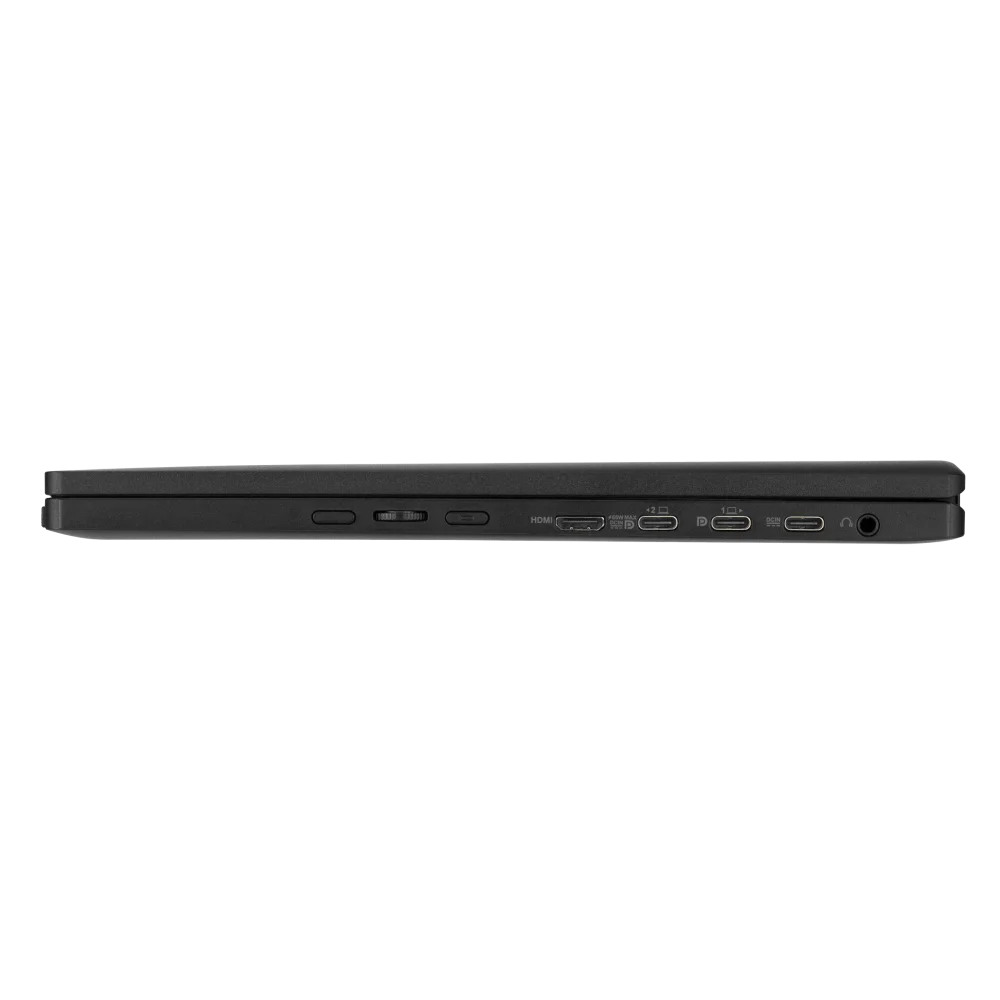
Each 14-inch IPS panel offers 1920 × 1200 resolution, 100% sRGB coverage and up to 60Hz refresh. The 16:10 format gives documents and applications more vertical room than a 16:9 panel of the same width. OSD-selectable Independent, Extend, Mirror and Split modes support different workflows. Split mode uses USB-C 2 and can present a tall 1920 × 2400 workspace when supported by the host graphics configuration. Independent mode can dedicate a panel to a separate source, using the appropriate USB-C or mini-HDMI connections.
Fold, rotate and share
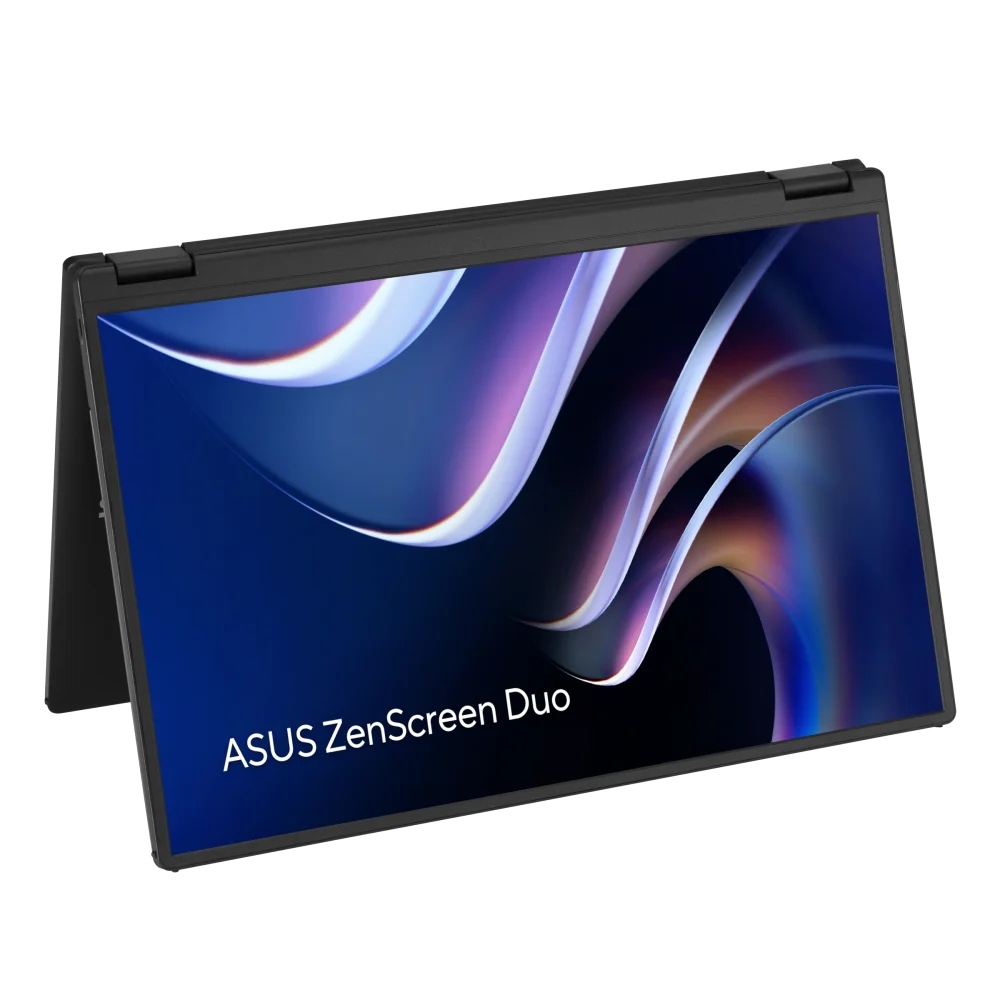
The 360° hinge allows several physical arrangements, including a tent setup for mirrored face-to-face presentations. The integrated kickstand supports landscape and portrait placement, and the 1/4-inch tripod socket adds an alternative support option.
Carry a dual-screen workspace
The monitor weighs approximately 1.2kg and folds to 31.6 × 21.4 × 1.9cm. The supplied ZenScreen sleeve helps organize the display for travel. Two panels are integrated into one folding unit, reducing the need to position separate portable monitors.
Color and viewing adjustments
The IPS panels cover 100% sRGB and include Low Blue Light, Splendid, QuickFit and six-axis color adjustment. DisplayWidget Center adds software control and supported auto-rotation. HDR10 support is listed, while the complete specification table identifies brightness, contrast and connection details.
USB-C video, pass-through power and foldable placement
The two USB-C ports support DisplayPort Alt Mode, and mini-HDMI provides an alternative video input. USB-C video requires a compatible host; HDMI operation also requires USB-C power. Up to 65W power pass-through is a charging limit, not a promise that every laptop receives that amount. The 360° hinge supports stacked, portrait and mirrored tent arrangements, with a fold-out kickstand and 1/4-inch tripod socket. DisplayWidget Center provides auto-rotation in supported Mirror and Split modes over USB-C 2. HDMI does not support that software feature, and extended-screen behavior depends on the host and operating system.
In the box
Manufacturer-listed accessories (contents vary by region): ZenScreen sleeve; Warranty Card; USB-C cable x 2; Quick start guide; Power adapter; Mini HDMI to HDMI cable
Complete Your Desk Setup
Build a comfortable workspace with the Keychron K10 HE keyboard and ASUS ROG Sheath II XXL desk pad. Browse more monitors or explore the ASUS range at AX Store.
Frequently Asked Questions
Are both panels 1920 × 1200?
Yes. Each 14-inch IPS panel has a native WUXGA resolution of 1920 × 1200 at up to 60Hz.
Does one USB-C cable always give two independent extended displays?
No. The available modes depend on the connection, host graphics and operating system. USB-C 2 supports Split and Extend modes; some Mac and phone configurations extend only one external display.
What does 65W power pass-through mean?
The monitor supports up to 65W pass-through charging with a suitable external power source and compatible laptop. It is not a 65W output guarantee in every configuration.
Does auto-rotation work over HDMI?
No. ASUS lists auto-rotation through DisplayWidget Center in supported Mirror and Split modes using USB-C 2. The software is required.
Build Your Setup with AX Store Kuwait
Need help choosing the right model or a compatible accessory? Contact AX Store and our team will help you build the right setup.
THE DETAILS
Technical specifications
Product identification
ASUS
90LM0CZ1-B01N71
Black
Model
ZenScreen Duo MB14FCD
Display
14
16:10
301.59(H) x 188.50 (V)
Anti-Glare
LED
IPS
178°/ 178°
0.157mm
1920x1200
100%
350cd/㎡
100,000,000:1
1000:1
16.7M
5ms(GTG)
60Hz
HDR10
Yes
Features
Yes
Yes (4 modes)
6-axis adjustment (R,G,B,C,M,Y)
Yes, supported by DisplayWidget Center
Yes
Yes, 1.4
Yes, DisplayWidget Center
Yes
Max. 65W
Audio
No
I/O Ports
USB-C x 2 (DP Alt Mode)
Mini HDMI x 1
No
Signal Frequency
V: 59~61 Hz H : 30~75 KHz
Power Consumption
13W
<0.5W
<0.3W
100-240V, 50/60Hz
Mechanical Design
No
Yes
Yes
Dimensions (Esti.)(vary by regions)
31.6 x 21.4 x 1.9 cm (12.44" x 8.43" x 0.75")
40.5 x 28.0 x 12.4 cm (15.94" x 11.02" x 4.88")
Weight (Esti.)(vary by regions)
1.2 kg (2.65 lbs)
2.3 kg (5.07 lbs)
Accessories (vary by regions)
ZenScreen sleeve; Warranty Card; USB-C cable x 2; Quick start guide; Power adapter; Mini HDMI to HDMI cable
Certificate
FSC MIX; TÜV Low Blue Light; TÜV Flicker-free; Energy Star
COMPLETE YOUR SETUP
Pairs well with