Ducky
Ducky Channel Premicord USB Type-A to Type-C Spiral Cable 1.8m
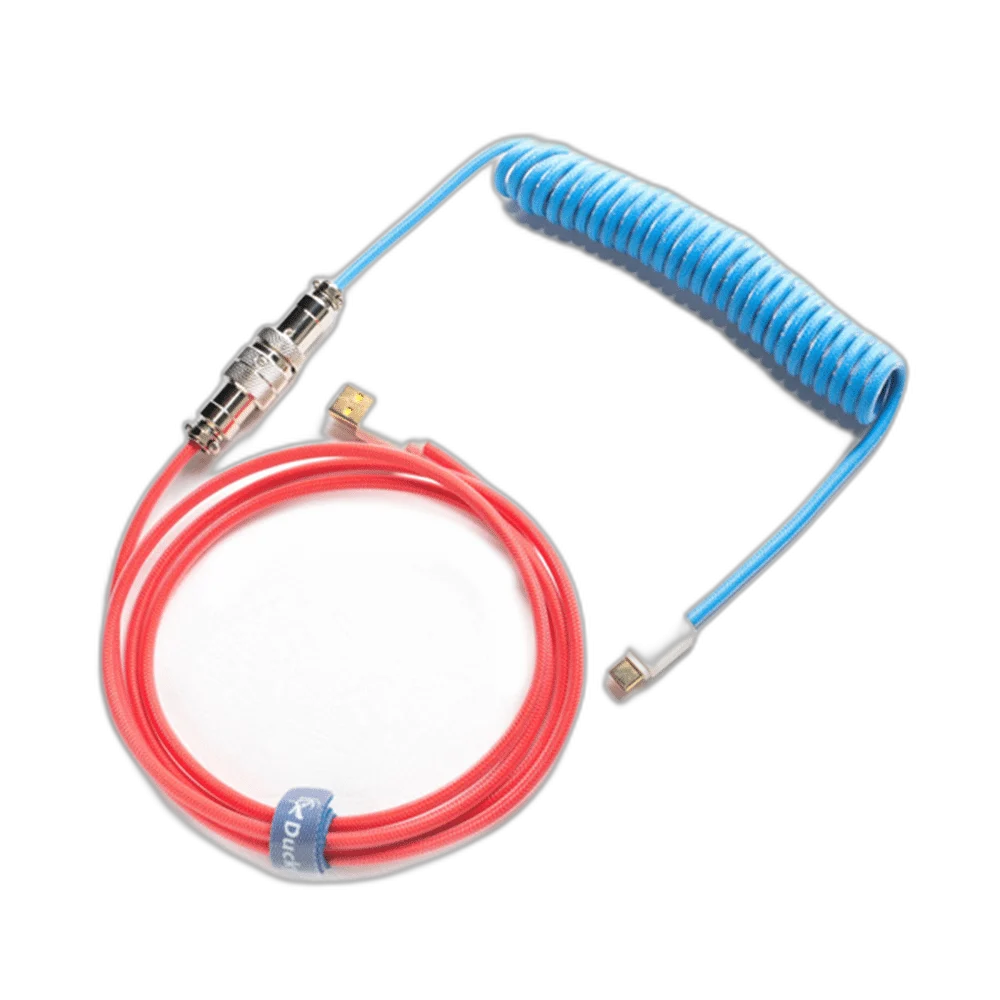
Ducky Premicord connects a compatible USB-C keyboard to a USB-A host through a coiled cable arrangement. This listing uses the 1.8 m cable configuration, with Bon Voyage, Pink and Joker colour choices retained for matching the desk setup.
Color
Regular price
14.000 KWD
or 4 payments of 3.500 KWD with
Pay with card & save


13.500 KWD
Save 0.500 KWD
Overview
DUCKY PREMICORD USB-A TO USB-C COILED CABLE
Ducky Premicord USB-A to USB-C Coiled Cable
Ducky Premicord USB-A to USB-C Coiled Cable: Ducky Premicord connects a compatible USB-C keyboard to a USB-A host through a coiled cable arrangement. This listing uses the 1.8 m cable configuration, with Bon Voyage, Pink and Joker colour choices retained for matching the desk setup. Explore this model at AX Store in Kuwait.
1.8 m
Nominal cable configuration
USB-A
Host connector
USB-C
Keyboard connector
Coiled
Desktop cable form
USB-A Host to USB-C Keyboard
The cable’s connector arrangement is USB Type-A at the host side and USB Type-C at the keyboard side. Match these ends to the actual ports on the computer and keyboard. A detachable keyboard cable is chosen around both connectors; the USB-C shape alone does not establish every device’s power or data requirements.
A Coiled Section on the Desk
The spiral section provides the Premicord’s coiled desktop appearance. Plan its position around the keyboard and monitor stand without stretching it tightly or allowing it to pull against the keyboard socket. A coiled cable’s nominal total length is different from the straight-line distance available between the installed devices.
The 1.8 m Cable Configuration
The listed cable configuration is one point eight metres. Measure the intended desk route with allowance for the coil, bends and connector access, rather than treating that number as an unobstructed straight reach. Leave the keyboard enough movement for normal positioning without placing tension on the attached lead.
Choose the Colour Theme
The available storefront themes are Bon Voyage, Pink and Joker, with the selected option defining the cable’s appearance. Choose the theme around the keyboard and other desk accessories. The colour choice is a styling decision for this cable listing; a matching keyboard or keycap set is purchased separately.
A Wired Keyboard Connection
Premicord provides a physical USB connection for a compatible keyboard setup. The keyboard itself determines its supported input features and polling modes. This listing does not assign a charging-power rating, high-speed storage capability or a special polling improvement to the cable; choose it for the documented connector and desk arrangement.
Model
Ducky Premicord USB-A to USB-C Coiled Cable
Cable configuration
1.8 m, nominal
Host connector
USB Type-A
Route and Handle the Cable Carefully
Arrange the cable with the connector housings accessible and the coil free from sharp edges or trapped objects. Move or disconnect it by the connector body rather than pulling the coiled section. Check the completed keyboard connection in normal use after positioning the cable and choosing the final desk layout.
Match the Accessory to Your Equipment
Check the exact device, connection and intended use before selecting an accessory. Compare the package contents and any required mount or adapter with the equipment already on your desk. Compare related options such as Wooting Wrist Rest 60 v2 - Just Black / Just White or Wooting Wrist Rest 80 for 80HE / 80HE+ - Black, keeping the exact model and configuration in the decision. For the wider setup, explore Logitech G PRO X Superlight Wireless Gaming Mouse, Ultra-light and check the connection, size or mounting requirements before pairing accessories. Browse the Ducky range at AX for more choices.
Ducky Premicord USB-A to USB-C Coiled Cable Setup Choices
Check the exact device, connection and intended use before selecting an accessory. Compare the package contents and any required mount or adapter with the equipment already on your desk. Explore SADES Bate Wolf 87 TKL Tri-Mode Mechanical Gaming Keyboard - Hot-Swappable RGB.
Frequently Asked Questions
Which connectors does it use?
USB-A to USB-C.
Is 1.8 m a guaranteed straight desk reach?
No. Allow for the coiled section, bends and connector positions.
Does it include a keyboard?
No.
Does the cable set the keyboard’s polling rate?
No. Polling modes are features of the connected keyboard and host.
Which themes are listed?
Bon Voyage, Pink and Joker, according to the selected option.
Build Your Setup with AX Store
Explore computers, displays and accessories for your workspace at AX Store. For help choosing the right model or checking an accessory, contact AX Store.
THE DETAILS
Technical specifications
Product Specifications
Ducky Premicord USB-A to USB-C Coiled Cable
1.8 m, nominal
USB Type-A
USB Type-C
Coiled keyboard cable
Bon Voyage; Pink; Joker
DKCC-BVCNC1; DKCC-CCCNC1; DKCC-JKCNC1
COMPLETE YOUR SETUP
Pairs well with