GAMVITY
GAMVITY Smart Desk with Wireless Charging
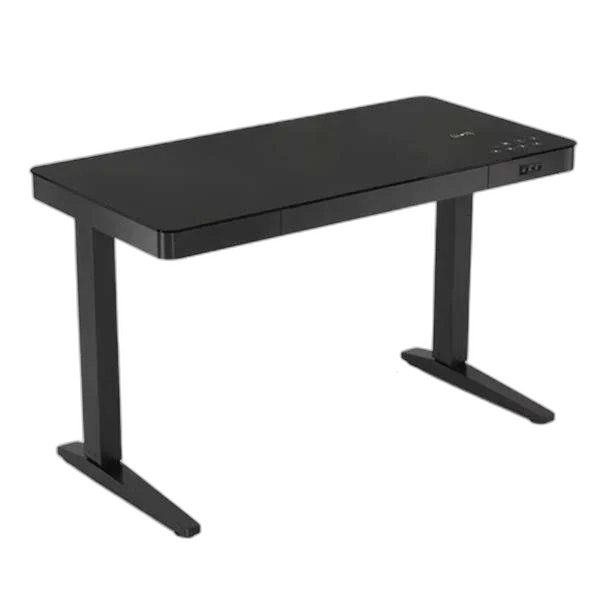
GAMVITY Smart Desk combines a working desktop with a wireless-charging feature for the setup. Choose the listed Black or White finish, then arrange the keyboard, mouse and everyday items around the work surface. It gives the desk and phone-charging area a place in the same workspace.
Color
Regular price
147.000 KWD
or 4 payments of 36.750 KWD with
Pay with card & save


139.900 KWD
Save 7.100 KWD
Overview
GAMVITY SMART DESK WITH WIRELESS CHARGING
A Desktop Workspace with Wireless Charging
GAMVITY Smart Desk combines a working desktop with a wireless-charging feature for the setup. Choose the listed Black or White finish, then arrange the keyboard, mouse and everyday items around the work surface. It gives the desk and phone-charging area a place in the same workspace.
Wireless
Charging feature
Black / White
Finish options
Smart Desk
Model
GAMVITY
Brand
Wireless Charging at the Desk
The wireless-charging feature provides a place for a suitably compatible phone in the workspace. Position the device on the intended charging area and check its charging indication before returning to the task. Device and case compatibility should suit the charging system being used.
Choose Black or White
The listed Black and White options let you choose the finish around the surrounding furniture and peripherals. Select the finish before arranging the setup, keeping the main work area available for the screen, keyboard and the items you use most frequently.
Arrange the Working Area
Start with the display and input devices when setting up the desktop. Leave enough clear mouse space for normal movements, then place smaller items around that area. A considered arrangement helps keep the working surface useful while keeping everyday equipment within reach.
Keep the Phone Within Reach
Place the phone so the charging area remains accessible during normal desk use. Keep loose items away from the device’s intended position and check that the phone is resting appropriately. This makes it easier to return the phone to the same place between tasks.
Plan Routes for Connected Equipment
Arrange the leads for the computer, display and peripherals around their actual connections. Keep access to plugs and controls available as the setup develops. Cable routing should suit the equipment you install without assuming that a particular organiser or powered accessory is included.
Brand
GAMVITY
Model
Smart Desk
Product type
Desk
Complete the Setup with Suitable Accessories
Choose the keyboard, mouse surface and other accessories around the available desktop space. Any clamp-mounted equipment should be matched to the actual desk structure and its mounting requirements. Freestanding accessories can be positioned around the working area and moved as your arrangement changes.
Complete Your Workspace
Explore Gaming Chairs & Desks to compare suitable options and complete your setup.
Frequently Asked Questions
Which finishes can I choose?
The listed Smart Desk options are Black and White.
What is its charging feature?
It provides wireless charging for a suitably compatible phone. Use a device and case suited to the desk’s charging system and check the phone’s charging indication.
How should I arrange the desktop?
Position the display, keyboard and mouse first, leaving a clear working area and access to the phone-charging position.
Can I add a monitor arm?
Match any arm or clamp to the actual desktop structure and the mounting requirements stated for that accessory.
Build Your Setup with AX Store Kuwait
Explore computers, displays and accessories for your workspace at AX Store Kuwait. For help choosing the right model or checking an accessory, contact AX Store.
THE DETAILS
Technical specifications
Product Specifications
GAMVITY
Smart Desk
Desk
Wireless
Black; White
LS-AFD-32875
LS-AFD-32876
COMPLETE YOUR SETUP
Pairs well with