Mousepads
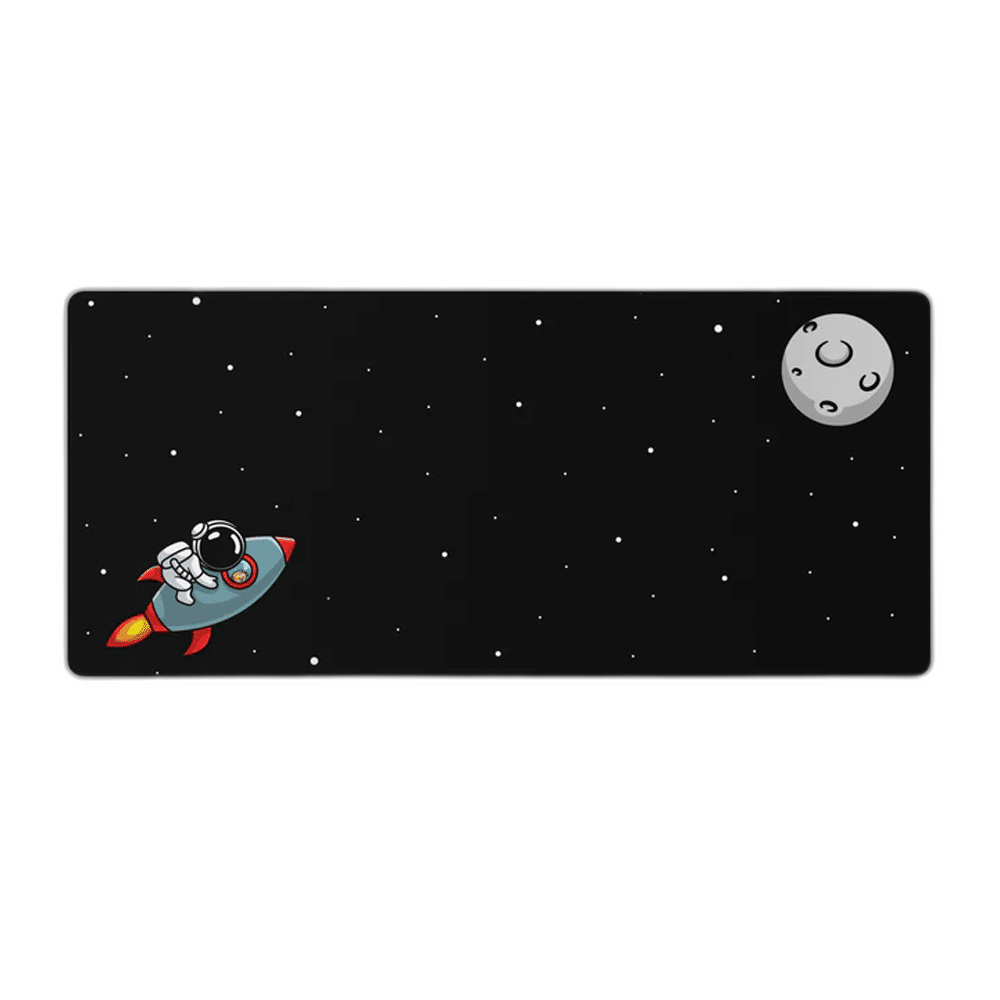
To The Moon Deskmat XL Edition
keycadets To The Moon Deskmat combines a smooth cloth surface, foam core and rubber non-slip base in a 900 × 400 × 4 mm deskmat. Its extended format provides room to arrange a keyboard and mouse area together, with the To The Moon design giving the setup its own visual identity.
Regular price
16.000 KWD
or 4 payments of 4.000 KWD with
Pay with card & save


15.000 KWD
Save 1.000 KWD
Overview
KEYCADETS TO THE MOON DESKMAT
A 900 × 400 mm Cloth Surface for Your Desktop
keycadets To The Moon Deskmat combines a smooth cloth surface, foam core and rubber non-slip base in a 900 × 400 × 4 mm deskmat. Its extended format provides room to arrange a keyboard and mouse area together, with the To The Moon design giving the setup its own visual identity.
900 × 400 mm
Footprint
4 mm
Overall thickness
Cloth
Working surface
Rubber
Non-slip bottom
Room for the Keyboard and Mouse
The 900 × 400 mm footprint creates a broad working area across the desk. Position the keyboard first, then leave enough open surface for your normal mouse movements. The extended format is useful when you want the two input devices arranged on the same continuous mat.
Smooth Cloth for Controlled Movement
The low-friction cloth surface supports smooth mouse movement across the pad. It provides a consistent working layer for gaming and everyday desktop use, whether your movements are short and precise or cover a larger part of the surface. Set sensitivity around your own preferred movement range.
A Foam Core Within a 4 mm Construction
The premium foam core forms part of the complete 4 mm-thick mat. It gives the cloth surface a supported layer between your equipment and the desk. Place the mat on a flat desktop and keep objects beneath it clear so the working surface remains even.
A Rubber Base Under the Working Area
The rubber non-slip bottom helps keep the deskmat positioned during normal use. Arrange the mat fully on a clean, dry surface, with connected leads routed away from its edges. This lets the base contact the desk while leaving the mouse path available.
A Surface for Different Mouse Setups
keycadets optimizes the cloth surface for different mouse sensors and sensitivity settings. You can keep your familiar mouse and set up the available area around your preferred sensitivity. The deskmat supplies the physical surface; mouse settings remain controlled through the mouse or computer.
Brand
keycadets
Collection
To The Moon
Product type
Extended cloth deskmat
Build the Setup Around the Design
The To The Moon design makes the mat part of the desktop presentation as well as a working surface. Arrange the keyboard, mouse and smaller accessories without crowding the usable area. Keep the cloth surface free of loose debris so it is ready for the next session.
Complete Your Workspace
Explore Mousepads to compare suitable options and complete your setup.
Frequently Asked Questions
What are the dimensions?
The complete deskmat measures 900 × 400 × 4 mm, including its layered construction.
Can it hold a keyboard and mouse together?
The extended surface is designed for a desktop arrangement with both devices. Leave enough mouse space for your own sensitivity and movements.
What is the base made from?
A rubber non-slip bottom sits beneath the foam core and cloth working surface.
Do I need a particular mouse sensor?
The surface is optimized for various mouse sensors and sensitivity settings. The mat does not change the mouse’s electronic settings.
Which design is this listing?
This is the To The Moon listing. Choose the design shown for this product when matching the rest of the setup.
Build Your Setup with AX Store Kuwait
Explore computers, displays and accessories for your workspace at AX Store Kuwait. For help choosing the right model or checking an accessory, contact AX Store.
THE DETAILS
Technical specifications
Product Specifications
keycadets
To The Moon
Extended cloth deskmat
900 × 400 × 4 mm
Smooth, low-friction cloth
Premium foam
Rubber, non-slip
Optimized for various mouse sensors and sensitivities
COMPLETE YOUR SETUP
Pairs well with