
ASUS
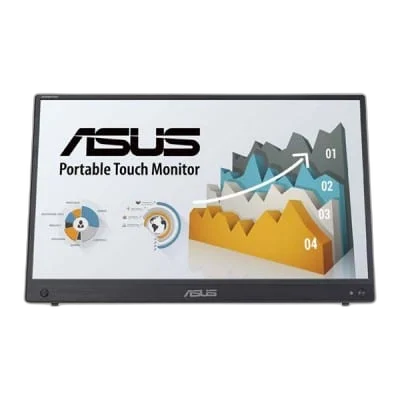
ASUS ZenScreen Touch MB16AHT 16 inch FHD 60Hz Portable Monitor
Add a portable second screen for notes, documents and everyday multitasking. ZenScreen Touch MB16AHT brings a 15.6-inch Full HD display to a flexible mobile setup. 15.6-inch IPS, 1920 × 1080 resolution and up to 60Hz.
Overview
ASUS ZENSCREEN TOUCH MB16AHT 16 INCH FHD 60HZ PORTABLE MONITOR
ASUS MB16AHT
ASUS MB16AHT: Add a portable second screen for notes, documents and everyday multitasking. ZenScreen Touch MB16AHT brings a 15.6-inch Full HD display to a flexible mobile setup. Available from AX Store in Kuwait.
15.6-inch Class
Display Size
1920 × 1080 (Full HD)
Native Resolution
60Hz
Supported Refresh Mode
IPS
Panel Technology
Work with a touch
Ten-point capacitive touch adds a hands-on way to interact with supported devices and applications. Touch support depends on your connected system. Check the available space and choose the viewing or storage position that suits the actual desk.
Connect your way
USB-C with DisplayPort Alt Mode and Mini HDMI provide two routes for a compatible video source. Match the actual device connections and the supported setup before using the product in the workspace.
A flexible viewing position
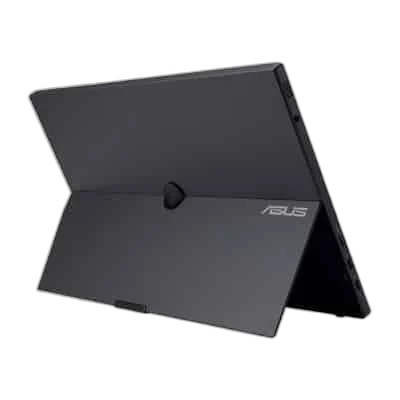
Use the adjustable stand or the built-in quarter-inch tripod socket to position the display for your workspace. Check the connected equipment and keep its ordinary controls and cables accessible during use.
Choose the Mode for the Actual Setup
The portable panel is 15.6 inches and supports ten-point capacitive touch on compatible systems and applications. Check touch support separately from the USB-C DP Alt Mode or Mini HDMI video route; a working picture does not by itself establish touch operation.
Connect the Ports for Their Stated Roles
The connection arrangement includes 2 × USB-C with DP Alt Mode and Mini HDMI. Select the correct video input and source output for the intended mode, keeping USB data, charging and display functions tied to the actual port specification.
Set the Viewing Position for the Desk
Use the supplied stand’s supported adjustments for the desk and seating position. If choosing another support, match the actual monitor size, load and mounting arrangement, leaving enough space for the display and its connected cables.
Plan the Display and the Rest of Your Desk
Compare resolution, refresh rate, screen size and the input you will actually use. Match the computer or console output to the chosen display mode, and leave room for the monitor stand and mouse movement. Compare related options such as ASUS ROG Strix XG27UCG-W 27 inch Dual Mode 4K 160Hz Gaming Monitor or ASUS ROG Swift OLED PG27AQWP-W 27 inch 540Hz Gaming Monitor, keeping the exact model and configuration in the decision. For the wider setup, explore ASUS ROG Harpe II Ace Red Wireless Gaming Mouse, 42000 DPI and check the connection, size or mounting requirements before pairing accessories. Browse the ASUS range at AX for more choices.
ASUS MB16AHT Setup Choices
Compare resolution, refresh rate, screen size and the input you will actually use. Match the computer or console output to the chosen display mode, and leave room for the monitor stand and mouse movement. Explore Wooting 60HE v2 60% Gaming Keyboard, Aluminium, Pulsar Pro Series Susanto-X Wireless Gaming Mouse Size 2, 50g, ARTISAN NINJA FX ZERO Gaming Mousepad – SOFT/XSOFT, XL/XXL.
Frequently Asked Questions
What native resolution is specified?
1920 × 1080 (Full HD).
What should I check for the refresh mode and connection?
The portable panel is 15.6 inches and supports ten-point capacitive touch on compatible systems and applications. Check touch support separately from the USB-C DP Alt Mode or Mini HDMI video route; a working picture does not by itself establish touch operation.
Which video and port details are listed?
2 × USB-C with DP Alt Mode and Mini HDMI.
Can I use a tripod instead of the stand?
1/4 inch tripod socket is provided. Select a suitable support and check touch compatibility separately for the connected system.
Build Your Setup with AX Store
Explore computers, displays and accessories for your workspace at AX Store. For help choosing the right model or checking an accessory, contact AX Store.
THE DETAILS
Technical specifications
Display
15.6 inches
1920 × 1080 (Full HD)
IPS
60Hz
5ms GTG
10-point capacitive
Connections
2 × USB-C (DP Alt Mode), 1 × Mini HDMI
2 × 1W
Yes
Design
Approximately 1.01kg
1/4 inch
No
COMPLETE YOUR SETUP
Pairs well with






