Controllers & Gamepads
Cronus Zen Controller Emulator
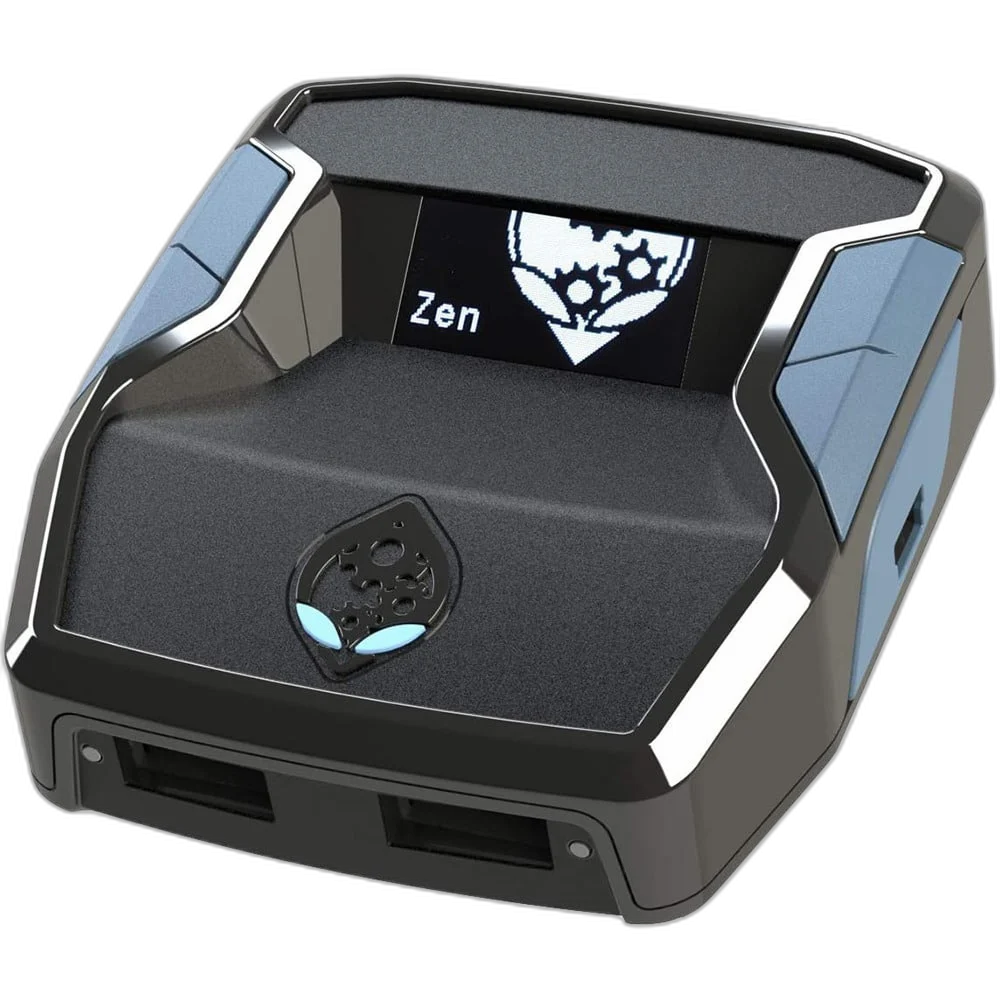
Cronus Zen CM00053 is a controller adapter with configurable input mapping and on-device profile functions. Zen Studio for Windows provides the configuration tools, while controller, console and headset support depend on the particular connection and firmware setup.
Regular price
47.000 KWD
or 4 payments of 11.750 KWD with
Pay with card & save


44.900 KWD
Save 2.100 KWD
Overview
CRONUS ZEN CM00053 CONTROLLER ADAPTER
Controller Mapping and Configuration Through Zen Studio
Cronus Zen CM00053 is a controller adapter with configurable input mapping and on-device profile functions. Zen Studio for Windows provides the configuration tools, while controller, console and headset support depend on the particular connection and firmware setup.
Zen Studio
Windows configuration
OLED
On-device information
Remapping
Controller input tools
USB setup
Required headset path
Arrange Controls Around Your Input Needs
Zen Studio provides controller remapping tools for buttons, sticks, triggers and supported sensors. This is useful when a preferred control layout differs from a game’s available presets. Configure the mapping for the connected controller and supported host, then check the resulting input in the software’s device monitor.
Zen Studio on a Windows Computer
The Windows configuration software gives access to device settings, input monitoring and profile programming. Follow the official setup order for the hardware and firmware being used. The computer is part of the configuration workflow, so make sure the required software and a suitable data connection are available.
Store and Select Configured Profiles
The software can program configured controller profiles to the Zen’s memory, and the built-in OLED interface provides on-device information and supported menu functions. Keep profiles named for the controller and intended setup. Test the selected profile before use so the active input arrangement is the one you expect.
Check the Exact Controller and Host Setup
Cronus publishes separate connection guides for different controller and console combinations. USB, Bluetooth and supported wireless adapters are not interchangeable setup methods. Match the device to its current supported-device guidance, including any authentication controller or additional equipment the selected setup requires.
Mouse and Keyboard Input Configuration
Zen Studio also provides mouse and keyboard configuration tools that translate supported inputs through the controller-adapter workflow. The game’s controller behaviour and host setup affect the result. Treat this as a configurable controller input path rather than an upgrade to the console’s native mouse support or a guaranteed PC-like response.
Model
Cronus Zen CM00053
Main role
Configurable controller adapter
Configuration software
Zen Studio for Windows
Understand the Headset Connection Path
The official controller guide states that headset support requires the controller’s USB connection; Bluetooth does not provide headset audio through this arrangement. Audio still varies across headset, controller and host combinations. Follow the matching setup guide and the platform or game’s permitted accessory and input-use requirements.
Complete Your Workspace
Explore Controllers & Gamepads to compare suitable options and complete your setup.
Frequently Asked Questions
Does every controller work identically on every console?
No. Follow the exact supported-device and connection guide.
Which software configures it?
Zen Studio for Windows provides the controller-adapter configuration workflow.
Does Bluetooth provide headset audio through Zen?
No. The official guide requires a USB-connected controller for this headset path.
Can PS5 support be assumed without additional setup?
No. Follow the current PS5-specific requirements and required equipment.
Does mouse conversion guarantee native PC mouse behaviour?
No. The controller translation and game behaviour affect the result.
Build Your Setup with AX Store Kuwait
Explore computers, displays and accessories for your workspace at AX Store Kuwait. For help choosing the right model or checking an accessory, contact AX Store.
THE DETAILS
Technical specifications
Specifications
Cronus Zen CM00053
Configurable controller adapter
Zen Studio for Windows
Button, stick and trigger remapping; supported sensor mapping
Built-in OLED interface
Program supported configurations to device memory
USB / Bluetooth / supported adapters, depending on device
Controller must use USB; no headset audio over Bluetooth
Follow current firmware and exact controller/host setup guidance
COMPLETE YOUR SETUP
Pairs well with