
Govee
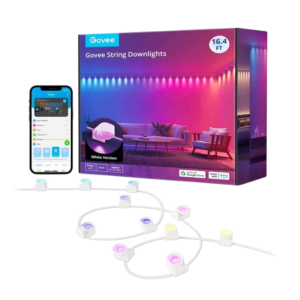
Govee H608B RGBIC String Indoor Downlights 3m
Govee H608B 3m RGBIC string downlights with multicolor effects, Govee Home controls, scene modes, music modes and DIY brightness and color settings.
Regular price
26.000 KWD
or 4 payments of 6.500 KWD with
Pay with card & save


24.900 KWD
Save 1.100 KWD
Overview
GOVEE H608B RGBIC STRING DOWNLIGHTS — 3M

A Decorative Line of Downlighting for Your Room
Govee H608B RGBIC String Downlights provide a decorative light arrangement along a wall or room feature. This is the approximately 3-metre / 9.8-foot version. App colors, scene selection, music modes and DIY effects give you ways to change the atmosphere, while the flexible layout can follow suitable corners and curves in the installation area.
RGBIC
Lighting Technology
Approx. 3 m
String Length
16 Million
Colour Options
Govee Home
App Controls
RGBIC Color along the Layout
RGBIC lighting supports multicolor effects across the downlight arrangement, with 16 million color options listed by Govee. Choose the effect around the wall or room feature you want to emphasize, then compare how the colors appear in the surrounding light. The line of downlighting gives you a different placement option from a single lamp or bulb.
The H608B 3-Metre Version
Govee identifies H608B as the 9.8-foot model, equivalent to approximately 3 metres. Other models in the family have different lengths, so use this version’s dimensions when planning the route. Measure the intended wall section and available space before installation, keeping the power location and the positions of the light sections in mind.
Scenes for Different Room Atmospheres
Scene modes provide starting points for changing the lighting without building an effect from the beginning. Choose a scene for the activity or room mood, then review its brightness and colors in the actual space. Switching between presets makes it possible to use the same installed layout for different evenings, desk activities or decorative lighting preferences.
Music Modes for Animated Lighting
Music modes change the way the string downlights display their effects around sound. Select a supported mode when you want a more animated atmosphere, then compare the movement and colors with the rest of the room. The available modes provide another way to use the installation alongside the regular scene and DIY lighting choices.
DIY Effects through Govee Home
Govee Home lets you choose colors and adjust brightness as part of the DIY lighting controls. Begin with the layout and surfaces you have installed, then experiment with the available effects until the lighting suits the space. Save or select the arrangement you prefer when you want a more personal result than the standard scene options.
Plan Corners, Curves and Power
The product description identifies adaptable installation around suitable corners and curves, with a listed lighting-effect depth of up to 100 cm. Review the installation guide before fixing the downlights or altering the layout. Govee specifies unplugging the lights before cutting; confirm the permitted cutting points and complete instructions for this model before making a permanent change.
Complete Your Workspace
Explore Smart Lighting at AX Store and choose the configuration or accessories that fit your setup.
Frequently Asked Questions
What lighting technology does this model use?
Lighting: RGBIC.
How is the lighting controlled or connected?
App: Govee Home. App controls: Color selection; brightness; DIY effects.
How long is the light and how can its layout be arranged?
Length: Approximately 3 m / 9.8 ft. Layout: Adaptable to suitable corners and curves.
Which lighting modes and app adjustments are available?
Modes: Scene; music; DIY. App controls: Color selection; brightness; DIY effects.
Build Your Setup with AX Store Kuwait
Explore computers, displays and accessories for your workspace at AX Store Kuwait. For help choosing the right model or checking an accessory, contact AX Store.
THE DETAILS
Technical specifications
Model and Confirmed Features
Govee
H608B
Approximately 3 m / 9.8 ft
RGBIC
16 million
Up to 100 cm — manufacturer lighting-effect specification
Scene; music; DIY
Govee Home
Color selection; brightness; DIY effects
Adaptable to suitable corners and curves
Disconnect power before cutting; follow the exact model installation guide
COMPLETE YOUR SETUP
Pairs well with