iVANKY
iVANKY DisplayPort Cable 4K 60Hz, 2m / 3m
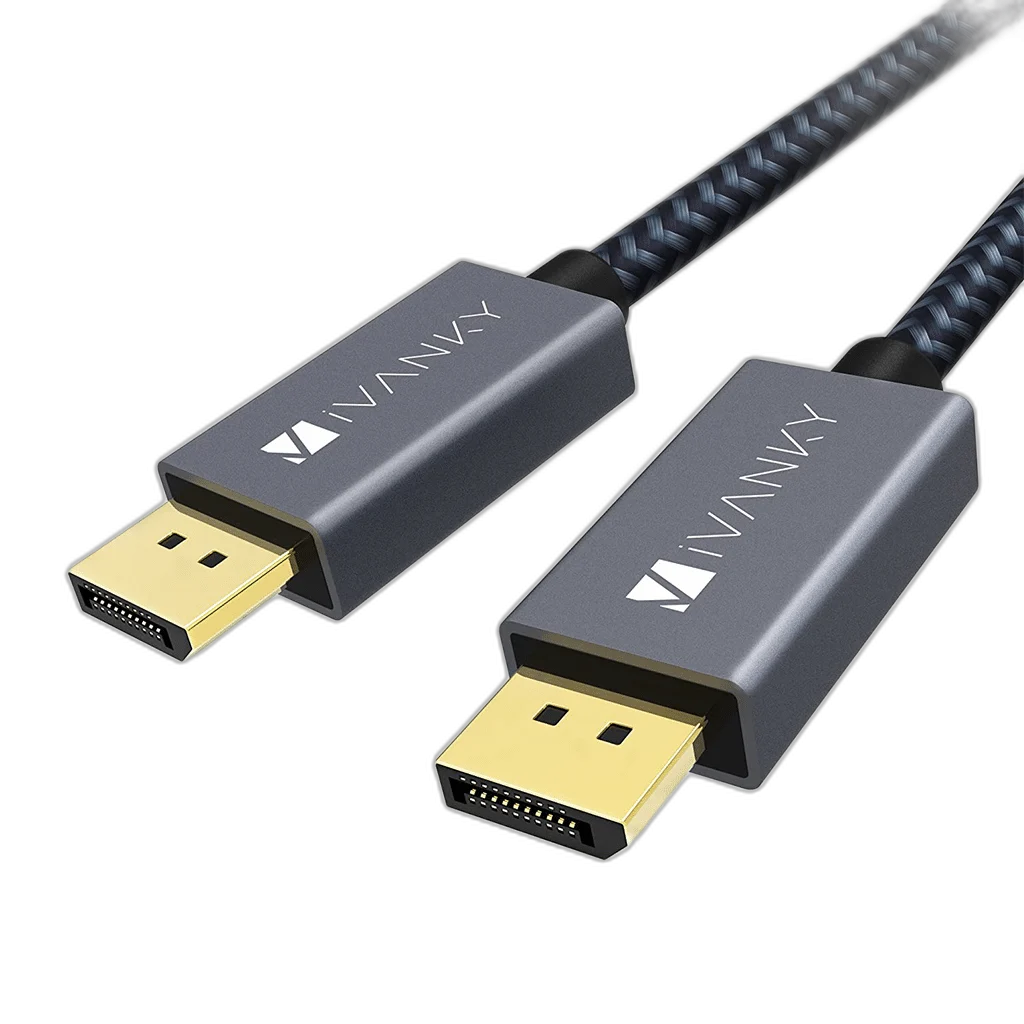
iVANKY DisplayPort Cable provides DisplayPort male to DisplayPort male connectivity between a suitable computer output and display input. Use it for 4K at 60 Hz when the complete source and display connection supports the selected mode.
Size
Regular price
7.000 KWD
or 4 payments of 1.750 KWD with
Pay with card & save


6.500 KWD
Save 0.500 KWD
Overview
IVANKY DISPLAYPORT CABLE
DisplayPort to DisplayPort for Your Display Setup
iVANKY DisplayPort Cable provides DisplayPort male to DisplayPort male connectivity between a suitable computer output and display input. Use it for 4K at 60 Hz when the complete source and display connection supports the selected mode.
DisplayPort
Source-side connector
DisplayPort
Screen connection
4K at 60 Hz
Display mode focus
Cable
Connection format
The Correct Source and Display Ports
The connection uses DisplayPort male to DisplayPort male. Connect the source-side plug to the appropriate computer output and the display-side plug to the screen input. Check the actual port labels before installation, since an input and output can share a similar physical connector.
Choose a Supported Display Mode
The connection is intended for 4K at 60 Hz. The source, display and complete cable route determine the resolution and refresh rate that can be used. Select a mode supported by both devices; a cable or adapter does not change the screen’s native resolution or add capabilities to the graphics output.
Host Requirements and Connection Direction
Use the computer or graphics card’s DisplayPort output and the monitor’s DisplayPort input. The physical connection provides the signal path, while the active equipment determines its supported operating modes. An HDMI source needs the appropriate separate conversion device rather than a direct DisplayPort lead.
Length and Equipment Placement
The available cable lengths are 2 m and 3 m. Include the path behind the screen, around a stand and along the desk. Allow clearance and slack at both ends so moving the equipment does not pull on a small socket.
Video and Audio Settings
Choose the connected screen’s correct input and select the desired display arrangement in the computer settings, such as a duplicate view or extended desktop when supported by the host. Digital audio also depends on the connected source and receiving equipment. Select the display audio output separately if that is the intended listening route.
Model
iVANKY DisplayPort Cable
Connector arrangement
DisplayPort male to DisplayPort male
Purpose
Digital display video connection
Connect and Check the Complete Setup
Seat the connectors securely, then check that the screen receives the selected input and that the operating system shows the expected resolution and refresh rate. If a connector has a release latch, use it when unplugging. Keep the cable supported and accessible, with enough room at the screen and computer to disconnect it without twisting the sockets.
Complete Your Workspace
Explore Gaming Cables & Adapters to compare suitable options and complete your setup.
Frequently Asked Questions
What connector arrangement is used?
DisplayPort male to DisplayPort male.
Will it make any monitor display 4K or 8K?
No. The source and screen must support the selected operating mode.
Is a separate HDMI cable needed?
No additional HDMI lead is required for this direct cable connection.
Does every USB-C port support display output?
No. A USB-C video connection requires DisplayPort Alternate Mode support.
How should the display mode be checked?
Confirm the resolution and refresh rate in the computer settings after selecting the correct screen input.
Build Your Setup with AX Store Kuwait
Explore computers, displays and accessories for your workspace at AX Store Kuwait. For help choosing the right model or checking an accessory, contact AX Store.
THE DETAILS
Technical specifications
Product Specifications
iVANKY DisplayPort Cable
DisplayPort male to DisplayPort male
Digital display video connection
DisplayPort source output to DisplayPort display input
Determined by source, display and complete connection
4K at 60 Hz with suitable equipment
2 m / 3 m
COMPLETE YOUR SETUP
Pairs well with