Logitech
Logitech BT.L Grips for G Pro X Superlight
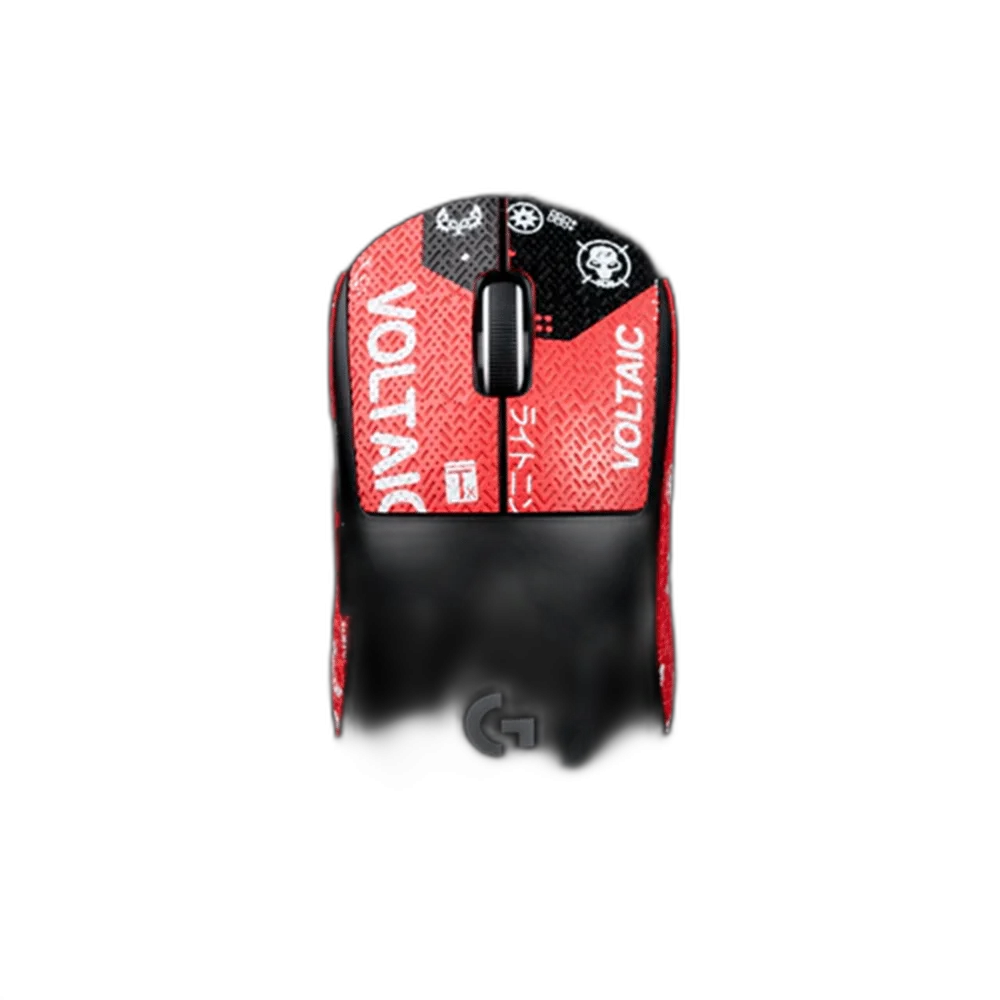
BT.L grip tape adds a contact layer to the Logitech G Pro X Superlight shell. Choose the available design option and match the supplied grip pieces to the original mouse’s body before fitting them.
Color
Regular price
6.000 KWD
or 4 payments of 1.500 KWD with
Pay with card & save


5.900 KWD
Save 0.100 KWD
Overview
BT.L GRIP TAPE FOR LOGITECH G PRO X SUPERLIGHT
BT.L Grip Tape for Logitech G Pro X Superlight
BT.L Grip Tape for Logitech G Pro X Superlight: BT.L grip tape adds a contact layer to the Logitech G Pro X Superlight shell. Choose the available design option and match the supplied grip pieces to the original mouse’s body before fitting them. Explore this model at AX Store in Kuwait.
BT.L
Grip accessory brand
Superlight
Original mouse fit
Grip tape
Contact accessory
Design choice
Existing pattern options
Match the Original Superlight Shell
This listing is for the Logitech G Pro X Superlight. Match the supplied pieces to that mouse’s shell and control positions before applying them. A similarly named Superlight 2 or DEX mouse should not be assumed compatible, since the grip cut shape and button layout are part of the fit.
A Contact Surface for the Hand
Grip tape changes the surface touched by the fingers and palm, providing an alternative feel to the bare mouse shell. The result depends on the hand position, selected pieces and personal grip. It is a physical accessory rather than a change to the sensor, switches, wireless receiver or polling hardware.
Choose the Available Design
The listing includes its existing colour and pattern options, allowing the visible grip design to be selected alongside the mouse and desk setup. Check the chosen option before installation. A design choice does not change the requirement for the grip pieces to match the original Superlight shell and intended contact areas.
Prepare a Clean, Dry Surface
Follow the supplied grip instructions for preparing the receiving shell areas. Keep those areas clean and dry, and check the alignment of each piece before exposing the adhesive. Avoid covering a control, opening or part of the shell that is not intended for the supplied grip piece.
Fit the Pieces Around the Controls
Apply each piece in its intended position and follow the supplied method for securing it. Check that mouse buttons, the wheel and any affected controls move normally after fitting. Do not force an incorrectly shaped piece into place or assume that repeated removal and reapplication preserves the original attachment.
Model
BT.L Grip Tape for Logitech G Pro X Superlight
Accessory type
Mouse grip tape
Brand
BT.L
Check the Feel in Normal Use
Use the mouse from the usual seated position and check the finger contact areas, button access and movement range. Keep the fitted surfaces clean using the supplied care guidance. Inspect the attachment and replace a worn or loose piece when its condition requires it, following the instructions for the supplied grips.
Match the Accessory to Your Equipment
Check the exact device, connection and intended use before selecting an accessory. Compare the package contents and any required mount or adapter with the equipment already on your desk. Compare related options such as Wooting Wrist Rest 80 for 80HE / 80HE+ - Black or Gator Frameworks Clamp Mounted Headphone Hanger for Desk, keeping the exact model and configuration in the decision. For the wider setup, explore Logitech G PRO X3 SUPERSTRIKE Wireless Mouse and check the connection, size or mounting requirements before pairing accessories. Browse the Logitech range at AX for more choices.
BT.L Grip Tape for Logitech G Pro X Superlight Setup Choices
Check the exact device, connection and intended use before selecting an accessory. Compare the package contents and any required mount or adapter with the equipment already on your desk. Explore ARTISAN NINJA FX ZERO Gaming Mousepad – SOFT/XSOFT, XL/XXL.
Frequently Asked Questions
Does it change the mouse sensor?
No.
Which mouse is this listing for?
The original Logitech G Pro X Superlight.
Can Superlight 2 or DEX fit be assumed?
No. Check the exact grip cut and mouse shell.
How is the design selected?
Use the existing colour and pattern options.
When should a piece be replaced?
Check wear and secure attachment, and follow the supplied care guidance.
Build Your Setup with AX Store
Explore computers, displays and accessories for your workspace at AX Store. For help choosing the right model or checking an accessory, contact AX Store.
THE DETAILS
Technical specifications
Product Specifications
BT.L Grip Tape for Logitech G Pro X Superlight
Mouse grip tape
BT.L
Logitech G Pro X Superlight
Physical hand-contact surface on mouse shell
Use existing colour / pattern options
Match supplied grip pieces to original Superlight shell
Follow supplied preparation and attachment instructions
COMPLETE YOUR SETUP
Pairs well with