
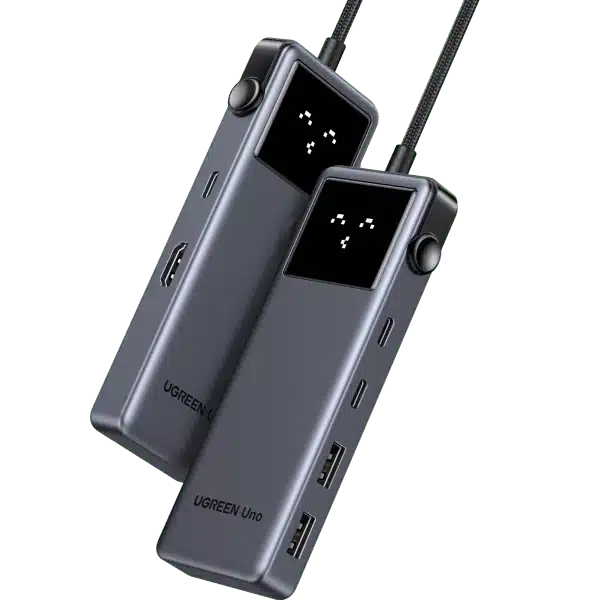
UGREEN
UGREEN Uno CM888 35998 6-in-1 USB-C Hub - 10Gbps / 4K 60Hz / 100W PD
UGREEN Uno 35998 six-in-one USB-C hub with HDMI up to 4K 60Hz, USB-A/USB-C data up to 10Gbps and a 100W PD input delivering up to 85W to the host. Includes an emoji LED status display. DP1.4 host video support is required for 4K 60Hz.
Regular price
13.500 KWD
or 4 payments of 3.375 KWD with
Pay with card & save


12.900 KWD
Save 0.600 KWD
Overview
UGREEN UNO 35998 6-IN-1 USB-C HUB
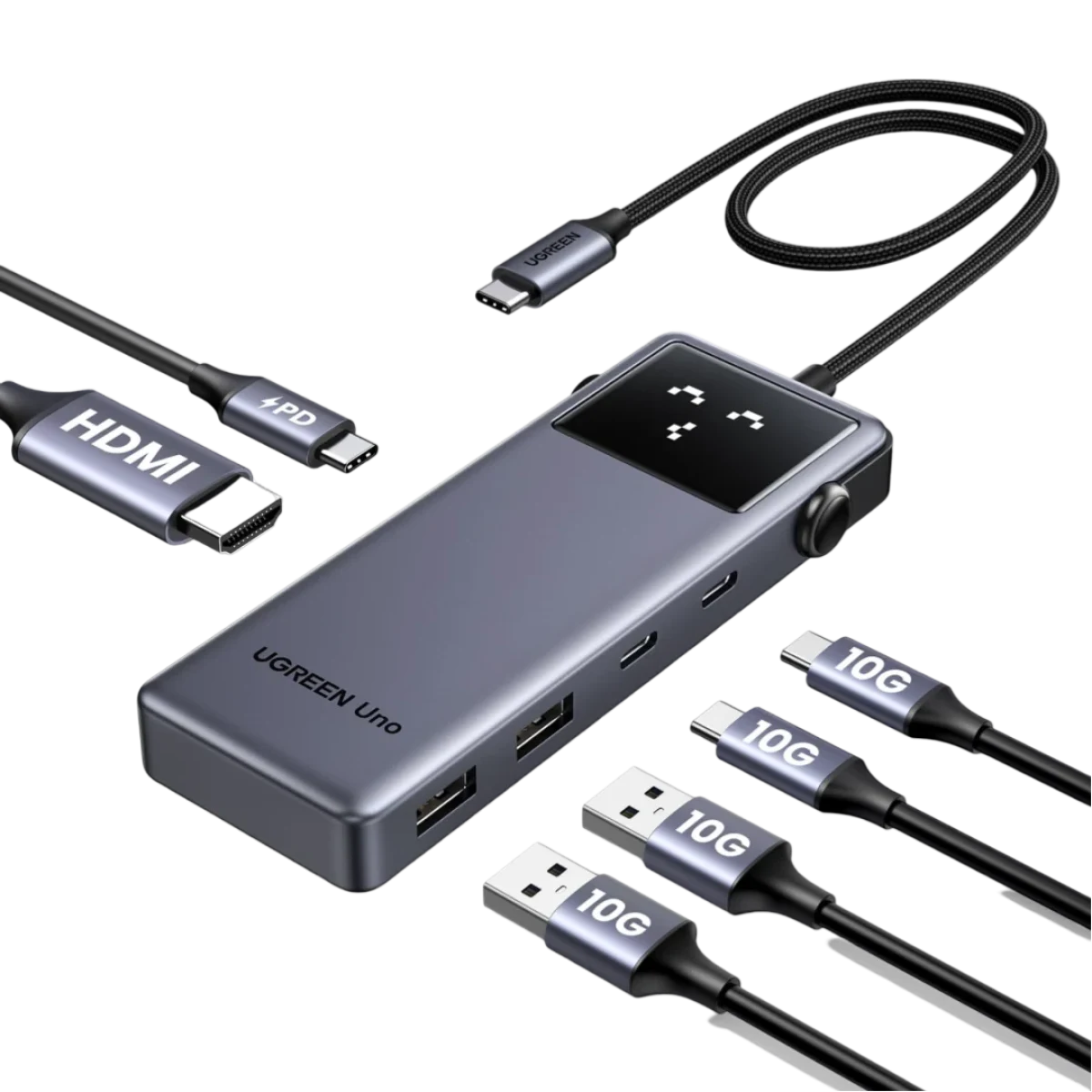
UGREEN Uno 35998
UGREEN Uno 35998 combines USB-C expansion with a playful LED status display. The six-in-one hub offers HDMI video up to 4K at 60Hz, fast USB-A and USB-C data connections, and a dedicated USB-C PD power input. Bring the connections for work, storage and an external screen together, while keeping the different data, video and charging roles clear when arranging the setup. Available from AX Store in Kuwait.
6
Expansion Connections
Up to 10 Gbps
USB Data Speed
100 W
Maximum PD Input
85 W
Maximum Host Charging
A Six-in-One Connection Point
Use the hub to expand a compatible USB-C host with connections for an external display, USB accessories and pass-through power. UGREEN lists five USB ports in total, including the dedicated charging input, alongside HDMI. Choose the connections around the equipment you actually use, keeping the host connection accessible when changing between a desk and a portable workspace.
HDMI Video up to 4K at 60Hz
The HDMI output supports up to 4K at 60Hz when the host video signal supports DisplayPort 1.4. Match the host USB-C video capability, HDMI connection and display to the mode you want to use. A compatible monitor gives the laptop or tablet another viewing surface for the applications and content you work with.
USB-A and USB-C Data up to 10Gbps
The USB-A and USB-C data ports support transfer rates up to 10Gbps for compatible equipment. Use them for storage and other supported peripherals while managing files through the host device. Actual throughput depends on the host, accessory and transfer workload. The USB-C data ports are for data and do not provide display output or PD charging.
100W PD Input with up to 85W for the Host
Connect a suitable charger to the dedicated USB-C PD input for up to 100W input and up to 85W pass-through charging to the host. Check the charger, cable and host charging requirements together. UGREEN specifically excludes the original Apple 100W charger from compatibility, so choose the power source around the published guidance for this hub.
LED Expressions Show Connection Status
The built-in LED display presents connection status through emoji expressions, adding a distinctive visual detail to the workspace. Position the hub where the display and ports remain visible and accessible alongside the connected equipment. The portable, lightweight format makes it practical to carry the same connection point between a regular desk and other compatible work locations.
Prepare the Power and Video Requirements
The hub is designed for plug-and-play use with compatible hosts and accessories. UGREEN recommends connecting a suitable PD charger when using a phone or tablet for stable video output. Check the host video and charging support before connection, use the dedicated PD input for power, and keep display use assigned to HDMI rather than the USB-C data ports.
Check the Ports and Signal Before Choosing a Cable
Match both devices, the connector type and the signal or data mode you intend to use. Physical fit alone does not establish supported resolution, charging or data capability. Compare related options such as UGREEN Revodok Pro 211 CM639 45520 11-in-1 USB-C Docking Station or UGREEN CM195 70410 USB-C Hub with HDMI, 3× USB 3.0 & SD/TF, keeping the exact model and configuration in the decision. For the wider setup, explore Razer Rogue 15 Backpack V3 Chromatic, Tear and Water Resistant and check the connection, size or mounting requirements before pairing accessories. Browse the UGREEN range at AX for more choices.
UGREEN Uno 35998 Setup Choices
Match both devices, the connector type and the signal or data mode you intend to use. Physical fit alone does not establish supported resolution, charging or data capability.
Frequently Asked Questions
Which expansion interfaces and USB transfer speed are provided?
Expansion connections: 6. Hardware interfaces: USB-C; USB-A; HDMI. USB data speed: Up to 10Gbps on USB-A and USB-C data ports.
How do PD input and host charging differ?
USB-C PD input: Up to 100W. Pass-through host charging: Up to 85W.
What is required for the listed HDMI mode?
Maximum HDMI video mode: 4K at 60Hz. Host video requirement for 4K 60Hz: DisplayPort 1.4 video signal over compatible host USB-C.
What limitation applies to the USB-C data port and supplied charger?
USB-C data-port limitation: Data only; no display output or PD charging. Manufacturer charger exclusion: Original Apple 100W charger is not compatible.
Build Your Setup with AX Store
Explore computers, displays and accessories for your workspace at AX Store. For help choosing the right model or checking an accessory, contact AX Store.
THE DETAILS
Technical specifications
Connections and Specifications
35998
Uno
6
USB-C; USB-A; HDMI
5, including the dedicated PD input
Up to 10Gbps on USB-A and USB-C data ports
4K at 60Hz
DisplayPort 1.4 video signal over compatible host USB-C
Up to 100W
Up to 85W
Data only; no display output or PD charging
LED emoji expressions showing connection status
Plug and play with compatible equipment
Original Apple 100W charger is not compatible
Suitable PD charger recommended for stable video output
COMPLETE YOUR SETUP
Pairs well with

Cable Matters
Cable Matters 8K Mini DisplayPort to DisplayPort Cable



Cable Matters