
Acer
Acer Nitro VG1 VG271 27 Inch FHD IPS 165Hz Gaming Monitor
Acer Nitro VG271 S UM.HV1EE.S06 with 27-inch FHD IPS panel, 165 Hz refresh, AMD FreeSync Premium, 400 cd/m² brightness and 99% sRGB coverage. Response specifications include1 ms VRB and 2 ms GTG. Includes two HDMI 2.0 inputs, DisplayPort 1.2, speakers, a tilt-adjustable stand and VESA100 x 100 mounting.
Regular price
68.500 KWD
or 4 payments of 17.125 KWD with
Pay with card & save


65.000 KWD
Save 3.500 KWD
Overview
ACER NITRO VG271 S · UM.HV1EE.S06
Acer Nitro VG271 S
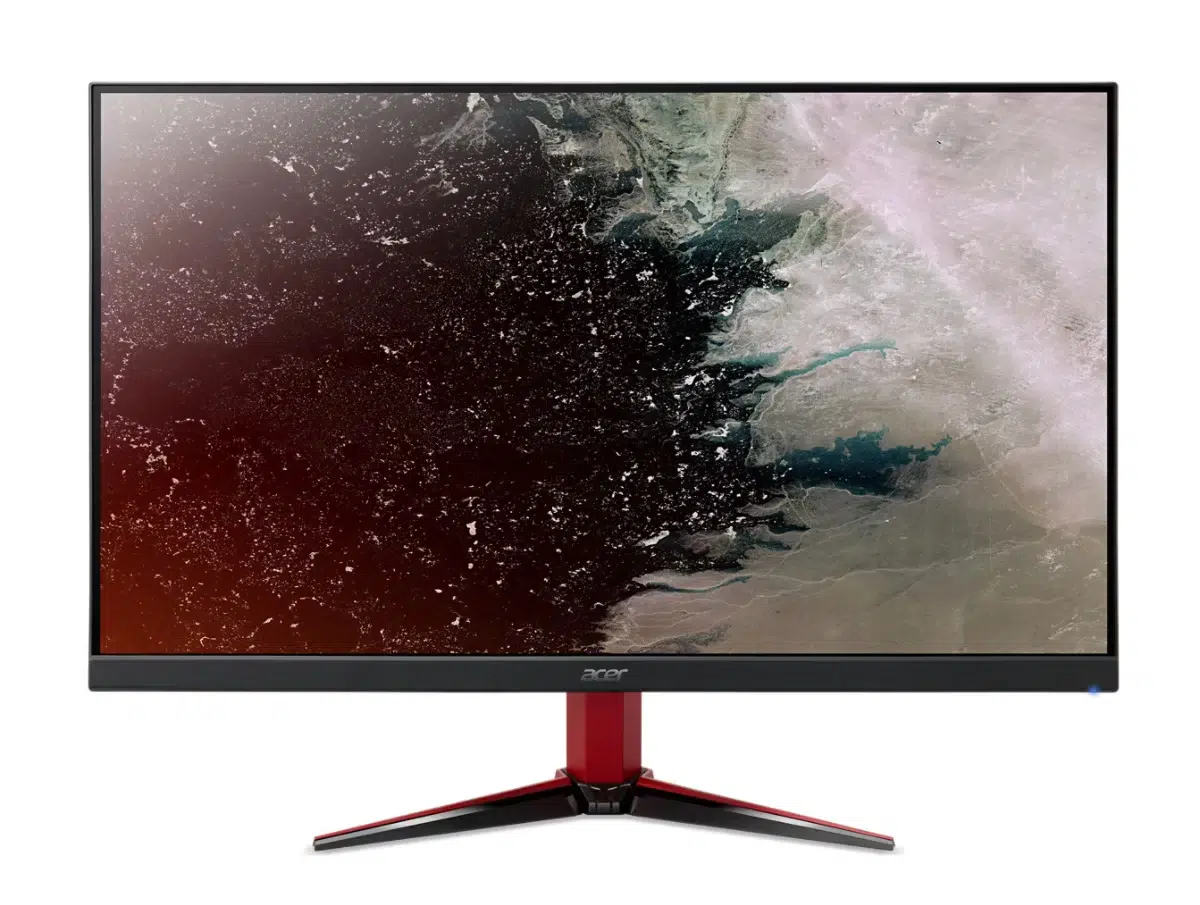
The Acer Nitro VG271 S combines a 27-inch Full HD IPS display with a 165 Hz refresh rate and AMD FreeSync Premium support. This UM.HV1EE.S06 configuration provides 400 cd/m² brightness, 99% sRGB colour coverage and a practical selection of video inputs. Its included speakers, tilt-adjustable stand and VESA mounting option help it fit into an everyday gaming workspace. Explore this model at AX Store in Kuwait.
27 inch
Display Diagonal
FHD
Resolution
165 Hz
Maximum Refresh
IPS
Panel Type
A 27-Inch IPS Display for Your Desk
The 1920 x 1080 panel uses a 16:9 aspect ratio, providing a familiar layout for games, video and everyday applications. IPS technology is paired with 178-degree horizontal and vertical viewing-angle specifications. The 27-inch diagonal gives you a larger image than a smaller desktop display, while the Full HD resolution keeps the pixel count straightforward to match with your connected gaming system.
165 Hz Refresh and FreeSync Premium
A standard refresh rate of 165 Hz provides high-refresh motion when the connected system and display settings support it. AMD FreeSync Premium is listed through both HDMI and DisplayPort for compatible hardware. Use the correct output mode and a suitable cable for your chosen setup, remembering that the monitor’s refresh capability and a game’s rendered frame rate are separate parts of the experience.
Separate VRB and Grey-to-Grey Ratings
The exact product table lists 1 ms VRB and 2 ms grey-to-grey response figures. Keeping those measurements separate gives you a clearer comparison with other screens, as they describe different response behaviour. Select the monitor’s response settings to suit the motion appearance you prefer, instead of assuming a single response number applies to every operating mode and transition.
400-Nit Brightness and 99% sRGB Colour
Acer specifies 400 cd/m² brightness, 99% sRGB colour coverage and a 1000:1 native contrast ratio for this model. Eight-bit colour supports 16.7 million colours. Together, these figures describe the panel more clearly than a general family headline, making it easier to compare the VG271 S when your screen will handle gaming, browsing, documents and video throughout the same day.
Video Connections and Everyday Sound
The monitor provides two HDMI 2.0 inputs and one DisplayPort 1.2 input, with a headphone connection and audio line-in also listed. Built-in speakers provide a basic playback option when you do not want to connect separate speakers for every task. Choose the input that fits the video output on your computer or other compatible source device.
Adjust the Angle or Use a VESA Mount
The original stand tilts from -5°to +20°, with no height adjustment or pivot function listed. A 100 x 100 mm VESA pattern allows an alternative compatible mount. With the stand attached, the monitor measures614 x 475 x 240 mm and weighs approximately5.63 kg. Acer lists 21 W operating consumption and 45 W maximum consumption, giving you useful size and power figures for planning the desk.
Plan the Display and the Rest of Your Desk
Compare resolution, refresh rate, screen size and the input you will actually use. Match the computer or console output to the chosen display mode, and leave room for the monitor stand and mouse movement. Compare related options such as ASUS ProArt PA328QV 31.5 Inch 75Hz WQHD IPS Monitor or Dell Alienware AW2725DF 27 inch QD-OLED QHD 360Hz Monitor, keeping the exact model and configuration in the decision. For the wider setup, explore Logitech G PRO X3 SUPERSTRIKE Wireless Mouse and check the connection, size or mounting requirements before pairing accessories. Browse the Acer range at AX for more choices.
Acer Nitro VG271 S Setup Choices
Compare resolution, refresh rate, screen size and the input you will actually use. Match the computer or console output to the chosen display mode, and leave room for the monitor stand and mouse movement.
Frequently Asked Questions
Which display size, panel and resolution does it use?
This configuration has a 27-inch IPS display with FHD resolution and a flat screen. The exact viewable diagonal and native pixel resolution are listed in the specifications below.
What refresh rate does this model support?
Standard Refresh Rate: 165 Hz.
How is its response time specified?
Response Time: 1 ms. Response Time Details: 1 ms VRB;2 ms GTG.
Can it be attached to a compatible monitor arm?
VESA Compatible: Yes. VESA Pattern: 100 x 100 mm. Check the mounting pattern, monitor weight and the arm’s supported load before choosing a mount.
Build Your Setup with AX Store
Explore computers, displays and accessories for your workspace at AX Store. For help choosing the right model or checking an accessory, contact AX Store.
Compare Acer Nitro XV0 XV270 27 Inch FHD IPS 200Hz Gaming Monitor. Match the exact model, connection and configuration to your setup.
THE DETAILS
Technical specifications
Product Identity
Acer
VG271 S
UM.HV1EE.S06
Technical Information
1
27-inch /68.6cm
27-inch
Full HD
IPS
1 ms
1 ms VRB;2 ms GTG
16:9
0.31100 x 0.31100 mm
178°
178°
LED
Wall mountable
No
-5°to +20°
No
No
597 x 336 mm
Audio
Yes
Physical Characteristics
Yes
100 x 100 mm
Black
367 mm
614 mm
66 mm
475 mm
614 mm
240 mm
5.18 kg
5.63 kg
Video
1920 x 1080
165 Hz
16.7 million
8-bit
100000000:1
400 cd/m²
AMD FreeSync Premium (DisplayPort/HDMI)
99% sRGB
1000:1
Miscellaneous
876662
VG271 S monitor;HDMI cable;UK power cord
Interfaces
Yes
2.0
2
Yes
Yes
Yes
1.2
1
Power
G
450mW
500mW
45 W
21 W
110VAC /220VAC
E
COMPLETE YOUR SETUP
Pairs well with