Apple
Apple Magic Mouse USB-C – Bluetooth, Multi-Touch – Black
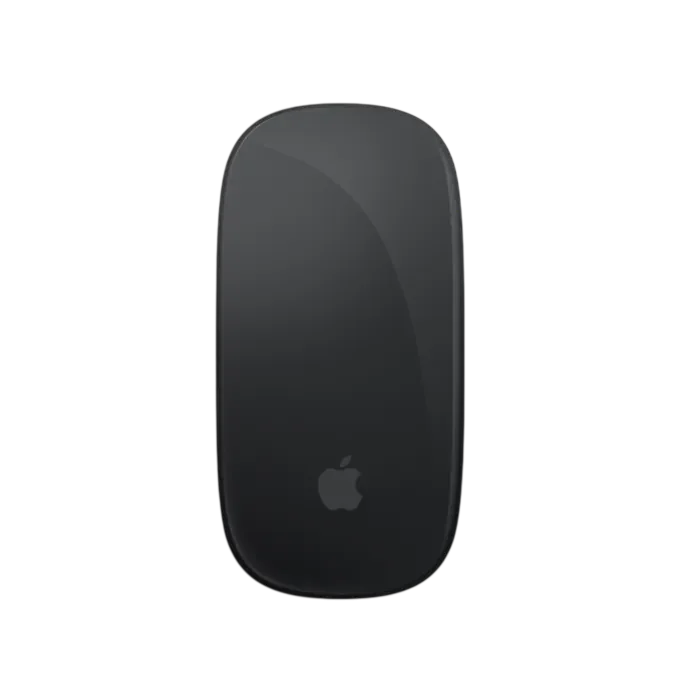
Navigate your workspace with the Apple Magic Mouse USB-C in Black, featuring Bluetooth wireless connectivity, a Multi-Touch surface for scrolling and gestures, and a built-in rechargeable battery. Its slim design pairs a black touch surface with a silver aluminum body. Includes a woven USB-C Charge Cable and supports Mac with macOS 15.1 or later and iPad with iPadOS 18.1 or later.
Regular price
31.500 KWD
or 4 payments of 7.875 KWD with
Pay with card & save


30.000 KWD
Save 1.500 KWD
Overview

APPLE MAGIC MOUSE · USB-C · BLACK
Scroll. Swipe. Stay in Control.
Apple Magic Mouse combines wireless pointing with a Multi-Touch surface that responds to simple finger gestures. Move through documents, browse web pages and switch between supported Mac workspaces from the mouse itself.
This Black USB-C model, MXK63ZM/A, includes a rechargeable battery and a woven USB-C Charge Cable for charging and initial pairing with your Mac.
Multi-Touch
Scroll and Gesture Control
Bluetooth
Wireless Connection
USB-C
Rechargeable Design
99g
Approximate Weight

Control More from the Surface
Slide one finger to scroll through a document or swipe between supported web pages. On Mac, additional gestures give you access to Smart Zoom, Mission Control and full-screen apps.
Open Mouse settings in macOS to choose your preferred gestures and enable secondary click. Available actions depend on your settings and the app you are using.
Useful Mac Gestures
Scroll and Browse
Move one finger up or down to scroll. Swipe left or right with one finger to move between supported pages.
Smart Zoom
Double-tap with one finger to zoom in and back out of a supported web page or PDF.
Move Between Workspaces
Swipe sideways with two fingers between desktops and full-screen apps. Double-tap with two fingers to open Mission Control.
A Slim Profile in Black
The curved black touch surface sits above a silver aluminum body. Its low profile measures 2.16cm high, with a compact shape that fits neatly beside a keyboard or MacBook.
The underside feet are designed to help the mouse glide across your desk. A built-in power switch lets you turn it off when you are finished.


Recharge with USB-C
The built-in battery provides about a month or more between charges, according to Apple. Actual battery life varies with use.
Connect the included cable to the USB-C port underneath the mouse and a compatible USB-C power source. Check the battery level from your Mac's Bluetooth controls.
Charging note: Magic Mouse cannot be used while charging. Unplug the cable before returning to wireless use.
Simple Bluetooth Setup
Magic Mouse connects directly through Bluetooth, so a separate USB receiver is not required.
- Connect the mouse to your Mac using the included USB-C cable.
- Turn on the mouse so green is visible beneath its power switch.
- Confirm the pairing in Bluetooth settings, then disconnect the cable for wireless use.
For Compatible Mac and iPad Models
Mac
Requires macOS 15.1 or later. Use macOS Mouse settings to adjust tracking, scrolling, secondary click and supported gestures.
iPad
Requires iPadOS 18.1 or later. Pair through Bluetooth to add mouse control to a compatible iPad. Available controls differ from macOS.
What's in the Box
- Apple Magic Mouse USB-C with Black Multi-Touch Surface
- Woven USB-C Charge Cable
The included cable has USB-C connectors at both ends and handles charging and initial pairing with a compatible Mac.

Complete Your Apple Setup
- MacBook Air — explore portable Mac configurations.
- MacBook Pro — compare options for work and creative projects.
- Apple iMac — browse all-in-one desktop setups.
- Apple Accessories — find accessories for your devices.
Frequently Asked Questions
Which charging port does this Magic Mouse use?
This is the USB-C version, model MXK63ZM/A. It charges through the USB-C port on its underside.
Does it require a USB receiver?
No. Magic Mouse connects wirelessly through Bluetooth and does not require a separate USB receiver.
Which Macs are supported?
Apple specifies a Mac running macOS 15.1 or later for this USB-C model.
Can I use it with an iPad?
Yes. Apple specifies an iPad running iPadOS 18.1 or later. Pair it through the iPad's Bluetooth settings.
Can I use it while it is charging?
No. Magic Mouse cannot be used while charging. Disconnect the charging cable before using it wirelessly.
How long does the battery last?
Apple rates the rechargeable battery for about a month or more between charges. Actual battery life varies with use.
Does it support right-click and scrolling?
Yes. Enable Secondary Click in macOS Mouse settings for right-click. Slide one finger across the Multi-Touch surface to scroll.
What comes in the box?
The box includes the Black Apple Magic Mouse and a woven USB-C Charge Cable.
Shop Apple Accessories at AX Store Kuwait
Choose accessories that fit your device and the way you work. For questions about this USB-C model or system compatibility, contact AX Store before ordering.
COMPLETE YOUR SETUP
Pairs well with