ASTRO
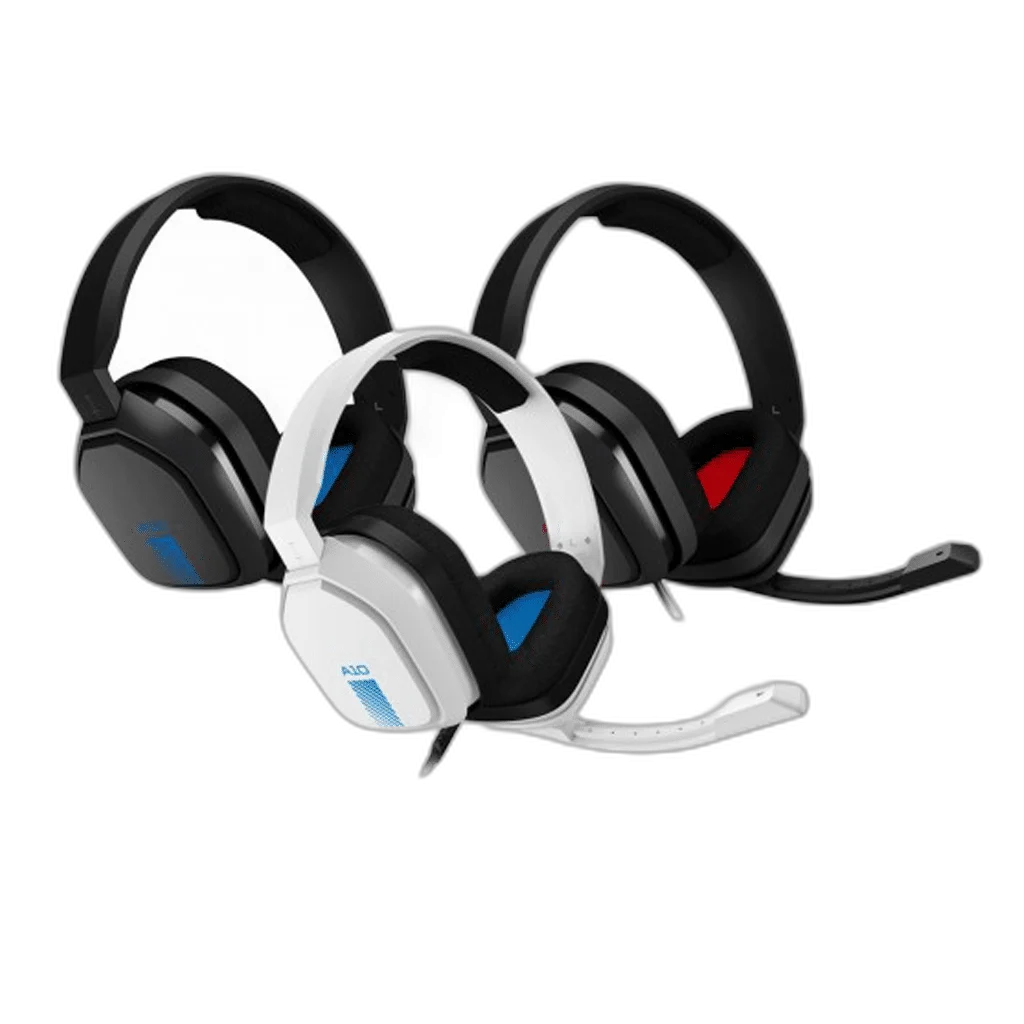
ASTRO A10 Wired Gaming Headset with Flip-to-Mute Mic
The original ASTRO A10 combines an over-ear wired design with 40 mm neodymium drivers and a flip-to-mute microphone. Its detachable volume cable provides a practical analogue connection for compatible gaming, computer and controller audio equipment.
Color
Regular price
16.000 KWD
or 4 payments of 4.000 KWD with
Pay with card & save


15.000 KWD
Save 1.000 KWD
Overview
ASTRO A10 GEN 1 WIRED GAMING HEADSET
ASTRO A10 Gen 1 Wired Gaming Headset
ASTRO A10 Gen 1 Wired Gaming Headset: The original ASTRO A10 combines an over-ear wired design with 40 mm neodymium drivers and a flip-to-mute microphone. Its detachable volume cable provides a practical analogue connection for compatible gaming, computer and controller audio equipment. Available from AX Store in Kuwait.
40 mm
Neodymium drivers
20 Hz–20 kHz
Frequency response
2 m
A10 volume cable
Flip-to-mute
Boom microphone
The Original A10 Driver Design
This first-generation A10 uses 40 mm neodymium drivers and a specified 20 Hz–20 kHz frequency response. The over-ear cups place the speakers around the ears for game audio, dialogue and music. Set listening volume from the connected equipment and use a comfortable level for the session.
Flip the Boom Up to Mute
The boom microphone provides a direct way to manage voice chat: raise it to mute when a conversation ends, then position it for use when speaking again. The microphone design is a 6 mm omnidirectional type, so its position and surrounding room sound affect the audio reaching your teammates.
A Wired Connection with Volume Control
The A10 uses a detachable 2 m A10 volume cable. This gives the headset a replaceable cable connection and an accessible way to adjust listening level. The headset-side connector is specific to the A10 cable arrangement, so use the correct cable rather than assuming every similarly sized lead is interchangeable.
Match the Headset to the Audio Socket
Logitech lists the original A10 for PS4, PC, Mac and Xbox One. The connected system or controller needs suitable analogue headset support for both listening and microphone input. A computer with separate headphone and microphone sockets may need the appropriate splitter rather than one shared headset jack.
Over-Ear Fit for a Desk or Console Setup
The original A10 weighs 346 g and uses an over-ear headband arrangement. Adjust the headset to place the cups and microphone comfortably before joining a game or call. Keep enough cable slack between the headset and controller or desk connection so normal movement does not pull on the socket.
Generation
ASTRO A10 Gen 1
Driver design
40 mm neodymium
Frequency response
20 Hz–20 kHz
Straightforward Audio Without Charging
The analogue wired connection carries the headset’s audio without a wireless pairing or battery-charging step. Select the correct input and output in the game, console or computer, then check voice levels before starting. Software effects and chat behaviour depend on the connected platform and its audio settings.
Plan the Platform and Chat Connection
Choose the exact platform version and check whether its connection uses USB, a wireless receiver or an analogue headset socket. Set the playback and microphone devices deliberately in your game or chat application. Compare related options such as ASTRO A50 X LIGHTSPEED Wireless Gaming Headset and Base Station – Mars Red or ASTRO A30 Wireless Gaming Headset for Xbox – White / Navy, keeping the exact model and configuration in the decision. For the wider setup, explore Shure SM7dB Dynamic Vocal Microphone with Built-in Preamp and check the connection, size or mounting requirements before pairing accessories. Browse the ASTRO range at AX for more choices.
ASTRO A10 Gen 1 Wired Gaming Headset Setup Choices
Choose the exact platform version and check whether its connection uses USB, a wireless receiver or an analogue headset socket. Set the playback and microphone devices deliberately in your game or chat application. Explore Wooting 60HE v2 60% Gaming Keyboard, Aluminium, ARTISAN NINJA FX ZERO Gaming Mousepad – SOFT/XSOFT, XL/XXL, Logitech G PRO X2 SUPERSTRIKE Wireless Gaming Mouse.
Frequently Asked Questions
Is this the A10 Gen 2 with 32 mm drivers?
No. This listing covers the original A10 Gen 1 with 40 mm drivers.
How is the microphone muted?
Raise the flip-to-mute boom.
Does it need wireless pairing?
No. Audio uses the wired analogue connection.
Can a PC with separate headphone and mic sockets need an adapter?
Yes. Use the correct headset splitter for that computer.
Is the cable detachable?
Yes. Use the appropriate A10 volume cable.
Build Your Setup with AX Store
Explore computers, displays and accessories for your workspace at AX Store. For help choosing the right model or checking an accessory, contact AX Store.
THE DETAILS
Technical specifications
Specifications
ASTRO A10 Gen 1
40 mm neodymium
20 Hz–20 kHz
32 Ω
6 mm omnidirectional boom
Flip-to-mute
Over-ear
346 g
2 m; detachable
3.5 mm 5-pole A10 connection
PS4 / PC / Mac / Xbox One; suitable headset connection required
COMPLETE YOUR SETUP
Pairs well with