BENFEI
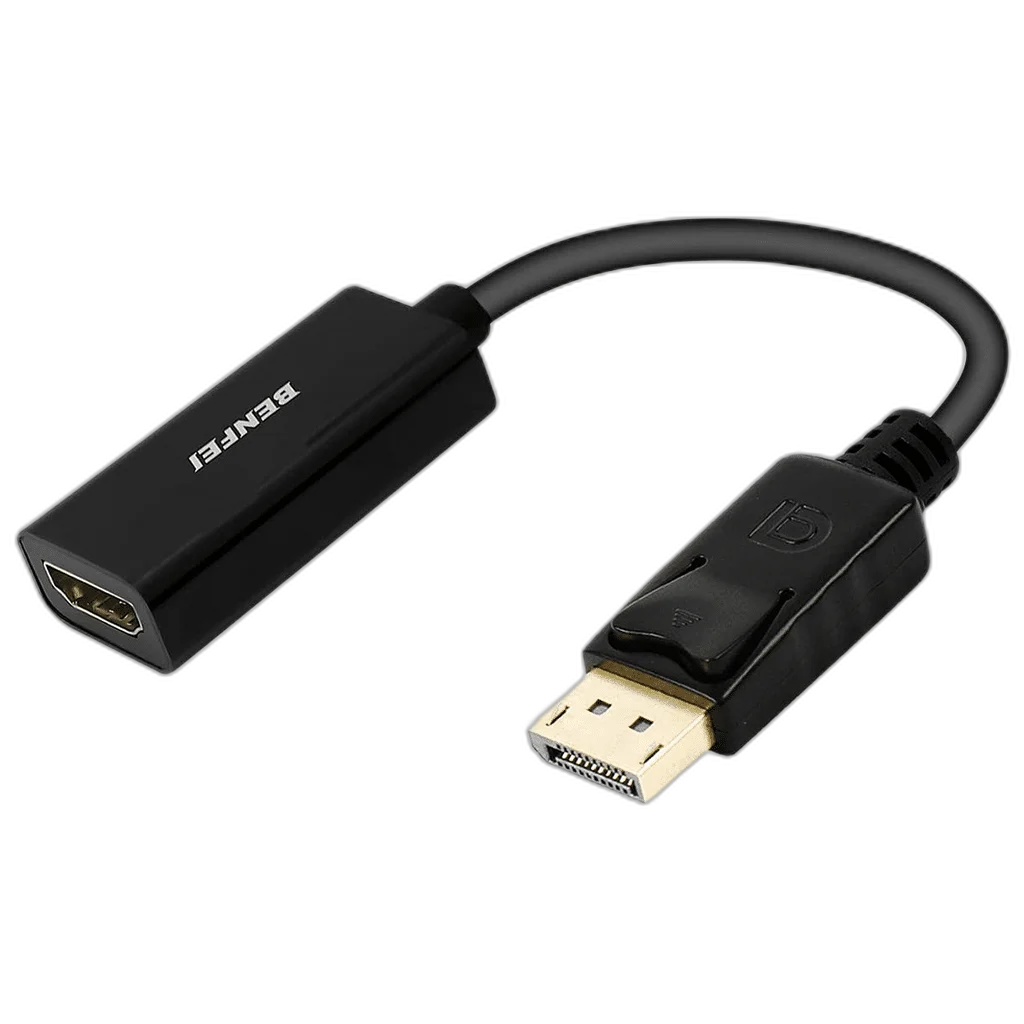
BENFEI DisplayPort to HDMI Adapter 4K Converter
BENFEI DisplayPort to HDMI Adapter provides DisplayPort male to HDMI female connectivity between a suitable computer output and display input. The adapter works with a separate HDMI cable. Use it for 4K UHD when the complete source and display connection supports the selected mode.
Regular price
6.000 KWD
or 4 payments of 1.500 KWD with
Pay with card & save


5.500 KWD
Save 0.500 KWD
Overview
BENFEI DISPLAYPORT TO HDMI ADAPTER
DisplayPort to HDMI for Your Display Setup
BENFEI DisplayPort to HDMI Adapter provides DisplayPort male to HDMI female connectivity between a suitable computer output and display input. The adapter works with a separate HDMI cable. Use it for 4K UHD when the complete source and display connection supports the selected mode.
DisplayPort
Source-side connector
HDMI
Screen connection
4K UHD
Display mode focus
Adapter
Connection format
The Correct Source and Display Ports
The connection uses DisplayPort male to HDMI female. Plug the adapter into the computer output and connect a suitable HDMI cable from its socket to the screen. Check the actual port labels before installation, since an input and output can share a similar physical connector.
Choose a Supported Display Mode
The connection is intended for 4K UHD. The source, display and complete cable route determine the resolution and refresh rate that can be used. Select a mode supported by both devices; a cable or adapter does not change the screen’s native resolution or add capabilities to the graphics output.
Host Requirements and Connection Direction
This adapter works from a DisplayPort computer output to an HDMI display input. It does not provide the reverse HDMI-source-to-DisplayPort-monitor conversion. Keep the signal direction clear when selecting it for a computer, console or screen, since the connector names alone do not describe the required conversion.
Length and Equipment Placement
A suitable separate HDMI lead is needed between this adapter and the display. Include the path behind the screen, around a stand and along the desk. Allow clearance and slack at both ends so moving the equipment does not pull on a small socket.
Video and Audio Settings
Choose the connected screen’s correct input and select the desired display arrangement in the computer settings, such as a duplicate view or extended desktop when supported by the host. Digital audio also depends on the connected source and receiving equipment. Select the display audio output separately if that is the intended listening route.
Model
BENFEI DisplayPort to HDMI Adapter
Connector arrangement
DisplayPort male to HDMI female
Purpose
Digital display video connection
Connect and Check the Complete Setup
Seat the connectors securely, then check that the screen receives the selected input and that the operating system shows the expected resolution and refresh rate. If a connector has a release latch, use it when unplugging. Keep the cable supported and accessible, with enough room at the screen and computer to disconnect it without twisting the sockets.
Complete Your Workspace
Explore Gaming Cables & Adapters to compare suitable options and complete your setup.
Frequently Asked Questions
What connector arrangement is used?
DisplayPort male to HDMI female.
Will it make any monitor display 4K or 8K?
No. The source and screen must support the selected operating mode.
Is a separate HDMI cable needed?
Yes, from the adapter to the screen.
Does every USB-C port support display output?
No. A USB-C video connection requires DisplayPort Alternate Mode support.
How should the display mode be checked?
Confirm the resolution and refresh rate in the computer settings after selecting the correct screen input.
Build Your Setup with AX Store Kuwait
Explore computers, displays and accessories for your workspace at AX Store Kuwait. For help choosing the right model or checking an accessory, contact AX Store.
THE DETAILS
Technical specifications
Product Specifications
BENFEI DisplayPort to HDMI Adapter
DisplayPort male to HDMI female
Digital display video connection
DisplayPort source output to HDMI display input
Determined by source, display and complete connection
4K UHD with suitable equipment
HDMI cable from adapter to screen
COMPLETE YOUR SETUP
Pairs well with