Cable Matters
Cable Matters 8K Mini DisplayPort to DisplayPort Cable
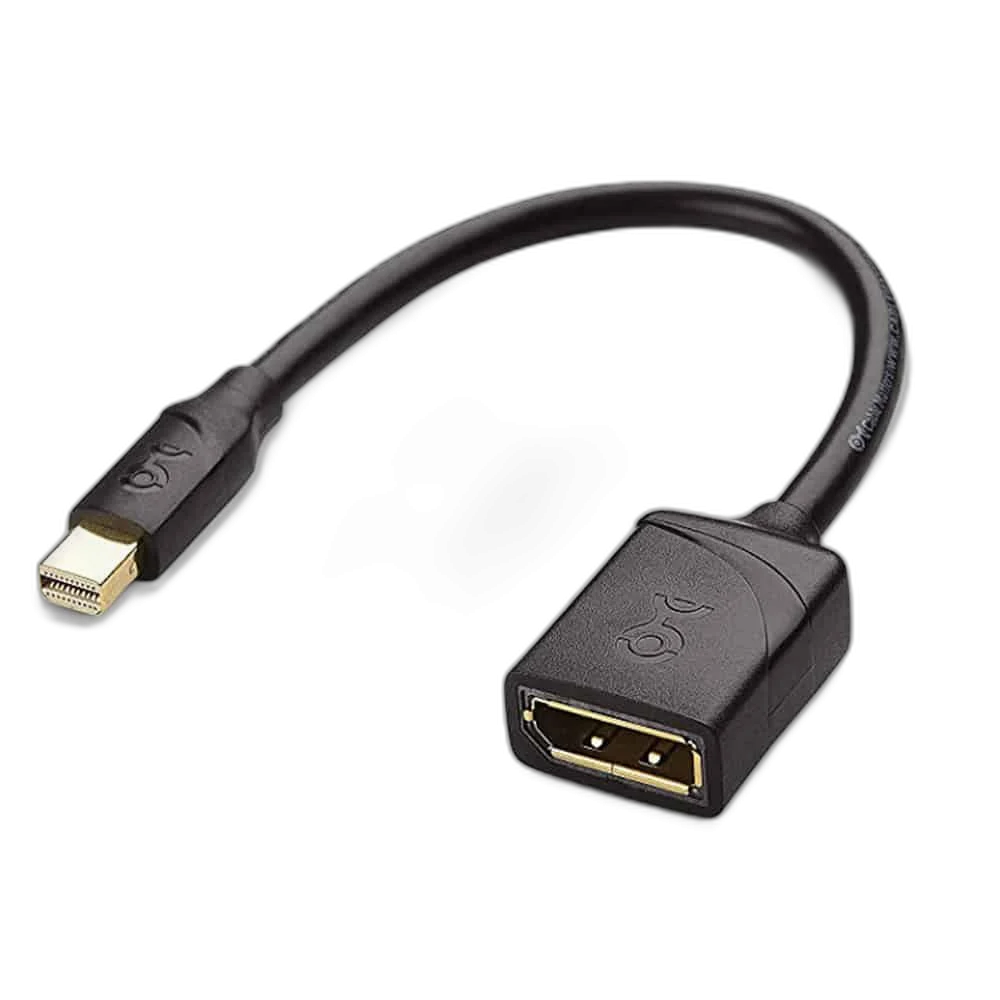
Cable Matters 101004 Mini DisplayPort to DisplayPort Adapter provides an adapter connection using Mini DisplayPort male to DisplayPort female. It supports the DisplayPort 1.4 family with an advertised maximum mode of 8K at 60 Hz when the complete source and display configuration supports the required features.
Regular price
9.000 KWD
or 4 payments of 2.250 KWD with
Pay with card & save


8.500 KWD
Save 0.500 KWD
Overview
CABLE MATTERS 101004 MINI DISPLAYPORT TO DISPLAYPORT ADAPTER
Cable Matters 101004 Mini DisplayPort to DisplayPort Adapter
Cable Matters 101004 Mini DisplayPort to DisplayPort Adapter provides an adapter connection using Mini DisplayPort male to DisplayPort female. It supports the DisplayPort 1.4 family with an advertised maximum mode of 8K at 60 Hz when the complete source and display configuration supports the required features. Available from AX Store in Kuwait.
8K 60 Hz
Maximum advertised mode
DP 1.4
Display interface family
Mini DisplayPort
Source-side connector
Adapter
Connection format
Match the Source and Display Ports
The connection uses Mini DisplayPort male to DisplayPort female. The Mini DisplayPort end uses the smaller DisplayPort connector found on compatible computers; it is different from USB-C. Check the actual ports before planning the route.
Up to 8K at 60 Hz
The maximum advertised resolution is 7680 × 4320 at 60 Hz under the appropriate DisplayPort 1.4 conditions. High-bandwidth modes can require Display Stream Compression support in the source and display. The adapter or cable does not add a resolution or refresh rate that either connected device cannot support.
DisplayPort 1.4 and the Complete Signal Path
DisplayPort 1.4 provides the connection framework for this product family. The native DisplayPort link supports an HBR3 raw link rate of up to 32.4 Gbps with suitable equipment. A monitor with a lower maximum resolution or an older source continues to operate within the capabilities shared by the complete setup.
Plan the Cable and Connection Route
A separate suitable DisplayPort cable is required between the adapter and the screen. Allow space around the adapter and the attached display lead. Include clearance at the sockets and avoid tightly bending the connection behind the screen or laptop.
Audio and Display Features
DisplayPort can carry digital audio alongside the video signal when the source and receiving equipment support it. Select the display as the audio output if that is the intended listening route. HDR and other display functions also depend on the source, screen, settings and content; the physical connection alone does not add missing display hardware.
Model
Cable Matters 101004 Mini DisplayPort to DisplayPort Adapter
Connector arrangement
Mini DisplayPort male to DisplayPort female
Display interface family
DisplayPort 1.4
Direction, Compatibility and Setup
The 101004 supports Mini DisplayPort signal connections, including suitable Thunderbolt or Thunderbolt 2 computer ports. It does not connect to a Thunderbolt-only display such as the Apple Thunderbolt Display. Confirm the resolution and refresh rate in the host display settings after installation.
Check the Ports and Signal Before Choosing a Cable
Match both devices, the connector type and the signal or data mode you intend to use. Physical fit alone does not establish supported resolution, charging or data capability. Compare related options such as Corsair Premium Sleeved PCIe 5.0 Cable, 12+4pin or BENFEI USB Type C to HDMI 4K UHD Cable, 1.8M, keeping the exact model and configuration in the decision. For the wider setup, explore Gator Frameworks Clamp Mounted Headphone Hanger for Desk and check the connection, size or mounting requirements before pairing accessories. Browse the Cable Matters range at AX for more choices.
Cable Matters 101004 Mini DisplayPort to DisplayPort Adapter Setup Choices
Match both devices, the connector type and the signal or data mode you intend to use. Physical fit alone does not establish supported resolution, charging or data capability. Explore Dell Alienware AW2725DF 27 inch QD-OLED QHD 360Hz Monitor.
Frequently Asked Questions
Does it make any screen an 8K display?
No. The source and display must support the selected mode.
Can 8K 60 Hz require DSC?
Yes. The complete connection must provide the required DisplayPort and compression support.
What is the connector arrangement?
Mini DisplayPort male to DisplayPort female.
Does a USB-C port need video support?
Yes, for the USB-C versions. A data-only USB-C port does not supply DisplayPort video.
Is an extra DisplayPort cable required?
Yes, for this adapter.
Build Your Setup with AX Store
Explore computers, displays and accessories for your workspace at AX Store. For help choosing the right model or checking an accessory, contact AX Store.
Compare Cable Matters Braided 8K DisplayPort 1.4 Cable. Match the exact model, connection and configuration to your setup.
THE DETAILS
Technical specifications
Product Specifications
Cable Matters 101004 Mini DisplayPort to DisplayPort Adapter
Mini DisplayPort male to DisplayPort female
DisplayPort 1.4
7680 × 4320 at 60 Hz; suitable source, display and DSC support as required
Supported with compatible source and receiving equipment
Determined by complete source, connection and display capabilities
Suitable DisplayPort cable to the screen
101004
Suitable Mini DisplayPort / Thunderbolt / Thunderbolt 2 computer ports
Thunderbolt-only displays not supported
COMPLETE YOUR SETUP
Pairs well with