Gameon
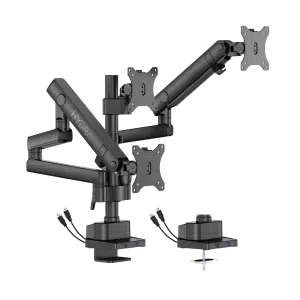
GAMEON GO-5367 Triple Monitor Arm 17" - 30" Each Up to 6 KG
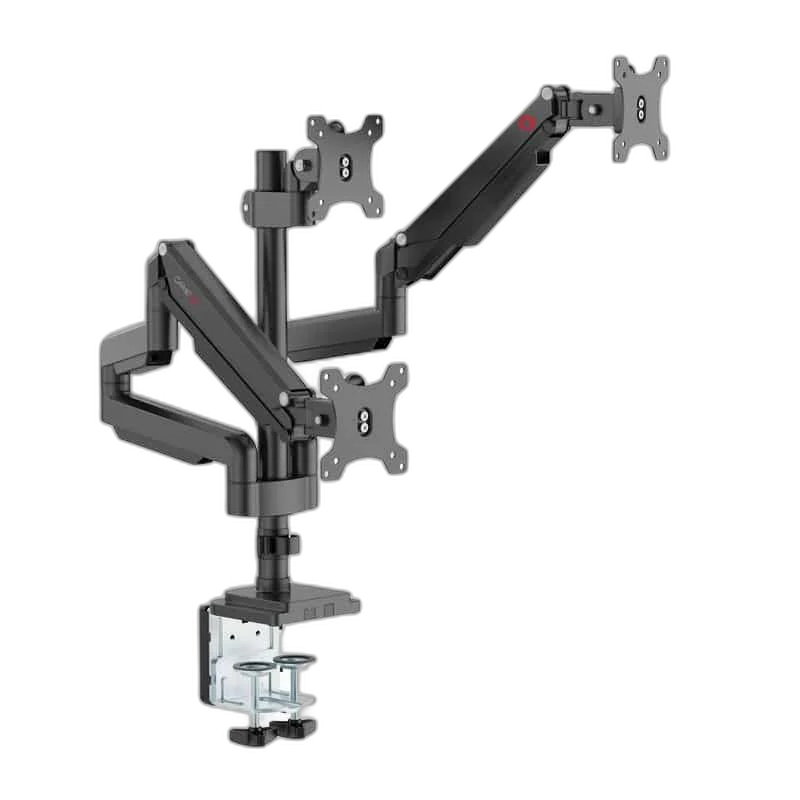
GAMEON GO-5367 Triple Monitor Arm supports 3 displays in the 17–30 inch size range, with a listed load of 1–6 kg per screen. The three-arm arrangement gives each display its own mounting point while bringing the desk to a shared support system.
Regular price
37.000 KWD
or 4 payments of 9.250 KWD with
Pay with card & save


35.000 KWD
Save 2.000 KWD
Overview
GAMEON GO-5367 TRIPLE MONITOR ARM
Three Screens on a Dedicated Monitor Support
GAMEON GO-5367 Triple Monitor Arm supports 3 displays in the 17–30 inch size range, with a listed load of 1–6 kg per screen. The three-arm arrangement gives each display its own mounting point while bringing the desk to a shared support system.
3
Supported displays
17–30 inch
Display size range
6 kg
Maximum per screen
75 / 100 mm
VESA patterns
A Triple-Screen Desk Arrangement
The three-arm arrangement gives each display its own mounting point while bringing the desk to a shared support system. Choose the layout around the main viewing position and the available desk width. Each screen must independently meet the arm’s size and weight requirements; the total number of screens does not increase the permitted load on an individual arm.
The Screen Size and Load Range
The supported display range is 17–30 inch, with 1–6 kg per screen as the load specification. Compare those limits with the actual screen weight after removing its original stand. Screen diagonal alone does not establish compatibility: rear mounting geometry and the clearance around the display also matter for the installation.
Mounting Compatibility Before Assembly
The arm uses 75 × 75 mm and 100 × 100 mm VESA mounting patterns. Check the rear of the screen for the matching holes, suitable screw access and any recessed mounting area. Use the screen manufacturer’s appropriate screw length; a matching pattern does not make every screw or spacer suitable.
Adjust the View Around the Workspace
Its documented movement ranges are ±90° tilt, ±90° swivel and ±90° screen rotation. Set the screen position around the seated viewing height and the task. Leave cable slack for movement, then check that the monitor and connectors remain clear of nearby surfaces throughout the intended range.
Match the Support to the Desk
Clamp mounting supports a desktop thickness of 10–85 mm; grommet installation supports 10–85 mm. These are distinct mounting ranges. Confirm the actual desk thickness, edge or through-hole access and the strength of the mounting area before choosing an installation route for the arm and the connected screens.
Model
GAMEON GO-5367 Triple Monitor Arm
Number of displays
3
Screen size range
17–30 inch
A Planned Route for Screen Cables
Built-in cable management provides a route along the arm for suitable screen leads. Steel, aluminium and plastic form the documented construction. Route the cables with enough free movement at the joints and monitor connections, then check the final arrangement with the screen in its normal working position.
Complete Your Workspace
Explore Monitor Arms & Mounts to compare suitable options and complete your setup.
Frequently Asked Questions
How many monitors does it support?
3 monitors; each must meet the stated limits.
What size range is supported?
17–30 inch.
What is the load range?
1–6 kg per screen. Use the actual screen weight with the original stand removed.
Which mounting patterns are supported?
75 × 75 mm and 100 × 100 mm VESA.
Are monitors included?
No. The product is a monitor support; displays are purchased separately.
Build Your Setup with AX Store Kuwait
Explore computers, displays and accessories for your workspace at AX Store Kuwait. For help choosing the right model or checking an accessory, contact AX Store.
THE DETAILS
Technical specifications
Monitor Arm Specifications
GAMEON GO-5367 Triple Monitor Arm
3
17–30 inch
1–6 kg per screen
The three-arm arrangement gives each display its own mounting point while bringing the desk to a shared support system.
75 × 75 mm; 100 × 100 mm
±90°
±90°
±90°
Clamp; grommet
10–85 mm
10–85 mm
Built in
Steel, aluminium and plastic
1520 × 192 × 740 mm
Required
9.36 kg
COMPLETE YOUR SETUP