
SteelSeries
SteelSeries Alias Boom Arm, Flexible Positioning & Cable Management
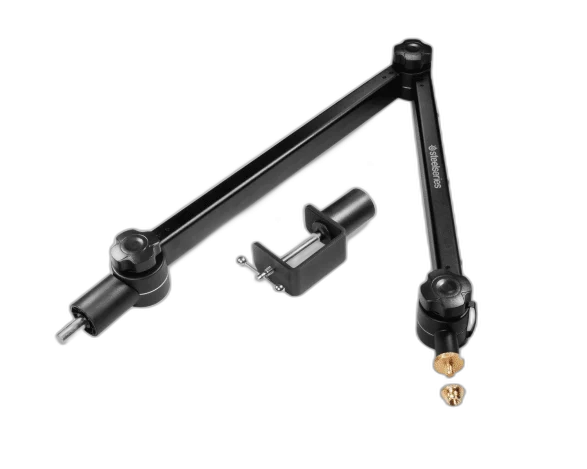
Move your microphone into a comfortable position with an adjustable metal boom arm. Hidden springs and cable channels keep your setup neat while you record, stream or chat.
Regular price
36.500 KWD
or 4 payments of 9.125 KWD with
Pay with card & save


34.900 KWD
Save 1.600 KWD
Overview
STEELSERIES ALIAS BOOM ARM, FLEXIBLE POSITIONING & CABLE MANAGEMENT
A cleaner position for your voice.
Move your microphone into a comfortable position with an adjustable metal boom arm. Hidden springs and cable channels keep your setup neat while you record, stream or chat.
360°
Rotation
3/8 + 5/8 inch
Listed Microphone Threads
Hidden
Cable Routing Channel
Desk Clamp
Included Mounting Hardware
Position it around your setup
Multiple adjustment points and 360° rotation give you flexible placement. Tightening wheels secure the arm once you find the right angle. Plan the device position and connections around the computer, display and other equipment used in your normal setup.
Made for Alias and compatible microphones
Use it with Alias, Alias Pro or other compatible microphones with 3/8-inch or 5/8-inch threads. The desk clamp and thread adapter are included; microphone sold separately.
Place the Microphone around Your Desk
Use the adjustment points to position a suitable microphone for the way you sit or work. Check the desk clamp location and leave room for the arm to move without catching other equipment.
Route the Cable with the Arm
The hidden cable channel keeps the microphone lead routed alongside the arm. Leave suitable slack at moving points and the microphone connection, following the cable-routing instructions when adjusting the position.
Match the Threads and Complete Load
Check the microphone thread, included adapter and complete mounting arrangement before attaching equipment. Count a shock mount or other fitted hardware with the microphone, and follow the arm’s stated load requirements where published.
A Microphone Setup Chosen Separately
The arm supplies mounting hardware rather than a microphone or audio interface. Choose the microphone, any required mount and an appropriate audio connection separately, checking the complete arrangement before tightening the desk clamp.
Check the Microphone and Desk Mount
Match the microphone weight and mounting thread to the stand or arm, including any adapter or accessory. Check clamp clearance and reach so the microphone can move into position without pulling its cable. Compare related options such as RØDE PSA1 Microphone Boom Arm Stand Professional Studio Arm or RØDE PSA1+ Professional Studio Microphone Boom Arm, keeping the exact model and configuration in the decision. For the wider setup, explore SteelSeries Alias Pro XLR Gaming Microphone with Stream Mixer and check the connection, size or mounting requirements before pairing accessories. Browse the SteelSeries range at AX for more choices.
Frequently Asked Questions
Which mounting hardware is included?
Boom arm, desk clamp, 3/8-to-5/8-inch adapter.
How is the cable routed?
Hidden channel.
Which microphones or threads are listed?
Alias, Alias Pro and compatible 3/8-inch or 5/8-inch threaded microphones.
Is a microphone included?
Sold separately.
Build Your Setup with AX Store Kuwait
Explore computers, displays and accessories for your workspace at AX Store Kuwait. For help choosing the right model or checking an accessory, contact AX Store.
THE DETAILS
Technical specifications
Product specifications
SteelSeries
Alias Boom Arm
Metal tube with hidden springs
360°
Multiple adjustment points
Tightening wheels
Hidden channel
Alias, Alias Pro and compatible 3/8-inch or 5/8-inch threaded microphones
Boom arm, desk clamp, 3/8-to-5/8-inch adapter
Sold separately
COMPLETE YOUR SETUP
Pairs well with



