
Xigmatek
XIGMATEK Aquarius S Mid Tower Case
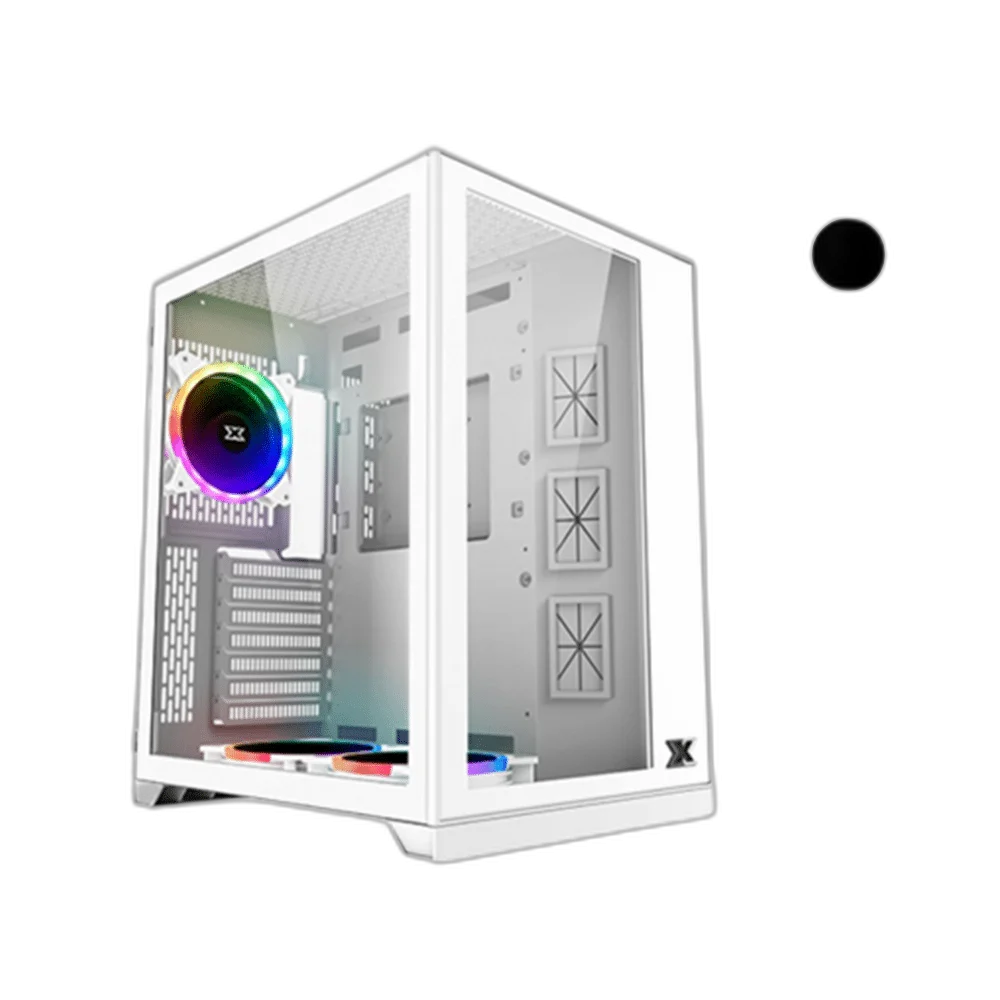
XIGMATEK Aquarius S supports ATX motherboard configurations. Front and left tempered-glass panels give the Aquarius S a display-oriented chassis arrangement, with separate access for storage and power components. The manufacturer’s Aquarius S Arctic platform information lists a 320 mm graphics-card length limit and 160 mm CPU-cooler height limit.
Color
Regular price
34.500 KWD
or 4 payments of 8.625 KWD with
Pay with card & save


33.000 KWD
Save 1.500 KWD
Overview
XIGMATEK AQUARIUS S
XIGMATEK Aquarius S
XIGMATEK Aquarius S supports ATX motherboard configurations. Front and left tempered-glass panels give the Aquarius S a display-oriented chassis arrangement, with separate access for storage and power components. The manufacturer’s Aquarius S Arctic platform information lists a 320 mm graphics-card length limit and 160 mm CPU-cooler height limit. Available from AX Store in Kuwait.
320 mm
Maximum GPU length
160 mm
CPU-cooler height
280 mm
Top / bottom radiator format
5 × 120 mm
Maximum fan positions
The Chassis and Display Design
Front and left tempered-glass panels give the Aquarius S a display-oriented chassis arrangement, with separate access for storage and power components. Plan the enclosure around the space available on the desk or floor, leaving access to the panels and the connected equipment. The panel layout is part of the case’s visual presentation and its practical assembly arrangement.
Motherboard and Component Planning
The documented motherboard support used for this listing is ATX. The manufacturer’s Aquarius S Arctic platform information lists a 320 mm graphics-card length limit and 160 mm CPU-cooler height limit. Match the actual motherboard, graphics card and cooling assembly before starting the build. A case’s individual component dimensions do not guarantee that all maximum-size parts can be installed together.
Fan and Radiator Positions
The common Aquarius S chassis supports up to five 120 mm fans, with top and bottom 240 / 280 mm radiator positions and a rear 120 mm position. Select the fan and radiator arrangement around the intended airflow path. Check the full radiator body, attached fan thickness, board components and nearby connectors together before committing to a cooling position.
Front Connections at the Desk
The front connection arrangement is 1 × USB 3.0; 2 × USB 2.0. Plan access to these ports when choosing the case position, and connect the appropriate internal leads to the motherboard. Front USB ports and audio sockets use their corresponding board connections rather than a single shared signal cable.
Build Access and Cable Routing
Plan the power, storage, fan and front-panel leads alongside the motherboard and cooling hardware. Keep the routes clear of rotating fan blades and leave enough access at connectors for assembly. A considered cable arrangement also makes it easier to reach individual parts when the system later needs cleaning or a component change.
Model
XIGMATEK Aquarius S
Motherboard support
ATX
Design
Front and left tempered-glass panels give the Aquarius S a display-oriented chassis arrangement, with separate access for storage and power components.
Check the Complete Installed Configuration
Choose the final components around the case’s documented mounting positions and the actual hardware package. Allow airflow at the intake and exhaust areas, and keep access to the panels. A radiator, graphics card or fan that fits one stated dimension still needs room for its connectors and the surrounding assembly.
Plan the Component Clearances
Check motherboard format, graphics-card length, cooler height and radiator positions together. Allow space for the power supply and cable routing before selecting the rest of the build. Compare related options such as LIAN LI O11 Dynamic XL Full Tower Case, USB 3.0 or Lian LI O11 Dynamic Mid Tower Case, Tempered Glass, keeping the exact model and configuration in the decision. For the wider setup, explore Corsair iCUE ML120 RGB ELITE 120mm Fan, Triple Pack and check the connection, size or mounting requirements before pairing accessories.
XIGMATEK Aquarius S Setup Choices
Check motherboard format, graphics-card length, cooler height and radiator positions together. Allow space for the power supply and cable routing before selecting the rest of the build. Explore NZXT Kraken X53 RGB 240mm Liquid Cooler, White.
Frequently Asked Questions
Which motherboard formats are documented?
ATX.
What radiator arrangement is listed?
The common Aquarius S chassis supports up to five 120 mm fans, with top and bottom 240 / 280 mm radiator positions and a rear 120 mm position.
What component-clearance information is used?
The manufacturer’s Aquarius S Arctic platform information lists a 320 mm graphics-card length limit and 160 mm CPU-cooler height limit.
Which front USB connections are provided?
1 × USB 3.0; 2 × USB 2.0.
Does a nominal radiator size establish complete fit?
No. Check the radiator, fans, motherboard and cable clearances together.
Build Your Setup with AX Store
Explore computers, displays and accessories for your workspace at AX Store. For help choosing the right model or checking an accessory, contact AX Store.
THE DETAILS
Technical specifications
Product Specifications
XIGMATEK Aquarius S
ATX
Front and left tempered-glass panels give the Aquarius S a display-oriented chassis arrangement, with separate access for storage and power components.
320 mm
160 mm
5 × 120 mm
Top 240 / 280 mm; bottom 240 / 280 mm; rear 120 mm
1 × USB 3.0; 2 × USB 2.0
Front and left tempered glass
Selected Black / White / Pink variant
3 × white AY120, bottom 2 + rear 1; other package contents depend on selected configuration
COMPLETE YOUR SETUP
Pairs well with