Elgato
Elgato Game Capture 4K60 S+, 4K HDR Gameplay Capture
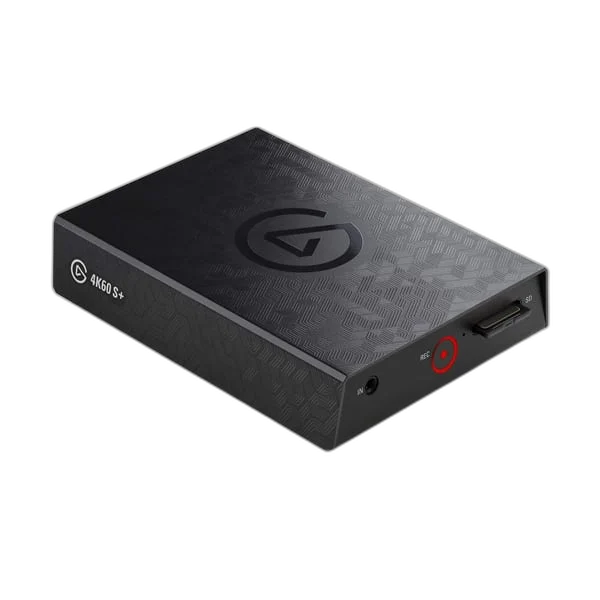
Elgato 4K60 S+. 4K60 S+ records compatible gameplay at up to 4K60, with onboard H.264 and HEVC encoding. Its HDMI passthrough and USB connection support a dedicated Windows capture workflow. It also records directly to a suitable SD card in standalone mode, using the bundled power supply without connecting a computer.
Regular price
156.500 KWD
or 4 payments of 39.125 KWD with
Pay with card & save


149.000 KWD
Save 7.500 KWD
Overview
ELGATO 4K60 S+
Elgato 4K60 S+
Elgato 4K60 S+: 4K60 S+ records compatible gameplay at up to 4K60, with onboard H.264 and HEVC encoding. Its HDMI passthrough and USB connection support a dedicated Windows capture workflow. It also records directly to a suitable SD card in standalone mode, using the bundled power supply without connecting a computer. Explore this model at AX Store in Kuwait.
4K60
Supported recording format
SD recording
Standalone mode
H.264 / HEVC
Onboard encoding
HDMI 2.0
Input and passthrough
Record SDR or HDR gameplay
The hardware encoder supports H.264 for SDR and HEVC for HDR recording. Supported capture resolutions include 2160p60, 1080p60 and 720p60. Check the actual computer, software and selected input before the session, then make a short test recording with the intended source.
Connect the whole capture chain
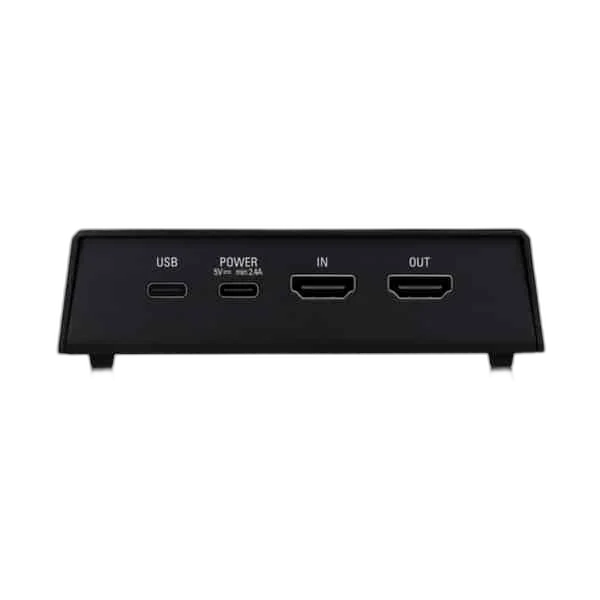
Use HDMI input and output for your source and display, USB 3.0 for the computer and a separate USB-C power connection. A stereo line input accommodates compatible analog audio.
Choose the Host Connection Before the Source
Choose standalone SD recording or the supported Windows computer workflow before connecting the unit. Standalone recording uses the bundled power supply and POWER port without a USB connection to a computer. The separate USB data and power connections have distinct jobs in the capture setup.
Keep Capture and Display Routing Distinct
HDMI passthrough sends a compatible source to the gaming display while the computer captures video. The passthrough limit and capture format are separate specifications. Choose a supported combination for the source, display, cable and software instead of treating a high-resolution display signal as proof of the recording format.
Route Audio for the Selected Recording Mode
Standalone recording uses the supported HDMI audio or stereo analogue line-input path. A USB-only microphone does not connect directly as a standalone input. For computer recording, a separate computer microphone can supply commentary in the software; keep that workflow distinct from direct SD recording.
Prepare Standalone Recording Before the Session
Use the specified SD card speed and prepare the card in exFAT or supported FAT32 format. In standalone mode, use the bundled power connection without connecting the computer data port. Check the recording indicator before starting and let file activity finish before removing the card for a separate reader.
Build the Video and Commentary Route
Choose the source connection and computer connection for this exact capture device. Plan display routing separately where needed, and select a microphone and monitoring arrangement for your own commentary. Compare related options such as Elgato Cam Link 4K Streaming Capture Device or RØDE RCV-G RODECASTER Video and Audio Console, keeping the exact model and configuration in the decision. For the wider setup, explore ASUS C501 ROG CARNYX RGB Wired Gaming Microphone, White and check the connection, size or mounting requirements before pairing accessories. Browse the Elgato range at AX for more choices.
Elgato 4K60 S+ Setup Choices
Choose the source connection and computer connection for this exact capture device. Plan display routing separately where needed, and select a microphone and monitoring arrangement for your own commentary. Explore Elgato Wave 3 MK.2 USB Condenser Microphone - Wave FX / Black, Elgato Stream Deck MK.2, 15-Key Customizable Controller, Razer Key Light Chroma - All-In-One Lighting Kit.
Frequently Asked Questions
Does recording need a computer?
4K60 S+ supports standalone recording to a suitable SD card. For that mode, use its bundled supply and do not connect the USB computer data port.
Which capture and passthrough limits apply?
4K60 S+ supports 2160p60 capture with its onboard SDR/HDR encoding and HDMI passthrough. It is distinct from the newer similarly named 4K S.
Can it capture protected streaming-service video?
The specified input is unencrypted HDMI. HDCP-protected content is not a supported capture source.
What is listed in the capture package?
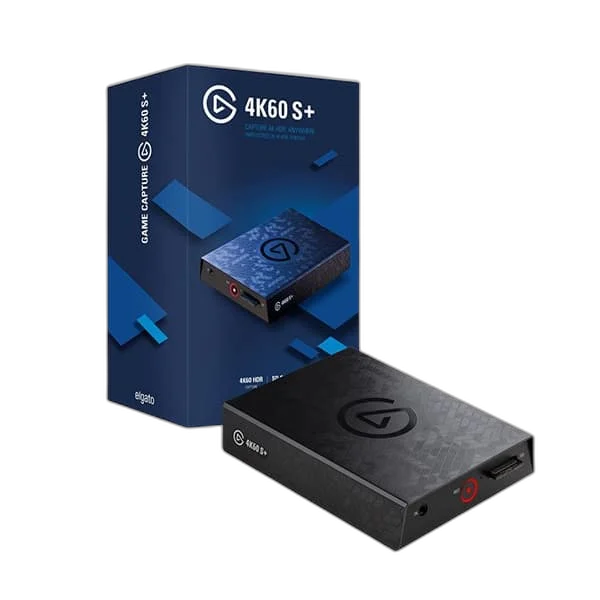
4K60 S+, its power supply, two USB 3.0 Type-C cables and an HDMI 2.0 cable.
Does a microphone connect to an HDMI input?
A microphone needs its own appropriate recording connection. A suitable USB microphone can provide computer commentary alongside video capture; an HDMI input is not an XLR microphone preamp.
What should I check before going live?
Confirm the source format, device selection, recording computer requirements and commentary routing. Make a short test and review both picture and sound before the full production.
What SD card and format are needed?
Use a card rated at least UHS Class 3 / V30. exFAT is recommended; FAT32 is supported but splits recordings into 4 GB segments.
Can the computer read the installed SD card through the device?
Remove the card after recording has stopped and use a separate card reader. The recorded card is not exposed to the computer as a USB card reader through 4K60 S+.
Do USB controllers or USB microphones connect directly in standalone mode?
No. Stream Deck controls and a separate computer USB microphone serve a supported computer production workflow. Standalone SD recording uses the device’s own controls and supported HDMI or analogue line-level audio.
Build Your Setup with AX Store
Explore computers, displays and accessories for your workspace at AX Store. For help choosing the right model or checking an accessory, contact AX Store.
Compare Elgato Game Capture 4K S USB Capture Card, 4K60 HDR. Match the exact model, connection and configuration to your setup.
THE DETAILS
Technical specifications
Product specifications
Elgato
4K60 S+
2160p60, 1080p60 and 720p60
HDMI 2.0 input and passthrough output
Unencrypted HDMI
USB 3.0 Type-C
Separate USB Type-C
3.5 mm TRS stereo line input
Onboard H.264 SDR / HEVC HDR
200 Mbps SDR / 140 Mbps HDR at 2160p60
142 × 111 × 32 mm
345 g
5 V, 2.4 A
Capture device, power supply, 2 USB 3.0 Type-C cables and HDMI 2.0 cable
Operating setup
Supported without a computer; use the bundled supply and POWER port without connecting the USB computer data port
UHS Class 3 / V30
exFAT recommended; FAT32 supported with recordings split into 4 GB segments
Remove the card after recording/file activity stops and use a separate computer card reader; the installed card is not exposed as USB card storage
COMPLETE YOUR SETUP
Pairs well with