
BUYING GUIDE
Smart Lighting
Govee Light Bars vs Wall Panels vs LED Strips: Plan Your Setup
Choose Govee light bars, wall panels or LED strips by placement, reflections, cable routes and room layout, with AX Store Kuwait product examples.
AA
Ali Aljaber
Quick answer
Choose Govee light bars for a desk accent you can reposition, wall panels for a visible feature on the wall, and LED strips for continuous lighting along a planned edge or concealed surface. They serve different roles. The strongest gaming room setup often begins with one well-placed lighting layer, then adds another only where it improves the room.
Before buying smart gaming lights in Kuwait, take a photograph from your normal sitting position and another from your camera position. Mark the areas you want to illuminate, any reflective screen surfaces and the available power sockets. A product photograph shows what a light can look like; your wall colour, distance and furniture determine how the effect will appear at home.
Compare the lighting types
| Type | Useful placement | Main advantage | Plan carefully |
|---|---|---|---|
| Gaming light bars | Behind or beside the monitor, according to the mounting instructions | Localised desk lighting with easier repositioning | Stand clearance, reflections and visible cables |
| Modular wall lights | A clear wall area behind or beside the setup | A visible composition that becomes part of the room | Panel count, layout, surface suitability and controller route |
| LED strips | Desk backs, shelves or suitable concealed edges | A continuous line or reflected wash | Exact length, corners, mounting and power access |
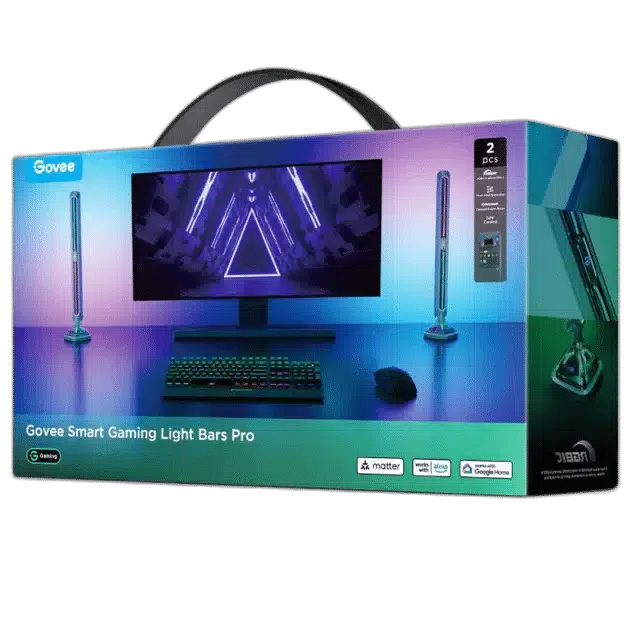
Govee Gaming Light Bars Pro H8048: start at the desk
The Govee Gaming Light Bars Pro H8048 are a relevant starting point when the desk is already built and you want an accent close to the monitor. Try the intended position before fixing cable clips. A reflective wash behind the screen usually looks different from placing the emitting surface directly in your line of sight.
Leave room for the monitor stand or arm to move. Check the full sweep of the screen, not just its central position. Keep light out of a webcam lens and inspect the monitor for reflected bright shapes. Lower output can look more balanced than maximum brightness when the rest of the room is dark.
Cyborg Cube and Mini Panels: design the wall composition
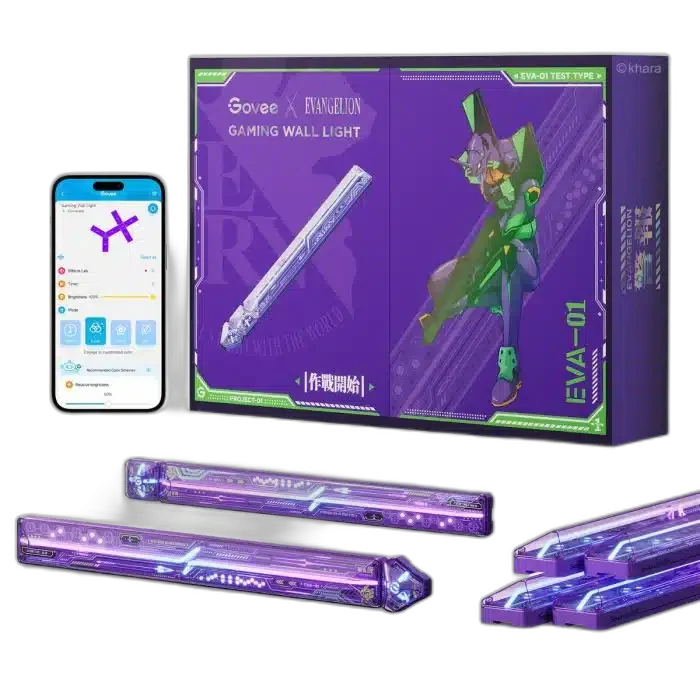
The Govee Cyborg Cube H6063281 6+2 EVA panel kit and Govee Mini Panel Lights H8069 10-pack are different kits with different visual shapes and component arrangements. Compare the actual included pieces and permitted layouts; a ten-pack is not automatically equivalent to ten modules of another product family.
Lay out the proposed composition at full size using measurements or paper templates before installation. Consider the edge of your desk, the monitor height and what remains visible when you sit down. A carefully sized shape can be more coherent than filling every available space. Check that the power lead can reach its controller without crossing the most visible part of the design.
Adhesive performance depends on the wall surface and preparation. Follow the manufacturer’s mounting requirements rather than assuming that rough paint, wallpaper and every decorative finish are equally suitable. Plan how the lights can be serviced or removed, and keep controllers accessible.
COB Strip Light Pro and Strip Light 2 Pro: plan the route first
The Govee COB Strip Light Pro H61E5 3 m and Govee Strip Light 2 Pro H61F5 5 m provide different lengths and light constructions. A COB-style emitting surface can be useful where you want a visually continuous line, while the final appearance of either strip still depends on mounting depth, diffusion and viewing angle.
Measure the entire route, including where the controller and power lead sit. Do not assume that a longer kit can be shortened, extended or rejoined in any location. Only cut a strip if the exact model’s instructions permit it, and only at its designated points. Avoid tight folds at corners, trapped leads and installations that prevent normal heat dissipation.
A strip hidden behind a desk can wash the wall rather than expose its LEDs. In a shallow shelf, however, the same strip may create bright reflections on a glossy object. Test a small section in the intended position before completing the installation. The product’s nominal length alone does not describe the finished lighting effect.
App control and synchronisation need model checks
Govee products do not all have identical integrations. Confirm the exact model’s support for your preferred app functions, smart-home platform and control method. Music effects, app scenes and screen-colour synchronisation are separate features. A light supporting one does not automatically include every camera, sync box or desktop integration used by another kit.
If you want screen-matched lighting, identify the complete supported signal path before ordering. Likewise, check the network requirements in the manual rather than assuming every light joins every Wi-Fi band. Do not replace a supplied power system with an unrelated adapter merely because the connector appears to fit.
A practical order for building the room
- Provide usable room and desk lighting for reading and work.
- Choose one main accent: desk bars, a wall composition or a concealed strip.
- Set a restrained palette and test it at normal screen brightness.
- Add a second layer only if another area needs depth or balance.
- Save separate working, gaming and filming scenes where the model supports them.
Our complete RGB room lighting plan covers the wider layout. For a face camera, read streaming key light placement: decorative RGB lights do not automatically provide flattering, consistent facial illumination. If the screen itself is part of the upgrade, compare OLED and IPS monitors before deciding where bright accents should sit.
Frequently asked questions
Should I buy wall panels or light bars first?
Choose the surface that needs attention. Bars suit a local desk accent; panels suit a deliberate visible wall feature. Measure the space before selecting a kit.
Can I cut any Govee LED strip to fit?
No. Check the exact model manual and designated cut points. Do not assume that all addressable strips can be cut or reconnected.
Will every Govee light copy my screen colours?
No. Screen synchronisation depends on the model and the required supported software or hardware. Confirm the whole setup.
Can RGB lights replace a camera key light?
They can create background atmosphere, but a separate controlled face light is often needed for clear and consistent camera exposure.
Manufacturer references
Product configurations checked against AX Store listings on 14 November 2026. Use the linked product pages for current prices, stock, selected colours and included accessories.
Explore the current Smart Lighting selection at AX Store Kuwait.
AA
KEEP READING
All Buying Guides guides



Choose the right equipment for your setup
Explore the exact models, current configurations and availability at AX Store Kuwait.