Lian LI
Lian LI O11D EVO Upright GPU Kit, Bracket Only
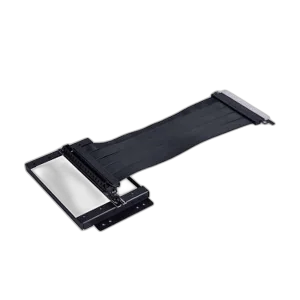
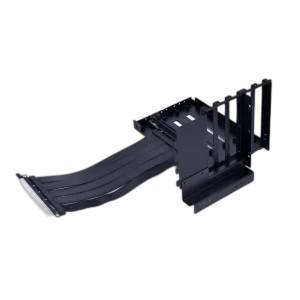
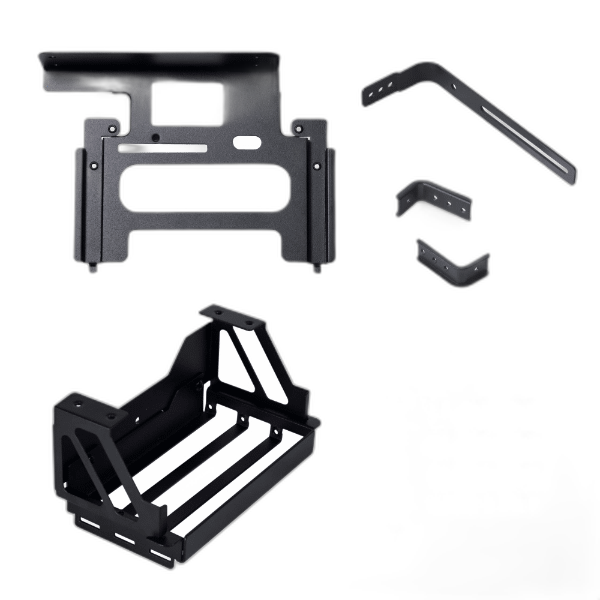
LIAN LI O11D EVO Upright GPU Bracket Only places a compatible graphics card in a upright arrangement inside O11D EVO. A suitable PCIe x16 riser cable is required separately; this is the bracket-only version. The mounting and support frames use 1 mm steel.
Color
Regular price
2.000 KWD
or 4 payments of 0.500 KWD with
Pay with card & save


1.800 KWD
Save 0.200 KWD
Overview
LIAN LI O11D EVO UPRIGHT GPU BRACKET ONLY
Upright Graphics Installation for the Intended Case
LIAN LI O11D EVO Upright GPU Bracket Only places a compatible graphics card in a upright arrangement inside O11D EVO. A suitable PCIe x16 riser cable is required separately; this is the bracket-only version. The mounting and support frames use 1 mm steel.
Upright
GPU position
O11D EVO
Intended case
Bracket only
Package version
Steel
Mounting frames
Built for O11D EVO
The mounting arrangement is intended for O11D EVO. Use the correct case model and mounting locations when planning the installation; similar case names do not always share the same rear panel or bracket layout. Check the selected graphics card and the available space around the intended mount before assembly.
Upright GPU Presentation
The bracket changes the position of the graphics card so its visible surfaces face a different direction within the case. The upright position mounts the card beside the motherboard, using a compatible HDD-tray panel or fan-bracket arrangement in the supported normal or reverse case layout. Choose a position that provides room for the graphics cooler, its power connections and the nearby case hardware, rather than relying only on the card’s nominal length.
The Graphics Connection
A suitable PCIe x16 riser cable is required separately; this is the bracket-only version. Match the motherboard slot, riser and graphics card to the intended PCIe link configuration. Route the connection without sharp bends or excess strain at the plugs, and follow the installation guidance for the actual cable revision supplied with or selected for the kit.
A Supported Mounting Structure
The mounting and support frames use 1 mm steel. Secure the mounting frame at the intended case attachment points before fitting the graphics card. The card’s cooler size, expansion-slot bracket and power plugs should all be considered together, with suitable access to the display connections after the system is assembled.
Leave Room for Cooling
Check the gap around the graphics-card fans, case panels and any nearby radiator or fan positions. The upright position mounts the card beside the motherboard, using a compatible HDD-tray panel or fan-bracket arrangement in the supported normal or reverse case layout. The final clearance depends on the card and cooling hardware selected for the build. Keep the GPU intake path open and leave enough room for its power cable to sit correctly.
Intended case
O11D EVO
GPU orientation
Upright
Graphics connection
A suitable PCIe x16 riser cable is required separately; this is the bracket-only version.
Plan the Complete Installation
Confirm the exact case, graphics-card dimensions and required riser arrangement before starting the installation. Follow the case and bracket installation instructions, then check that the card, bracket and connection leads are secured without putting unnecessary strain on any connector.
Complete Your Workspace
Explore Case Accessories to compare suitable options and complete your setup.
Frequently Asked Questions
Which case is it intended for?
O11D EVO.
How is the graphics card positioned?
Upright. The upright position mounts the card beside the motherboard, using a compatible HDD-tray panel or fan-bracket arrangement in the supported normal or reverse case layout.
What graphics connection should I use?
A suitable PCIe x16 riser cable is required separately; this is the bracket-only version.
What clearance should I check?
The graphics card’s length, width, thickness, fan intake space and power-plug clearance, together with nearby case fans or radiators.
Is a riser cable included?
No. This is the bracket-only version, and the riser cable is separate.
Does every card within the size limits fit?
No. The manufacturer lists model-specific restrictions, including cards that work only in reverse mode. Check the exact GPU compatibility list and case orientation.
Build Your Setup with AX Store Kuwait
Explore computers, displays and accessories for your workspace at AX Store Kuwait. For help choosing the right model or checking an accessory, contact AX Store.
Compare Lian LI O11D-1 Dynamic Vertical GPU Kit, PCI-e 4.0. Match the exact model, connection and configuration to your setup.
THE DETAILS
Technical specifications
Mounting Hardware
LIAN LI O11D EVO Upright GPU Bracket Only
O11D EVO
Upright
A suitable PCIe x16 riser cable is required separately; this is the bracket-only version.
The mounting and support frames use 1 mm steel.
The upright position mounts the card beside the motherboard, using a compatible HDD-tray panel or fan-bracket arrangement in the supported normal or reverse case layout.
O11DE-6X / O11DE-6W
356 mm, subject to the compatibility list
62 mm with the large L-type support bracket
100–150 mm
121–150 mm
Up to 158 mm
Not included
COMPLETE YOUR SETUP