Sabrent
Sabrent USB Type-C External Stereo Sound Adapter
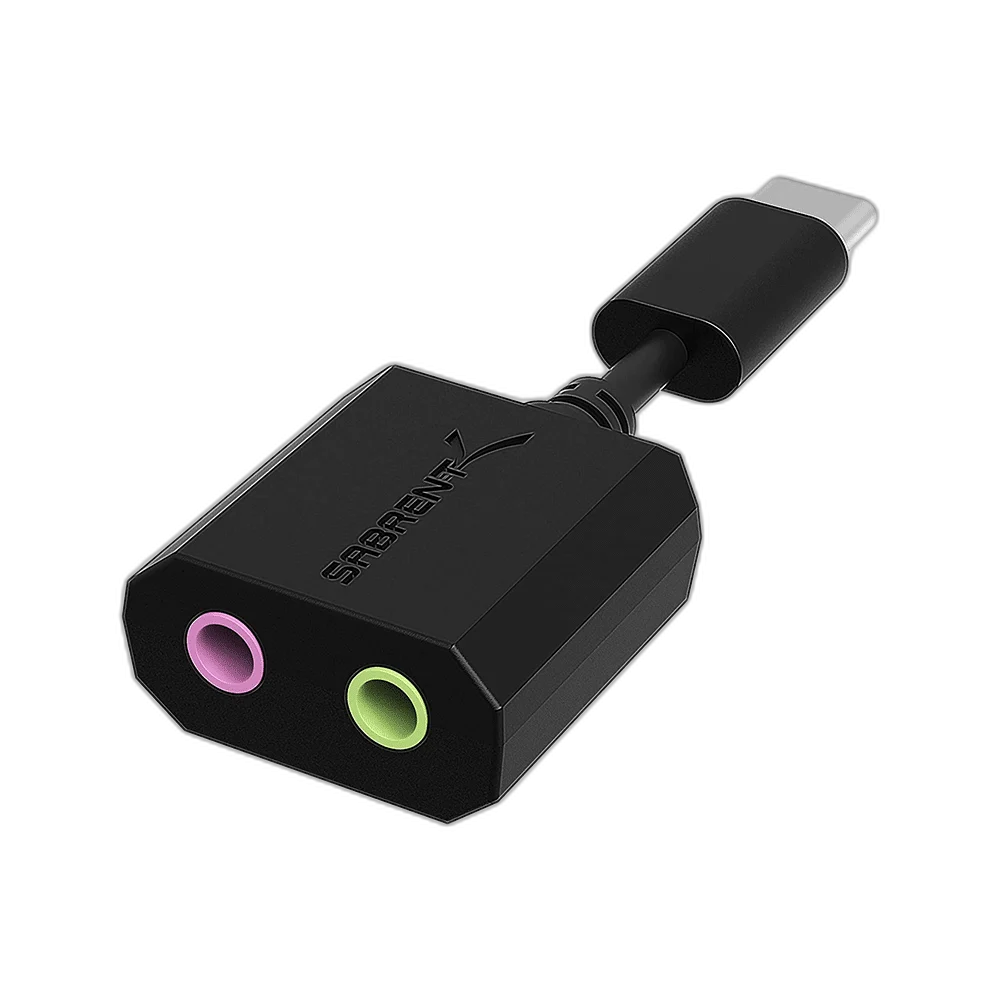
Sabrent AU-MMSC USB-C external stereo sound adapter for Windows and Mac, with separate stereo output and microphone input, plug-and-play operation and USB power.
Regular price
6.000 KWD
or 4 payments of 1.500 KWD with
Pay with card & save


5.900 KWD
Save 0.100 KWD
Overview
SABRENT AU-MMSC · USB-C STEREO SOUND ADAPTER
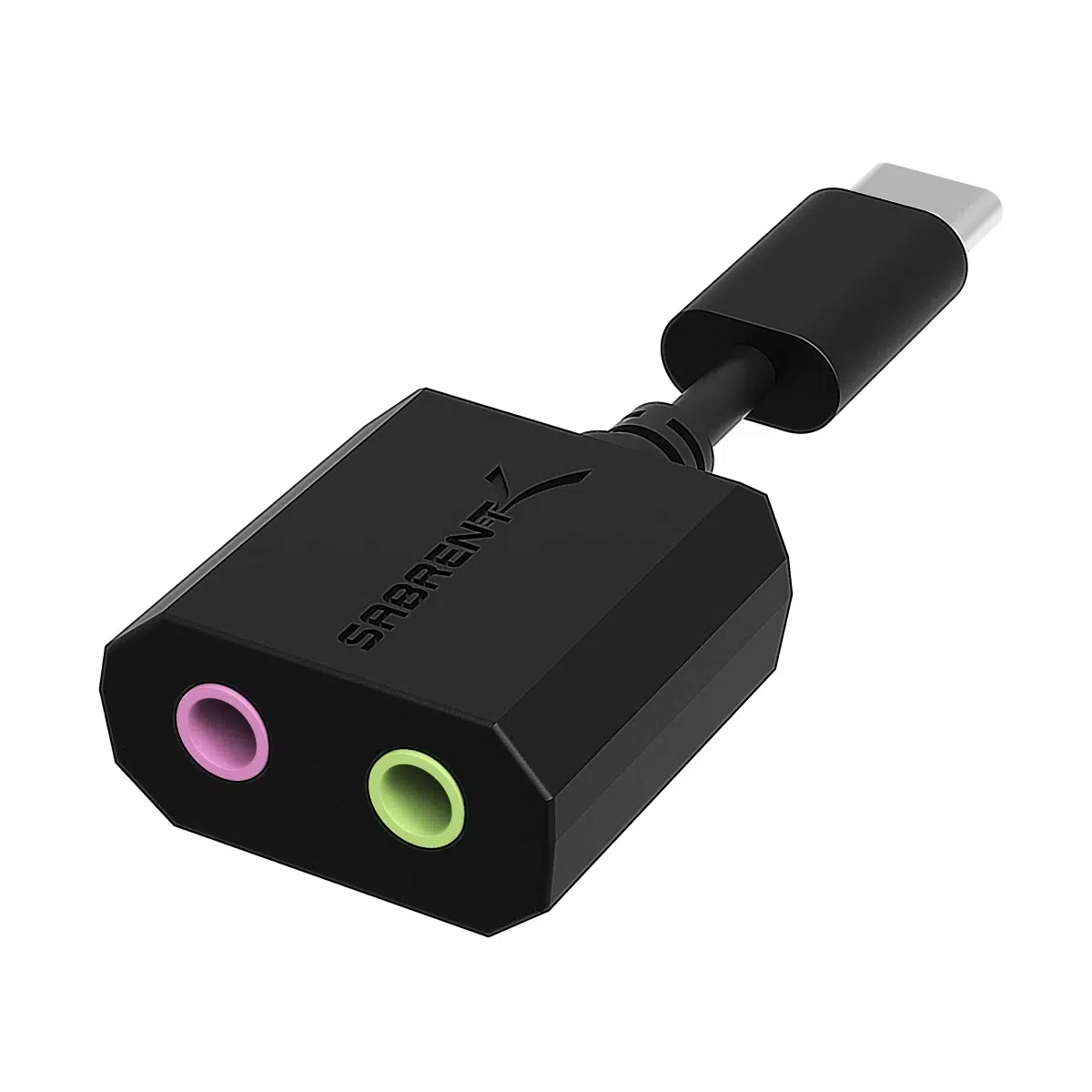
Sabrent AU-MMSC USB-C sound adapter
Sabrent AU-MMSC USB-C sound adapter: The Sabrent AU-MMSC gives a compatible Windows or Mac computer an external stereo audio output and a separate microphone input through USB-C. Its plug-and-play design operates without an external power supply, providing a straightforward way to connect audio accessories through a USB-C port. Explore this model at AX Store in Kuwait.
USB-C
Computer Connection
Stereo
Audio Output
Plug and Play
Driver Setup
USB Powered
Power Source
Stereo Audio Through USB-C
The AU-MMSC connects to the USB-C port of a compatible computer or laptop and provides an external stereo audio connection. It gives you another route for your sound accessories when planning the connections around a desk. Choose the adapter in your computer’s audio settings as needed, then check the output before starting a call or playing audio.
Separate Output and Microphone Connections
A stereo output jack and a dedicated microphone input jack keep the two audio roles separate. The user guide identifies the green port for headphones or speakers and the pink port for a microphone. Match each accessory to its appropriate connection when setting up the adapter, then check both playback and microphone input through your computer.
Plug-and-Play Operation
Sabrent describes the adapter as plug and play, with no additional drivers required. Connect it to the compatible host and use the computer’s sound settings to manage the available audio devices. This makes it convenient when you want a dedicated external connection for audio accessories without adding a more elaborate audio setup to the desk.
Powered by the USB Connection
The adapter does not require an external power supply, keeping its operating power and computer connection together through USB-C. That is useful when preparing a laptop-based workspace with limited room for extra equipment. Position the adapter so its audio jacks are convenient to reach and the connected leads can sit comfortably around the rest of the setup.
USB Type-C 2.0 Hi-Speed Specification
The AU-MMSC follows the USB Type-C 2.0 Hi-Speed specification for its host connection. Sabrent identifies it for Windows and Mac use, making it an option to consider when selecting an external audio adapter for either type of computer. Confirm the available USB-C connection on the host before deciding how to arrange your audio equipment.
Manage Levels from Your Computer
Volume and microphone settings are controlled directly from the computer or laptop, as described in the user guide. Check the selected recording device and playback device after connecting your accessories, then adjust their levels for the intended activity. A brief sound and microphone check helps you prepare for voice calls, listening or other regular desktop audio tasks.
Match Both Ends of the Signal Route
Choose the connectors, signal type and cable length for the equipment at both ends. A passive lead does not add an audio interface, power supply or a different signal protocol; confirm the input function before ordering. Compare related options such as Stagg XLR to XLR Microphone Cable, 3m or BESIGN Ground Loop Noise Isolator with 3.5mm Audio Cable, keeping the exact model and configuration in the decision. For the wider setup, explore RØDE PodMic USB Dynamic Microphone – USB-C & XLR – Black / White and check the connection, size or mounting requirements before pairing accessories. Browse the Sabrent range at AX for more choices.
Sabrent AU-MMSC USB-C sound adapter Setup Choices
Choose the connectors, signal type and cable length for the equipment at both ends. A passive lead does not add an audio interface, power supply or a different signal protocol; confirm the input function before ordering.
Frequently Asked Questions
Which computer platforms are listed?
Host platforms: Windows; Mac.
Which audio inputs and outputs are provided?
Audio output: Stereo output jack; green port for headphones or speakers. Audio input: Microphone input jack; pink port.
Are an external power supply or extra drivers required?
Driver installation: Plug and play; no additional drivers required. Power source: USB connection; no external power required.
Where are sound levels adjusted?
Level controls: Volume and microphone controls on the host computer.
Build Your Setup with AX Store
Explore computers, displays and accessories for your workspace at AX Store. For help choosing the right model or checking an accessory, contact AX Store.
Compare Sabrent 3.5mm Stereo Y Splitter Adapter. Match the exact model, connection and configuration to your setup.
THE DETAILS
Technical specifications
Audio and Connection
AU-MMSC
External USB-C stereo / 3D sound adapter
USB Type-C 2.0 Hi-Speed
Stereo output jack; green port for headphones or speakers
Microphone input jack; pink port
Windows; Mac
Plug and play; no additional drivers required
Power and Operation
USB connection; no external power required
Volume and microphone controls on the host computer
COMPLETE YOUR SETUP
Pairs well with