Skip to content
COMPARISON Pro Audio

USB vs XLR Microphones: Choose Your Recording Setup

USB vs XLR Microphones is a choice about the recording setup you need: a direct computer connection or a separate interface and microphone chain.

AS
AX Store
Updated 27 October 2026 5 min read
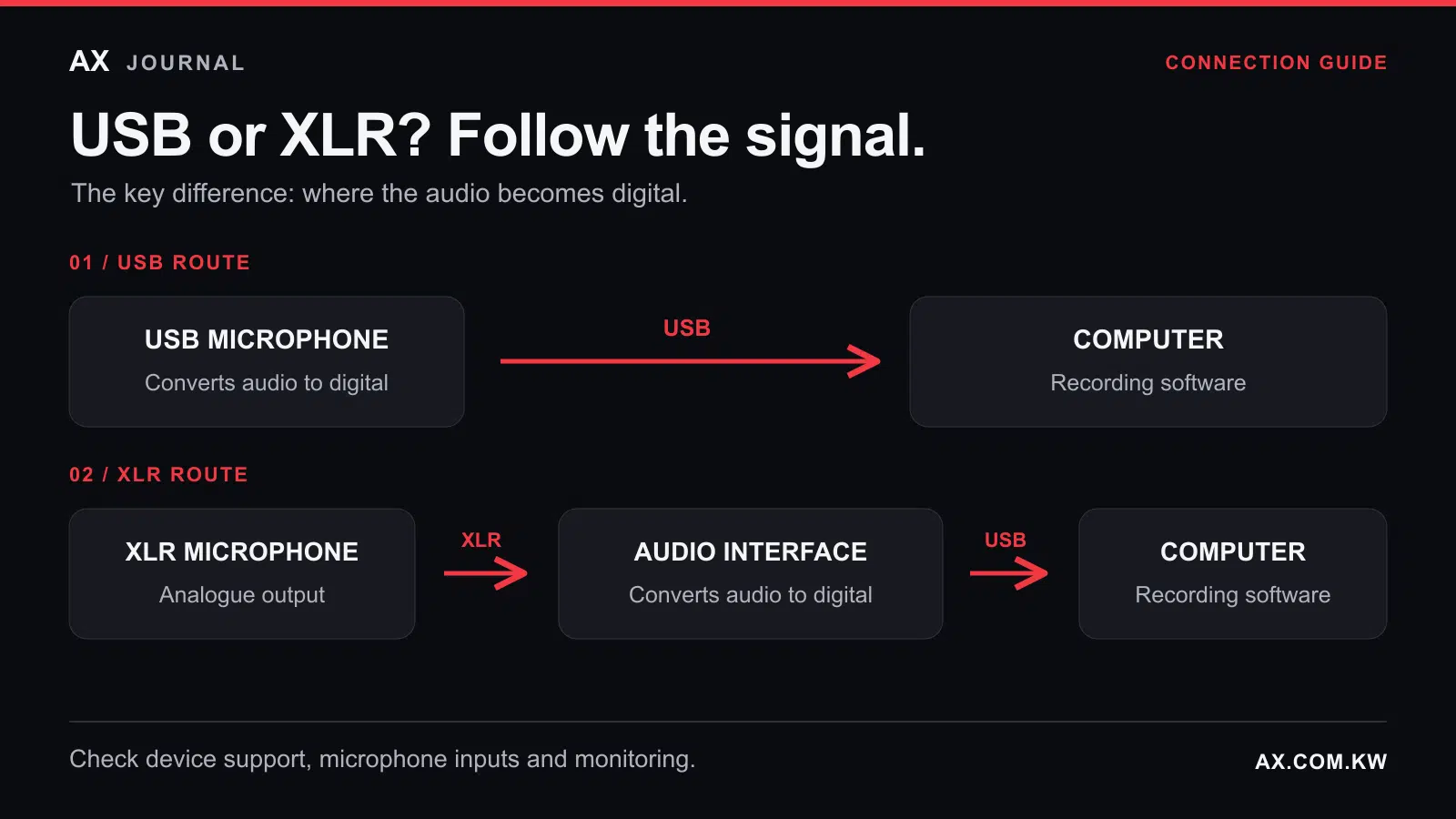
Signal paths from a USB microphone directly to a computer, and from an XLR microphone through an audio interface to a computer.

USB vs XLR Microphones: the essentials

USB vs XLR Microphones is a choice about the recording setup you need: a direct computer connection or a separate interface and microphone chain.

Start with your setup

Choosing between a USB and an XLR microphone starts with two questions: how many people will you record, and what device will you use? For one person at a computer, USB can be the simplest route to a capable setup. For two people sharing a room, XLR microphones connected to an interface with two microphone inputs often make the recording easier to organise.

Compare the complete setup, including monitoring and accessories, before comparing microphone prices. This guide explains equipment functions and manufacturer specifications; it does not present a listening test of individual microphones.

Choose around your recording workflow

Your use A sensible starting point Check before buying
Solo voiceovers or computer streaming USB microphone Operating system support and direct monitoring
Two people in one room Two XLR mics and a two-mic-input interface Separate recording tracks and monitoring for both people
Solo now, a larger setup later USB/XLR hybrid microphone Which features work over each connection
You already own an audio interface A compatible XLR microphone Gain requirements and microphone power
Focusrite Scarlett Solo 4th Gen USB Audio Interface — product view
Focusrite Scarlett Solo 4th Gen USB Audio Interface

Where does the audio become digital?

A USB microphone converts its audio signal into digital data inside the microphone. A conventional XLR microphone sends an analogue signal to an audio interface or suitable mixer, which handles conversion for the computer.

USB reduces the number of devices on your desk. XLR lets you choose and replace the microphone and interface separately. Neither connector alone tells you how good a recording will sound. The microphone, room, positioning and recording level all matter.

Compare complete baskets

For a USB setup, check whether the supplied cable reaches your computer and whether the included stand suits your desk. Add monitoring headphones if you need them. For XLR, include the microphone, XLR cable, interface, stand and headphones. Product photography is not a reliable list of box contents.

A simple connector adapter cannot perform analogue-to-digital conversion. Some XLR-to-USB adapters contain the necessary electronics, but their gain, microphone power and monitoring options still need checking.

For a Kuwait purchase, compare the total in KWD using the current product pages. Include every required accessory and check the terms attached to any payment-specific offer. The cheaper microphone may produce the more expensive complete setup.

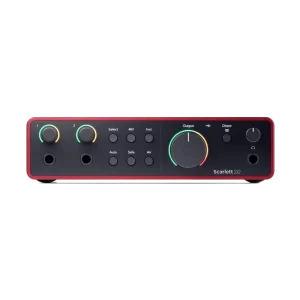
Focusrite Scarlett 2i2 4th Gen USB Audio Interface, 120dB Dynamic Range — product view
Focusrite Scarlett 2i2 4th Gen USB Audio Interface, 120dB Dynamic Range

For two speakers, count microphone inputs

“Two inputs” does not necessarily mean two microphone inputs. The fourth-generation Scarlett Solo has one XLR microphone input and one instrument input. The fourth-generation Scarlett 2i2 has two microphone preamps.

That makes Solo worth considering for one voice, while 2i2 is a more direct starting point for two XLR microphones. Also count headphone outputs. Two microphone inputs do not guarantee independent headphone connections for you and a guest; a suitable headphone distribution device may be needed.

Set up a separate mono recording track for each speaker so you can adjust their levels independently later. Multiple USB microphones can work with supported software and hardware combinations, but connecting two different USB mics does not guarantee that every recording application will accept them together. Check the intended combination first.

When a hybrid microphone makes sense

A microphone with both USB and XLR lets you start directly on a computer and move to an interface later. PodMic USB is one example: it offers both connections and headphone monitoring. Check which processing and software features are available on each connection. A hybrid microphone’s USB and XLR workflows may differ.

Four checks that prevent awkward surprises

  • Device compatibility: a USB socket does not establish phone or console compatibility. Confirm the operating system, cable and power requirements.
  • Monitoring: check how you will hear your voice without distracting delay. Running hardware and software monitoring together can create an unwanted doubled signal.
  • Microphone power: use phantom power according to the microphone’s instructions. Not every XLR microphone requires 48V.
  • Placement: use a stable mount and the manufacturer’s recommended speaking position. A different connector will not fix room echo or desk vibration.

Frequently asked questions

Does a USB microphone need an audio interface?

Usually not when connected by USB to a supported device: conversion happens inside the microphone. A particular device may still need a suitable adapter or power arrangement.

Is XLR suitable for a beginner?

Yes, when it solves a specific need, such as recording two people or using an interface you already own. Choose the equipment around the session you plan to record.

Does USB mean condenser?

No. USB and XLR describe connections. Dynamic and condenser describe microphone technology. These are separate choices.

Build your setup with AX

For one speaker, explore USB microphones. For an XLR setup, compare the Scarlett Solo 4th Gen and Scarlett 2i2 4th Gen against your input needs. Contact AX with your device model, speaker count and total budget to discuss the connections before ordering.

Shop the equipment in Kuwait

AX price check, 26 October 2026: Focusrite Scarlett Solo 4th Gen USB Audio Interface — KWD 49.900 (out of stock); Focusrite Scarlett 2i2 4th Gen USB Audio Interface, 120dB Dynamic Range — KWD 69.900 (in stock). The product cards show the current price and availability when you shop.

Explore Focusrite at AX Kuwait, RODE at AX Kuwait for the rest of the range.

AS

WRITTEN BY

AX Store

All guides from this desk

Build a microphone setup that works together

Choose around your computer, speaker count and recording plans. Explore interfaces or ask AX about the connections your setup needs.

Added to cart

View cart

Subscribed

We'll email you as soon as it's back in stock.

Saved to wishlist

View wishlist