
BUYING GUIDES
Same-day delivery · Official warranty · Taly & Deema
Read a gaming laptop as one complete system: processor, laptop GPU, cooling, screen, memory, ports and portability. Two machines carrying a similar.

Read a gaming laptop as one complete system: processor, laptop GPU, cooling, screen, memory, ports and portability. Two machines carrying a similar graphics name can still make very different buying choices.
Decide where the laptop will spend its time. A machine that lives on a desk with an external display has different priorities from one carried to university every day. Add the charger, headphones and any dock to the bag you expect to carry; the laptop’s own weight is only part of that setup.
List the games and other applications you need. Gaming, video editing, software development and streaming can emphasise different resources. Build a shortlist around those tasks before choosing between a larger screen, more graphics power or a smaller chassis.
A laptop GPU and a desktop graphics card are distinct implementations even when their names share a number. The power configuration and cooling of the complete laptop affect how it operates. Do not use a desktop benchmark as if it were a promise for the mobile version.
When comparing reviews, match the exact laptop configuration and its operating mode. A result recorded while plugged in under a performance profile is not a battery-life prediction. If a manufacturer lists graphics power information, read it with the model’s cooling and system design rather than treating the number alone as a ranking.

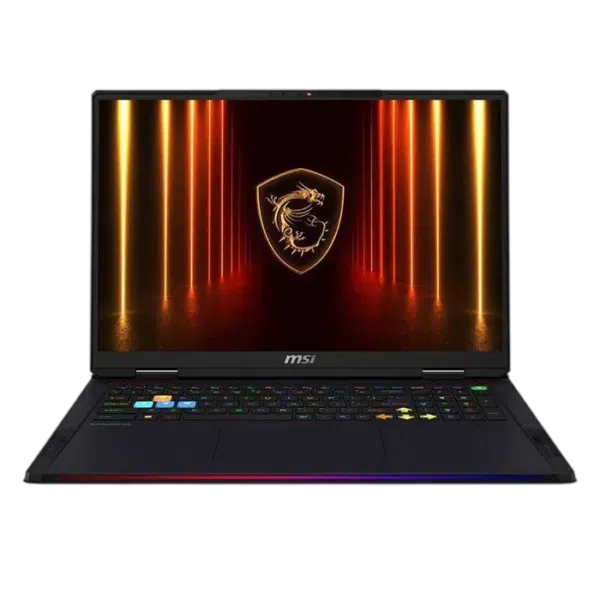
The ASUS ROG Zephyrus G16 OLED configuration combines a 16-inch screen with the listed Core Ultra 9 285H and RTX 5080 Laptop GPU. The MSI Raider 18 HX AI configuration changes the chassis, screen size and CPU class. The MSI Vector 16 HX AI configuration has a different CPU, graphics and memory specification.
These names are starting points, not interchangeable packages. Open the exact AX listings and compare the full configuration you are ordering, including memory, storage, display and keyboard version. Do not transfer specifications from another regional listing that happens to show the same chassis.
| Detail | Buying question |
|---|---|
| Size and resolution | Does the workspace suit your games and everyday applications? |
| Refresh rate | Can your intended games use the mode you want? |
| Panel technology | Which viewing characteristics and care requirements matter to you? |
| Brightness and finish | Will the screen work in your usual room? |
| External outputs | Which ports support the display and mode you intend to connect? |
A high refresh-rate number does not identify resolution, colour characteristics or every port capability. If you plan to use an external monitor, verify the laptop output, cable and monitor input as one chain. Our monitor setup guide explains how to confirm the selected mode after connection.
Memory and storage upgrade options are model-specific. Some machines have replaceable memory modules; some have soldered memory, and others combine arrangements. Check the service documentation rather than assuming that a listed capacity can always be doubled.
For storage, confirm the supported module size, available slots and cooling clearance. A second slot may not mean a second drive can be installed without opening the chassis or moving an existing part. If you already know you need more capacity, compare the suitable configuration at purchase with the practical upgrade route.
Battery runtime depends on the task, screen settings, power mode and other conditions. Avoid converting a light-use marketing figure into a gaming runtime promise. A laptop chosen for portability should still be judged in the work you will do away from power.
If the machine will rarely move, compare the total cost with a desktop PC and separate monitor. If it will become a desk workstation, plan the USB-C hub or dock around its actual port capabilities.
No. They are different implementations, and the laptop configuration, power and cooling matter.
No. Check the exact model documentation for soldered memory, supported modules and access.
No. The port must support the required video function, and the cable and monitor input must support the intended mode.
Related guide: Gaming monitor buying guide.
AX price check, 26 October 2026: ASUS ROG Zephyrus G16 16″ OLED 240Hz – Ultra 9 285H, RTX 5080 16GB, 32GB RAM, 1TB SSD – Platinum White — KWD 1139.000 (in stock); MSI Raider 18 HX AI – Ultra 9 285HX, RTX 5080 16GB, 32GB RAM, 1TB SSD – Core Black — KWD 987.000 (in stock). The product cards show the current price and availability when you shop.
Explore ASUS at AX Kuwait, MSI at AX Kuwait for the rest of the range.
KEEP READING
All Buying Guides guides

Build a setup that fits how you use it
Tell AX your exact models and what you want to do. We can help match the equipment and connections.
Added to cart
Subscribed
We'll email you as soon as it's back in stock.
Saved to wishlist

