Insta360
Insta360 Mic Pro 2 TX + 1 RX Wireless Microphone System with Charging Case – Graphite Black
Insta360 Mic Pro 2 TX + 1 RX combines two clip-on transmitters, one camera receiver and a charging case for camera, phone and computer audio.Three-microphone array with selectable pickup direction, NPU-powered noise reduction and customizable 1.22-inch colour E-Ink identification on each transmitter.48kHz audio; selectable 24-bit or 32-bit float internal WAV recording to 32GB built-in memory per transmitter.Up to 400m TX-to-RX range under open, interference-free conditions; Bluetooth direct connection is device/app dependent.Touchscreen receiver with monitoring, Mono/Stereo/Quadraphonic/Safety Track routing and LTC timecode workflows.Charging case included; manufacturer-rated 10-hour TX, 11-hour RX and up to 30-hour case-supported use under stated test conditions.USB-C mobile adapter and 3.5mm camera cable included. Lightning, Sony Camera Adapter and external lavalier accessories are sold separately.
Overview
INSTA360 MIC PRO · 2 TX + 1 RX
Insta360 Mic Pro 2 TX + 1 RX
Record two speakers with independent transmitters and carry the system in its included charging case. The Graphite Black system combines compact wireless audio with an unusually flexible microphone array, editable transmitter identity graphics, local backup recording and production-friendly receiver controls. Use the receiver for camera and USB-C workflows, or choose a supported direct Bluetooth connection when the camera or recording app allows it.
The exact kit and how it fits your setup
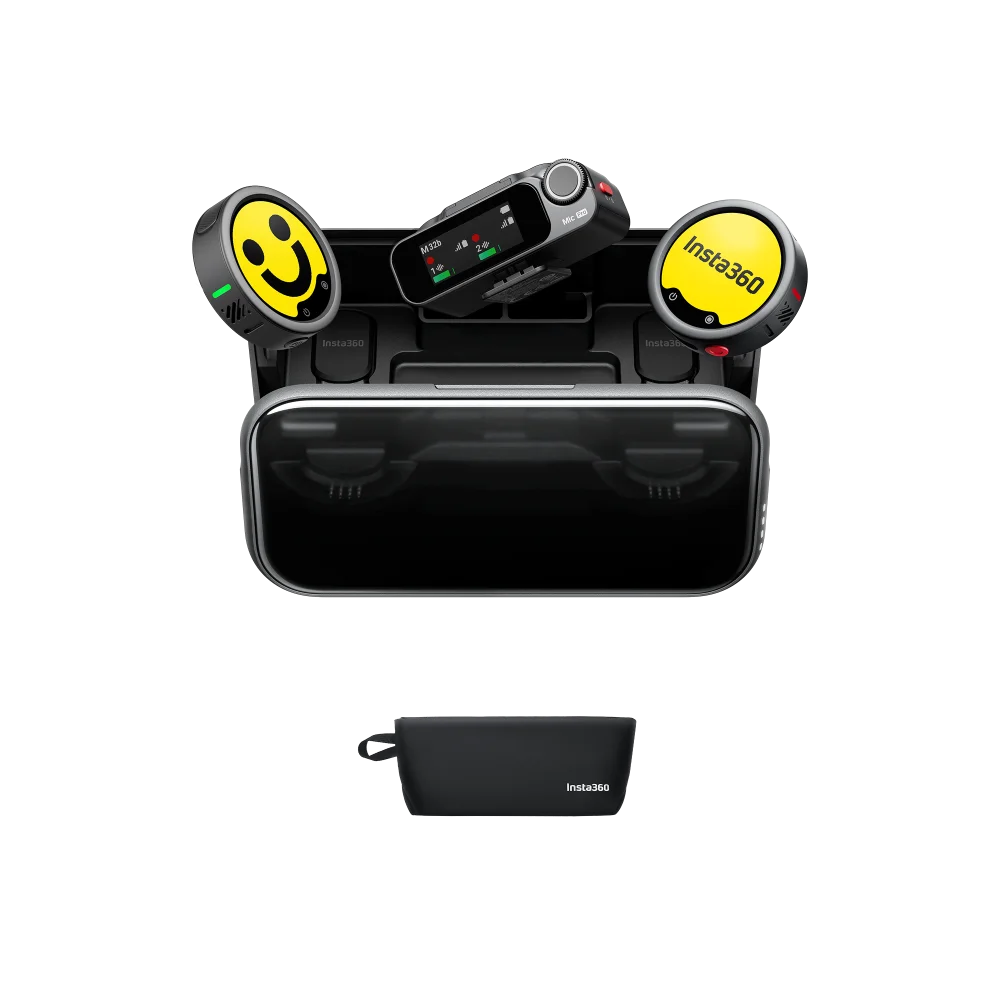
This listing is the 2 TX + 1 RX package. It supplies two transmitters and one receiver, plus the charging case and the accessories listed below. Both speakers can be captured through the receiver; expansion to four transmitters or multiple receivers requires separately purchased units.
The camera cable connects the receiver to a compatible 3.5mm microphone input. The included USB-C mobile adapter provides a compact phone connection, while the transmitter clips or magnetically attaches to clothing. Neither a camera nor a phone is included.
Three microphones, four ways to shape the pickup
Mic Pro uses three microphone capsules and digital processing to change the area from which it prioritizes sound. Omnidirectional mode captures a broad sound field and uses the top microphone. Directional pickup and stereo internal recording use the microphone array for more selective or spatial capture.
- Omnidirectional: natural surrounding sound for vlogs, ambient capture and general speech.
- Cardioid: emphasizes sound in front while reducing the contribution from the sides and rear, useful for podcasts, personal streams and close speech.
- Figure-8: captures in front and behind while reducing sound at the sides, useful for a face-to-face conversation or a performer and instrument.
- Voice Focus / Super-directional: concentrates on a forward area of about 60°. Insta360 recommends it as an on-camera pickup mode rather than a body-worn lavalier setting. Noise reduction cannot run at the same time as this mode.
For worn or handheld voice recording, the manufacturer recommends positioning the microphone about 5–30cm from the mouth. For omnidirectional ambience, keep the intended source within about 2m. Directional performance still depends on placement, voice level and surrounding noise.
Visible identity with a customizable E-Ink display
Each transmitter has a 1.22-inch, six-colour E-Ink panel with 240 × 208 resolution and 197PPI. Upload a channel logo, a speaker name or a graphic through the Insta360 app to identify a microphone on camera and make multi-transmitter assignments easier to follow. The displayed artwork can remain visible while the transmitter is powered off; the screen does not need continuous illumination to hold the image.
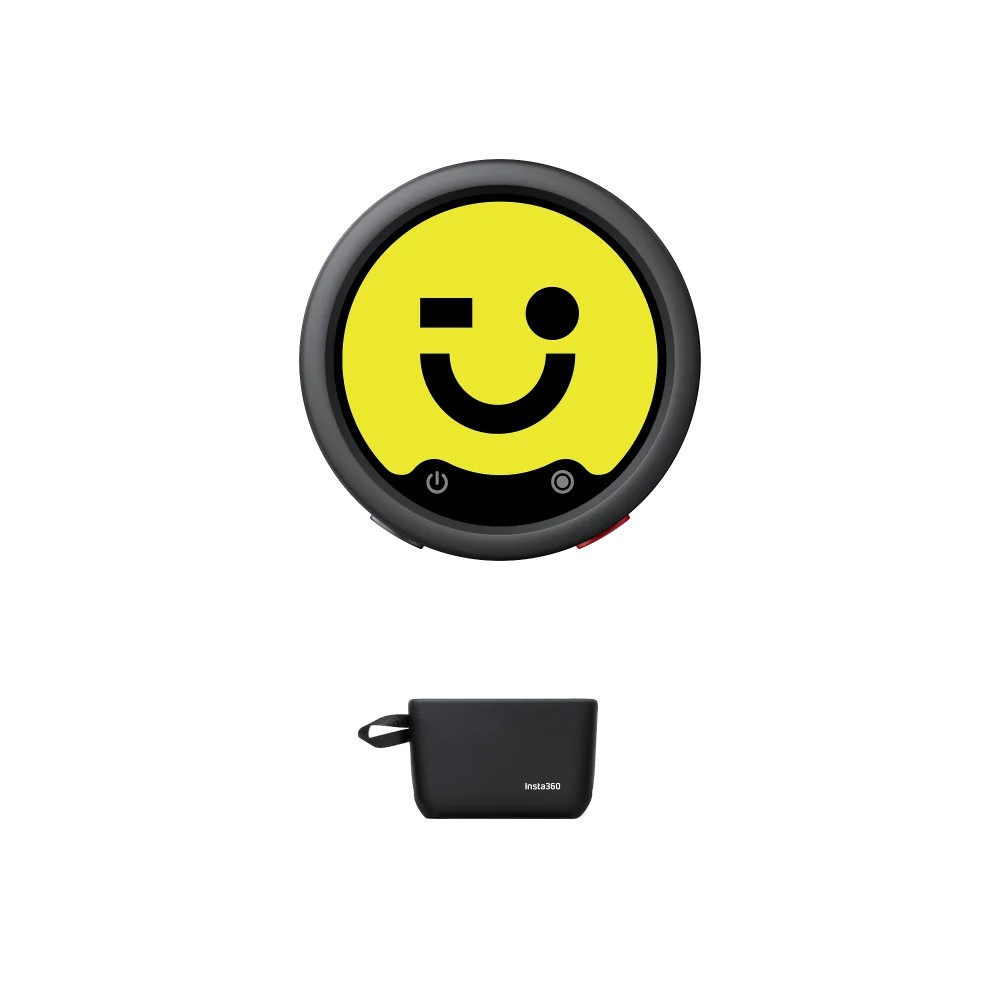
The transmitter itself remains Graphite Black. The yellow graphics in the official product photographs are examples of screen artwork, not a separate hardware colour. Integrated controls provide power, pairing and internal-recording functions, with configurable button behaviour and status indications.
Noise reduction, voice tone, low cut and gain
A dedicated NPU supports AI noise processing, with two noise-reduction strength levels. Choose a lighter setting when natural ambience matters or a stronger setting when more background suppression is needed. The setting can be controlled from the receiver or the Insta360 app, and supported Insta360 cameras expose compatible audio controls.
Standard, Rich and Bright voice presets change the tonal presentation through combinations of processing such as EQ, compression and effects. The 100Hz low-cut option reduces low-frequency content. Auto gain offers automatic clipping-prevention and dynamic-control modes for changing voice levels, while manual transmitter gain is adjustable from −12dB to +12dB for a deliberate recording setup.
These tools serve different purposes: processing changes the sound, receiver gain sets the level sent to the connected device, and headphone volume changes only the monitoring level. Strong processing cannot correct poor placement or make a microphone immune to physical sound-pressure limits.
32GB onboard recording and 32-bit float recovery
Each transmitter can record independently to its own 32GB internal storage. This keeps a local recording available if the wireless path is interrupted or the receiver is not connected. WAV recording can use 24-bit or 32-bit float and mono or stereo capture; the default is 24-bit mono. Enable the desired format before a shoot. Stereo internal recording is restricted to Original files; Processed file mode is unavailable when stereo recording is enabled.
32-bit float applies to the transmitter’s internal files. It should not be interpreted as a promise that the connected camera, phone, Bluetooth link or live receiver output records 32-bit float. In a compatible editing workflow, the local float file provides substantial level-recovery flexibility within the microphone’s hardware limits.
- Approximate maximum stored duration: 60 hours at 24-bit mono, 29.7 hours at 24-bit stereo, 44.8 hours at 32-bit mono, or 22.2 hours at 32-bit stereo.
- Continuous internal recordings are divided automatically into 30-minute files, allowing a long session to continue across file boundaries.
- Start or stop recording with the transmitter recording button or the receiver REC control. Supported Insta360 cameras can synchronize internal recording with camera recording; receiver options also support automatic internal-recording triggers.
- Connect the transmitter to a computer with the USB cable to copy the WAV files. Files marked orig are original recordings, while processed files include the selected processing workflow. When optional Loop Recording is enabled, the oldest files are overwritten once storage is full. Back up important material before reuse or formatting the storage.
The transmitter’s USB-C port is used for charging, stored-file transfer and a supported external lavalier connection through the optional USB-C to 3.5mm adapter. It is not a real-time USB audio-output device; use the receiver for live USB audio.
Receiver touchscreen, routing and real-time monitoring
The compact receiver provides a 1.09-inch AMOLED touchscreen and a dial for reviewing microphone status and making adjustments. Signal strength, transmitter batteries, audio levels, recording state and receiver gain are presented together. Receiver gain and monitoring volume each offer a −12dB to +12dB adjustment range; monitoring changes do not alter the recorded level.
- Mono: combines the transmitters into the same signal on both output channels.
- Stereo: places the first transmitter on the left and the second on the right for separate treatment after capture. If more than two transmitters are used in this mode, TX1/TX3 share the left and TX2/TX4 share the right.
- Safety Track: works from a mono mix, with the right channel 6dB below the left as a lower-level backup.
- Quadraphonic: supports four independently routed transmitter tracks in a compatible four-channel recording workflow. A standard 3.5mm camera input cannot provide four separate digital tracks; compatible software or the appropriate supported camera adapter is required.
Headphone monitoring lets you check the selected paired transmitters before and during recording. Set receiver output gain to suit the camera or phone input; a clean internal float backup does not prevent that separate input from clipping if it is driven too hard.
Camera, USB-C phone and computer connections
For a camera with a compatible microphone input, mount the receiver and connect the supplied 3.5mm camera cable. Camera adapters may be required on bodies that lack an accessible 3.5mm microphone socket. With supported cameras, the receiver can follow camera power over the 3.5mm connection; the transmitter shooting-control button is not a general remote shutter for a camera connected by this cable.
For a compatible USB-C phone or tablet, fit the supplied mobile adapter to the receiver and connect it to the device. A USB-C power connection to the receiver can support longer sessions and pass-through phone charging. Shooting-control support depends on the recording app accepting volume-button-style controls. Lightning iPhones require the separately sold Lightning mobile adapter.
The published receiver compatibility list covers USB-C Windows computers running Windows 10 or later and USB-C M-series macOS computers. Select the microphone in the chosen recording software. The manufacturer’s compatible four-channel software examples include Audacity on Windows, GarageBand on iOS, and Logic Pro, Cubase or Adobe Audition on macOS; app versions and input configuration matter.
Direct Bluetooth and the Insta360 camera ecosystem
Supported direct camera connections include Luna Pro, Luna Ultra, X6, X5, X4 Air, Ace Pro 2 and GO Ultra, subject to camera and microphone firmware. Current features and simultaneous microphone support depend on the camera. Use the receiver when the required recording workflow or number of speakers is not supported directly.
Direct phone or tablet Bluetooth is a separate workflow. It requires compatible third-party recording or live-streaming apps; native phone camera audio capture is not supported in this mode, and the manufacturer notes a default 16kHz Bluetooth audio setting. Receiver-based USB-C audio is the recommended route when recording quality and broad camera-app support are priorities.
Insta360’s published Bluetooth app examples include Zoom and Protake on both iOS and Android, Blackmagic Camera on iOS, and Filmic Pro on Android. Its current table does not support direct Bluetooth livestreaming in Instagram or YouTube. Receiver-based recording works with many video and streaming apps but is not intended for calling apps. Consult the current official compatibility list before relying on a particular app or device.
Expandable multi-person and multi-camera recording
Multi-TX mode supports up to four transmitters with one receiver. Multi-RX mode supports up to two transmitters feeding as many as four receivers. These are expansion capabilities, not extra hardware included in this listing. A compatible Sony camera with the separately sold Insta360 Camera Adapter can receive four-channel 48kHz/24-bit digital audio in the supported workflow.
Pairing can be managed from the receiver, and an appropriate charging case can automatically detect unpaired units placed inside it. Switching between multi-transmitter and multi-receiver modes unbinds the current devices, so plan and pair the system before recording. Current Mic and Mic Pro hardware can share compatible transmitters and receivers with the required firmware; Mic Air is not part of that cross-generation pairing system.
LTC timecode for synchronized productions
Mic Pro provides professional LTC and Audio-TC workflows, with manufacturer-rated clock drift below one frame in 24 hours. Available synchronization settings are N/A for internal timing, L-IN for receiving an external LTC reference and jam synchronization, L-OUT for sending LTC, and A-OUT for audio timecode. Master Run and Auto Jam support the appropriate master-clock workflow.
Match the selected timecode frame rate to the camera and the other recording devices. The published frame-rate options are 23.98, 24, 25, 29.97, 29.97DF, 30, 30DF, 50 and 60. When timecode is recorded as an audio signal, it occupies one channel—normally the left—with voice retained on the other. This changes the audio routing available for that recording.
Use current firmware and make a short 10–30 second test clip to check the recorded channels and timecode before a production. A camera without automatic LTC metadata support can still record the timecode audio for alignment in compatible post-production software. A rhythmic timecode signal should be separated from the final listening track during editing.
Battery, fast charging and everyday use
The manufacturer rates a transmitter for about 10 hours and the receiver for about 11 hours in its close-range test with noise reduction and internal recording disabled and the receiver connected to a camera by 3.5mm cable. Actual runtime changes with settings, radio conditions and use. The included 2815mAh charging case supports approximately two full recharges of two transmitters and one receiver, extending the stated case-supported operating period to about 30 hours under the specified test conditions. The case itself takes about two hours to recharge.
USB-C charging and supported fast charging help between sessions. The published five-minute fast-charge test provides up to about 1.5 hours of additional use with a battery below 50% and processing/internal recording disabled. Transmitter charging is approximately one hour; published receiver test figures range from approximately one hour to 75 minutes. Automatic power-saving and supported camera power synchronization reduce unnecessary idle use.
Operate between −10°C and +45°C and charge between 0°C and +45°C. The system has no waterproof or dustproof rating. Use the supplied windshield for outdoor speech, keep the capsule clear of rubbing clothing and protect the charging points and ports from moisture.
What is included
- 2 × Insta360 Mic Pro Graphite Black transmitters
- 1 × Insta360 Mic Pro receiver
- 1 × charging case
- 1 × mobile phone adapter (USB-C)
- 1 × 3.5mm camera audio cable
- 1 × USB-C cable
- 2 × button magnets
- 2 × mounting clips
- 2 × windshields
- 1 × carry pouch
A Lightning adapter, Sony Camera Adapter, external lavalier microphone, USB-C to 3.5mm lavalier adapter and additional transmitters or receivers are separately sold accessories.
Setup and recording workflow
- Charge the supplied units, update compatible microphone/camera firmware through the Insta360 app, then confirm transmitter-to-receiver pairing.
- Attach the microphone securely, fit the windshield when needed and select a pickup mode that matches the microphone position.
- Connect the receiver using the included USB-C mobile adapter or 3.5mm camera cable, then choose the external microphone in the recording device or app.
- Choose Mono, Stereo, Safety Track or a supported multichannel workflow. Set receiver output gain and listen through monitoring headphones before starting.
- Enable the desired internal backup format separately, confirm the red recording indication and make a short sound/timecode test if applicable.
- After recording, copy the stored WAV files from each transmitter for backup and editing. Retain original files when creating processed or normalized versions.
Specifications — Package and identity
Model
Insta360 Mic Pro
Configuration
2 TX + 1 RX
Colour
Graphite Black
Retail barcode / SKU
6942590200771
Included charging case
Yes
Specifications — Audio and wireless performance
Polar Pattern
Omnidirectional
Selectable Pickup Modes
Omnidirectional/Super-directional/Cardioid/Figure-8
Frequency Response
Low Cut Off: 20Hz-20kHz
Low Cut On: 100Hz-20kHz
Microphone Sensitivity
Microphone Capsule: -38±1 dBV@1kHz, 94dB SPL
Signal-to-Noise Ratio (SNR)
72dB (A-weighted)
Maximum Sound Pressure Level (SPL)
130 dB SPL@10% THD
Sampling Frequency
48kHz
Bit Depth
32-bit float/24-bit; 32-bit float is available for internal transmitter recordings only
Maximum Input Level (3.5 mm)
-8dBV
Equivalent Noise
22dB (A-weighted)
Monitor Interface Output Power
Max Output Power: 20 mW@1 kHz,32 Ω
Max Transmission Range
400m; open, unobstructed, interference-free TX-to-RX test; direct Bluetooth to X5 approximately 100m under its stated test conditions
Specifications — Transmitter
Dimensions
38 × 12.2mm (Diameter×H)
Weight
19.7g, excluding the clip and button magnet
Display
6-Color E-Ink Screen
Size: 1.22''
Resolution: 240 × 208
PPI: 197 (Pixels Per Inch)
Wireless Mode
GFSK 1Mbps and 2Mbps
Equivalent Isotropic Radiated Power (EIRP)
2.400-2.4835GHz: ≤ 20dBm (FCC/CE/SRRC/MIC)
Wireless Mode Operating Frequency
2.400-2.4835GHz
Bluetooth Protocol
Bluetooth V5.4
Bluetooth Operating Frequency
2.400-2.4835GHz
Bluetooth Transmitter Power (EIRP)
BLE: ≤ 20 dBm
BR/EDR: ≤ 20 dBm
Battery Type
Li-ion
Battery Capacity
240mAh
Battery Energy
0.94Wh
Battery Voltage
3.89V
Charging Specification
Max 5V
Charging Temperature
0℃ to 45℃
Operating Temperature
-10℃ to 45℃
Charging Time
Fully charged in approximately 1 hour, 80% in about 24 minutes.
5-Minute Fast Charge
A 5-minute charge gives 1.5 hours of use.
Operating Time
10 hours
Onboard Memory
32 GB
Internal Recording Available Duration
24-bit (Mono Internal Recording): 60 hours
24-bit (Stereo Internal Recording): 29.7 hours
32-bit (Mono Internal Recording): 44.8 hours
32-bit (Stereo Internal Recording): 22.2 hours
USB connection
USB-C, USB 2.0; charging, stored-file export and an external lavalier through the optional USB-C to 3.5mm adapter
USB charging input
USB BC 1.2; 5V/500mA
File format
WAV; selectable 24-bit or 32-bit float, mono or stereo
File segmentation
Automatic 30-minute segments during continuous internal recording
Internal recording default
24-bit mono; enable 32-bit float and stereo when required
Manual TX gain
−12dB to +12dB
Stereo internal recording restriction
Original files only; Processed file mode is unavailable when stereo internal recording is enabled
Loop recording
Optional; automatically overwrites the oldest recordings when storage is full
Specifications — Receiver
Dimensions
55.8×27.7×21mm (2.2×1.1×0.8in) (L×W×H)
Weight
29.8g (1.1oz)
Wireless Mode
GFSK 1Mbps and 2Mbps
Equivalent Isotropic Radiated Power (EIRP)
2.400GHz-2.4835GHz: ≤ 20dBm (FCC/CE/SRRC/MIC)
Operating Frequency
2.400GHz-2.4835GHz
Bluetooth Protocol
Bluetooth V5.4
Bluetooth Operating Frequency
2.400GHz-2.4835GHz
Bluetooth Transmitter Power (EIRP)
BLE: ≤ 20 dBm
Battery Type
Li-ion
Battery Capacity
410mAh
Battery Energy
1.60Wh
Battery Voltage
3.89V
Charging Specification
Max 5V
Charging Temperature
0℃ to 45℃
Operating Temperature
-10℃ to 45℃
Charging Time
Approximately 60–75 minutes to full charge; approximately 27–30 minutes to 80%, depending on the manufacturer test table
5-Minute Fast Charge
A 5-minute charge gives 1.5 hours of use.
Operating Time
11 hours
Display
1.09-inch AMOLED; 126 × 294 RGB pixels; 292 PPI
USB connection
USB-C, USB 2.0
Receiver gain
−12dB to +12dB
Monitoring level adjustment
−12dB to +12dB; does not change recording level
USB charging input
USB BC 1.2 / PD; 5V/700mA
Specifications — Included charging case
Dimensions
122 × 61.9 × 42.2 mm
Weight
174g (Charging Case only, without included accessories)
Battery Type
Li-ion
Battery Capacity
2815mAh
Battery Energy
10.951Wh
Battery Voltage
3.89V
Charging Specification
Max 5 V
Charging Temperature
0℃ to 45℃
Operating Temperature
-10℃ to 45℃
Operating Time with Charging Case
30 hours
Charging Time
Approx. 2 hours
Charging Cycles for TX and RX
When charging two Transmitters and one Receiver simultaneously, a fully charged charging case can fully charge them for approx. 2 times.
USB charging input
USB BC 1.2; up to 5V/3A
Specifications — Connections, routing and operating requirements
Wireless link
2.4GHz digital TX-to-RX link; Bluetooth 5.4 for supported direct connections
Receiver outputs
3.5mm camera audio connection and USB-C mobile/computer connection; optional Lightning and Sony Camera Adapter workflows
Channel modes
Mono, Stereo, Quadraphonic and Safety Track
Safety track
Merged audio with the right channel 6dB lower than the left
Maximum expansion
Up to four transmitters to one receiver, or up to two transmitters to four receivers; additional hardware sold separately
Directional modes
Omnidirectional, Cardioid, Figure-8 and Voice Focus (Super-directional, 60° forward area)
Noise reduction
Two strength levels; unavailable in Voice Focus/Super-directional mode
Tone presets
Standard, Rich and Bright
Low-cut filter
100Hz
Timecode
LTC / Audio-TC; N/A, L-IN, L-OUT and A-OUT synchronization settings; Master Run / Auto Jam
Timecode frame rates
23.98, 24, 25, 29.97, 29.97DF, 30, 30DF, 50 and 60, as listed by Insta360
Timecode accuracy
Manufacturer-rated drift below one frame over 24 hours
Timecode input
3.5mm TRS; maximum input ≤ +6dBu
Timecode output
3.5mm TRS and USB-C workflows; reserves one audio channel when embedded as audio timecode
Direct Insta360 camera compatibility
Luna Pro, Luna Ultra, X6, X5, X4 Air, Ace Pro 2 and GO Ultra, subject to current firmware and camera-specific features
Computer receiver compatibility
USB-C Windows 10 or later; USB-C M-series macOS computers on the published manufacturer list
Phone/tablet compatibility
Compatible USB-C Android/iOS/iPadOS devices; older Lightning devices require the separately sold Lightning adapter; app support varies
Water/dust protection
No waterproof or dustproof rating; keep the system dry
Operating temperature
−10°C to +45°C
Charging temperature
0°C to +45°C
Product-specific questions
Does 32-bit float apply to my camera recording?
It applies to internal WAV recordings saved on each transmitter. The connected camera or phone follows its own input and recording format. Copy the transmitter files for a 32-bit float post-production workflow.
Can I use it with a Lightning iPhone?
Yes, with the separately sold Lightning mobile adapter. The supplied mobile adapter is USB-C.
Can I use the transmitter as a live USB microphone?
The transmitter USB-C connection exports stored files and supports charging or an optional lavalier adapter. It does not provide real-time USB audio; use the receiver for that workflow.
Can two people record with this package?
Yes. Two transmitters are included and can feed the supplied receiver.
Is a charging case included?
Yes, along with both transmitters, the receiver and the listed accessories.
Will direct Bluetooth work with every camera app?
No. Native phone camera Bluetooth audio is unsupported, and third-party app support varies. The receiver and included USB-C adapter provide the intended high-quality phone workflow.
Can I expand to four microphones or multiple cameras?
Supported expansion modes allow four transmitters to one receiver or two transmitters to four receivers. Extra devices and the appropriate compatible recording workflow or camera adapter are required.
Explore compatible recording gear
Browse microphones at AX Store and the Insta360 range. For device-specific requirements, consult the official compatibility table and manufacturer specifications.
THE DETAILS
Technical specifications
Package and identity
Insta360 Mic Pro
2 TX + 1 RX
Graphite Black
6942590200771
Yes
Audio and wireless performance
Omnidirectional
Omnidirectional/Super-directional/Cardioid/Figure-8
Low Cut Off: 20Hz-20kHz Low Cut On: 100Hz-20kHz
Microphone Capsule: -38±1 dBV@1kHz, 94dB SPL
72dB (A-weighted)
130 dB SPL@10% THD
48kHz
32-bit float/24-bit; 32-bit float is available for internal transmitter recordings only
-8dBV
22dB (A-weighted)
Max Output Power: 20 mW@1 kHz,32 Ω
400m; open, unobstructed, interference-free TX-to-RX test; direct Bluetooth to X5 approximately 100m under its stated test conditions
Transmitter
38 × 12.2mm (Diameter×H)
19.7g, excluding the clip and button magnet
6-Color E-Ink Screen Size: 1.22'' Resolution: 240 × 208 PPI: 197 (Pixels Per Inch)
GFSK 1Mbps and 2Mbps
2.400-2.4835GHz: ≤ 20dBm (FCC/CE/SRRC/MIC)
2.400-2.4835GHz
Bluetooth V5.4
2.400-2.4835GHz
BLE: ≤ 20 dBm BR/EDR: ≤ 20 dBm
Li-ion
240mAh
0.94Wh
3.89V
Max 5V
0℃ to 45℃
-10℃ to 45℃
Fully charged in approximately 1 hour, 80% in about 24 minutes.
A 5-minute charge gives 1.5 hours of use.
10 hours
32 GB
24-bit (Mono Internal Recording): 60 hours 24-bit (Stereo Internal Recording): 29.7 hours 32-bit (Mono Internal Recording): 44.8 hours 32-bit (Stereo Internal Recording): 22.2 hours
USB-C, USB 2.0; charging, stored-file export and an external lavalier through the optional USB-C to 3.5mm adapter
USB BC 1.2; 5V/500mA
WAV; selectable 24-bit or 32-bit float, mono or stereo
Automatic 30-minute segments during continuous internal recording
24-bit mono; enable 32-bit float and stereo when required
−12dB to +12dB
Original files only; Processed file mode is unavailable when stereo internal recording is enabled
Optional; automatically overwrites the oldest recordings when storage is full
Receiver
55.8×27.7×21mm (2.2×1.1×0.8in) (L×W×H)
29.8g (1.1oz)
GFSK 1Mbps and 2Mbps
2.400GHz-2.4835GHz: ≤ 20dBm (FCC/CE/SRRC/MIC)
2.400GHz-2.4835GHz
Bluetooth V5.4
2.400GHz-2.4835GHz
BLE: ≤ 20 dBm
Li-ion
410mAh
1.60Wh
3.89V
Max 5V
0℃ to 45℃
-10℃ to 45℃
Approximately 60–75 minutes to full charge; approximately 27–30 minutes to 80%, depending on the manufacturer test table
A 5-minute charge gives 1.5 hours of use.
11 hours
1.09-inch AMOLED; 126 × 294 RGB pixels; 292 PPI
USB-C, USB 2.0
−12dB to +12dB
−12dB to +12dB; does not change recording level
USB BC 1.2 / PD; 5V/700mA
Included charging case
122 × 61.9 × 42.2 mm
174g (Charging Case only, without included accessories)
Li-ion
2815mAh
10.951Wh
3.89V
Max 5 V
0℃ to 45℃
-10℃ to 45℃
30 hours
Approx. 2 hours
When charging two Transmitters and one Receiver simultaneously, a fully charged charging case can fully charge them for approx. 2 times.
USB BC 1.2; up to 5V/3A
Connections, routing and operating requirements
2.4GHz digital TX-to-RX link; Bluetooth 5.4 for supported direct connections
3.5mm camera audio connection and USB-C mobile/computer connection; optional Lightning and Sony Camera Adapter workflows
Mono, Stereo, Quadraphonic and Safety Track
Merged audio with the right channel 6dB lower than the left
Up to four transmitters to one receiver, or up to two transmitters to four receivers; additional hardware sold separately
Omnidirectional, Cardioid, Figure-8 and Voice Focus (Super-directional, 60° forward area)
Two strength levels; unavailable in Voice Focus/Super-directional mode
Standard, Rich and Bright
100Hz
LTC / Audio-TC; N/A, L-IN, L-OUT and A-OUT synchronization settings; Master Run / Auto Jam
23.98, 24, 25, 29.97, 29.97DF, 30, 30DF, 50 and 60, as listed by Insta360
Manufacturer-rated drift below one frame over 24 hours
3.5mm TRS; maximum input ≤ +6dBu
3.5mm TRS and USB-C workflows; reserves one audio channel when embedded as audio timecode
Luna Pro, Luna Ultra, X6, X5, X4 Air, Ace Pro 2 and GO Ultra, subject to current firmware and camera-specific features
USB-C Windows 10 or later; USB-C M-series macOS computers on the published manufacturer list
Compatible USB-C Android/iOS/iPadOS devices; older Lightning devices require the separately sold Lightning adapter; app support varies
No waterproof or dustproof rating; keep the system dry
−10°C to +45°C
0°C to +45°C
COMPLETE YOUR SETUP
Pairs well with